DevSecOps is a software development approach that builds security into every stage of the development lifecycle, from writing code through testing, building, and releasing software. Rather than treating security as a final gate before launch, DevSecOps makes it a shared responsibility across development, security, and operations teams, catching vulnerabilities early when they're cheapest and fastest to fix.
What is DevSecOps?
DevSecOps is a framework that combines Development, Security, and Operations. It extends the DevOps model by embedding security practices directly into the workflows that development and operations teams already use. Security becomes part of the process instead of being added at the end.
The security review is often the last step in a traditional development cycle.
By the time a dedicated security team audits the finished product, they inevitably uncover issues that must be fixed before release. The product gets sent back to the developers who’ve already moved on to the next project, so context is lost, fixes are slow, and the release slips.
DevSecOps flips this. Security checks run automatically as part of every build, scanning code for vulnerabilities, flagging issues in third-party libraries, and testing running applications for exploitable weaknesses. The developer gets security feedback instantly and can make the fix right there. No waiting or delays.
In a DevSecOps team, security isn't someone else's job. It’s everyone’s job. Developers consider it throughout the lifecycle, from considering the security implications of their code, to operations engineers assessing infrastructure attack surfaces, to the security team setting guardrails rather than reviewing every change.
For mobile teams building with continuous integration, this matters even more. Mobile apps ship to devices you don't control, store sensitive data locally, and rely on platform-specific security models that differ between iOS and Android. This makes getting security right all the more critical, and the window to catch and mitigate issues before they reach users even narrower.
How does a DevSecOps pipeline work?
DevSecOps works by embedding automated security checks at each stage of the CI/CD workflow, so that testing happens continuously rather than just a final pass before release.
Here's how security maps to each phase of the CI/CD lifecycle:
CI/CD strategy
Before writing code, teams choose the right security testing methods for their stack and define a threat model: mapping the application's architecture, identifying where sensitive data flows (APIs, local storage, third-party SDKs), and assessing which components are most vulnerable.
Shift-left thinking comes into play here, deciding which checks will run on every commit rather than waiting until the pre-release audit.
Building
When code is committed and a build triggers, Static Application Security Testing (SAST) tools analyse the source code without running it, scanning for insecure data storage, improper certificate validation, and other vulnerabilities defined in standards like the OWASP Mobile Top 10. Dependency management scanners (Software Composition Analysis, or SCA) check every third-party library against known vulnerability databases, catching risks in SDKs before they're compiled into your binary.
Testing
Dynamic Application Security Testing (DAST) probes the running application, checking network traffic for unencrypted data, verifying certificate pinning, and testing authentication flows for bypass vulnerabilities. Security acceptance testing validates that the app meets your organisation's security policies before it moves further. Vulnerability scanning tools check the compiled binary and its runtime environment for known exploits.
Releasing
The build workflow verifies code signing (certificates and provisioning profiles for iOS, keystores for Android), runs a final compliance check, and signs the binary. Secrets (API keys, signing credentials) are injected from encrypted vaults and never stored in the repository or build logs.
Monitoring
After release, continuous monitoring flags anomalies that may indicate security issues: unexpected network calls, tampered binaries, or jailbreak/root detection failures. Live penetration testing runs against production APIs and endpoints to find vulnerabilities that only surface under real-world conditions.
Measuring
Security data feeds back into the next cycle. Teams review findings from peer reviews and security scans, update secure coding standards based on patterns they've seen, and adjust their threat models. The metrics that matter: time to detect a vulnerability, time to patch, and how many issues were caught in CI versus production.
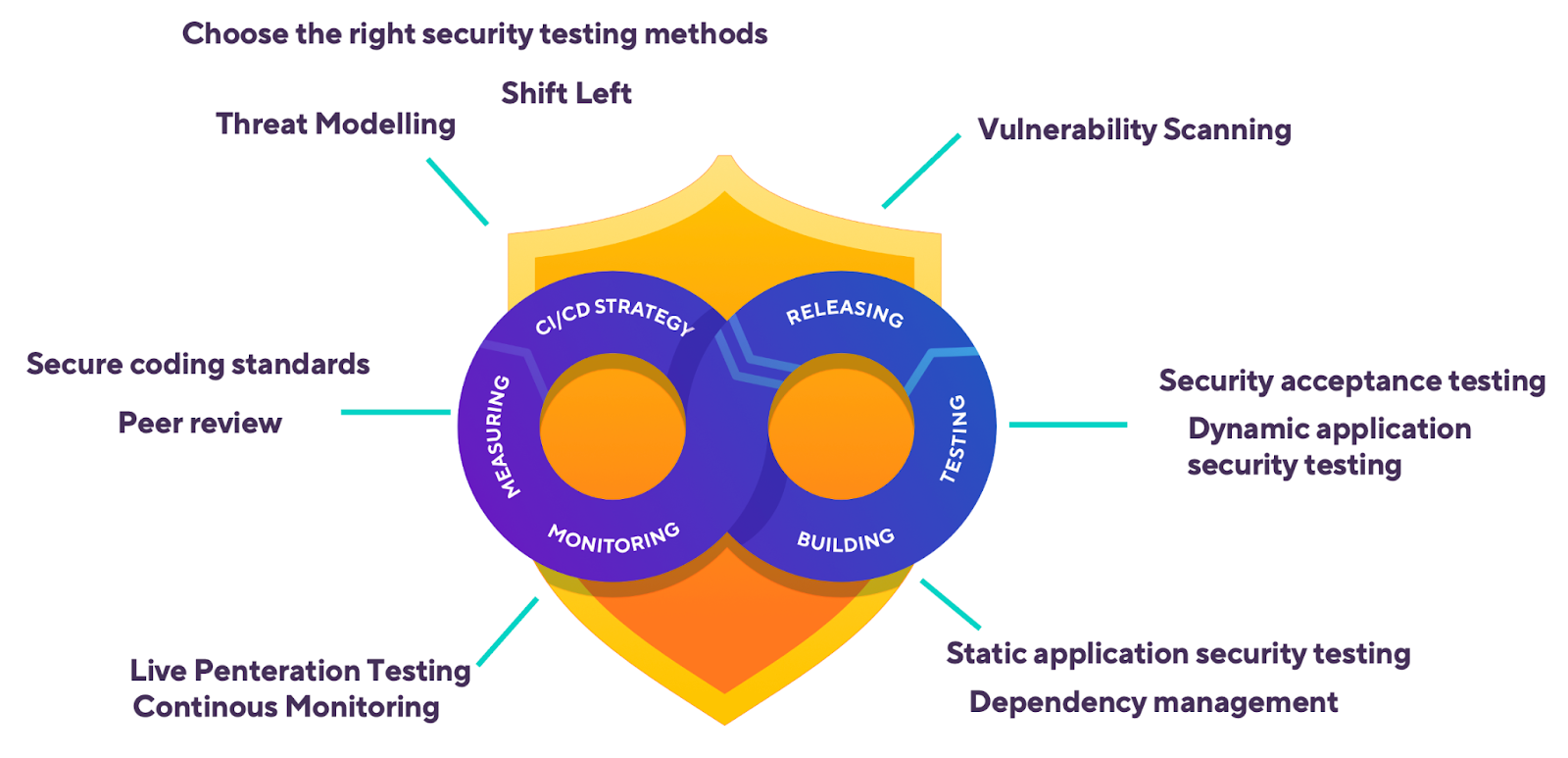
The key difference from traditional security review is timing. Instead of a single gate that blocks the release, DevSecOps distributes smaller checks across the entire workflow. Each runs on every commit, so vulnerabilities surface within minutes, and the measuring stage feeds lessons back into the next cycle.
Example: Bitrise workflow with security steps
Here's what a DevSecOps workflow looks like in practice. This Bitrise workflow runs a Static Application Security Testing (SAST) scan and dependency check before the build even starts, then follows up with security testing and secure code signing. Every step runs automatically on each commit, so nothing ships without being scanned first.
# bitrise.yml - workflow with security checks at each stage
workflows:
  security-checked-build:
    steps:
    # Stage 1: Scan source code for secrets and vulnerabilities
    - git-clone@8: {}
    - script@1:
        title: Run SAST scan
        inputs:
        - content: |
            # Run Semgrep with mobile-specific rulesets
            semgrep scan --config "p/owasp-top-ten" --config "p/mobsfscan" .

    # Stage 2: Check dependencies for known vulnerabilities
    - script@1:
        title: Dependency vulnerability scan
        inputs:
        - content: |
            # Scan all dependencies across iOS and Android with Snyk
            snyk test --all-projects

    # Stage 3: Build the app
    - xcode-build-for-test@3: {}

    # Stage 4: Run security-focused tests on real devices
    - xcode-test@5:
        inputs:
        - destination: platform=iOS Simulator,name=iPhone 15

    # Stage 5: Auto-provision and sign securely
    - manage-ios-code-signing@1:
        inputs:
        - distribution_method: app-store

    # Stage 6: Run NowSecure mobile security analysis
    - bitrise-step-nowsecure-auto-analysis@1: {}
DevSecOps for mobile: why's it different?
Most DevSecOps guidance covers building web applications or cloud services. Mobile application development faces different security risks, and teams that apply web-based server-side security thinking to mobile will leave gaps.
The app binary lives on untrusted devices
Web apps retain code on servers you control. Mobile apps ship a compiled binary to millions of devices you don't. Attackers can decompile, reverse-engineer, and tamper with that binary. Code obfuscation, certificate pinning, and runtime integrity checks aren't optional extras for mobile; they're baseline requirements.
Client-side data storage is an attack surface
Mobile apps routinely store tokens, credentials, and user data on-device. Insecure storage is consistently one of the top issues in the OWASP Mobile Top 10. DevSecOps for mobile must include automated checks that scan for hardcoded secrets, insecure Keychain or keystore usage, and unencrypted local databases as part of every CI build.
Platform fragmentation multiplies risk
iOS and Android have different security models, permission systems, and update cadences. A vulnerability that doesn't exist on one platform may be critical on another. Mobile DevSecOps teams need to run security tests across both platforms, ideally on real devices and emulators, to catch platform-specific issues before users do.
App store review is not a security gate
Apple's App Store Review and Google Play Protect catch some issues, but they're not thorough security audits. Teams that rely on store review as their security backstop are taking an unnecessary risk. Security scanning needs to happen in the mobile CI/CD workflow, well before the distribution stage.
Third-party SDKs expand the attack surface
Mobile apps commonly integrate analytics, advertising, payment, and social SDKs, each with its own dependencies and potential vulnerabilities. DevSecOps for mobile must include automated dependency scanning and Software Composition Analysis (SCA) to catch known vulnerabilities in third-party code before it ships.
How to integrate security testing into a mobile CI/CD pipeline
Adding security testing to an existing mobile workflow doesn’t need to happen all at once. Each layer of testing slots into a stage your pipeline already has, and teams typically adopt them in this order:
- Start with static analysis (SAST) on every pull request. SAST tools read your source code without running it, catching hardcoded secrets, insecure API usage, and known vulnerable patterns while a fix is still cheap. Wire the scan into the same workflow that runs your unit tests.
- Add dependency scanning (SCA) to every build. Mobile apps inherit most of their attack surface from third-party SDKs and packages, so software composition analysis belongs next to compilation, checking Podfile.lock, Package.resolved, and Gradle lockfiles against vulnerability databases.
- Run dynamic analysis (DAST) against build artifacts. DAST tools exercise the running app to find what static analysis can’t: insecure data storage at runtime, weak TLS behaviour, and exposed endpoints. Some tools combine both approaches: interactive testing (IAST) instruments the running app to trace vulnerabilities back to specific lines of code.
- Test security behaviour on real devices. Keychain access, biometric prompts, and attestation APIs like App Attest and Play Integrity behave differently on hardware than on simulators and emulators, so device-level checks belong in the same test stage as your mobile app testing [link: https://bitrise.io/guides/mobile-app-testing].
- Benchmark against a published standard. The OWASP Mobile Application Security Verification Standard (MASVS) [link: https://mas.owasp.org/MASVS/] defines what a secure mobile app looks like, and its companion testing guide (MASTG) describes how to verify each requirement. Aiming your automated checks at the MAS testing profiles turns "are we secure?" into a checklist you can measure.
Purpose-built mobile security steps make most of these layers a configuration change rather than an integration project:
DevSecOps best practices
1. Shift security testing left in your workflow
The earlier you catch a vulnerability, the less it will cost to fix. Run SAST scans and dependency audits on every commit, not just before release. For mobile teams, this means adding security steps to your CI workflow so that every pull request gets scanned before it's merged.
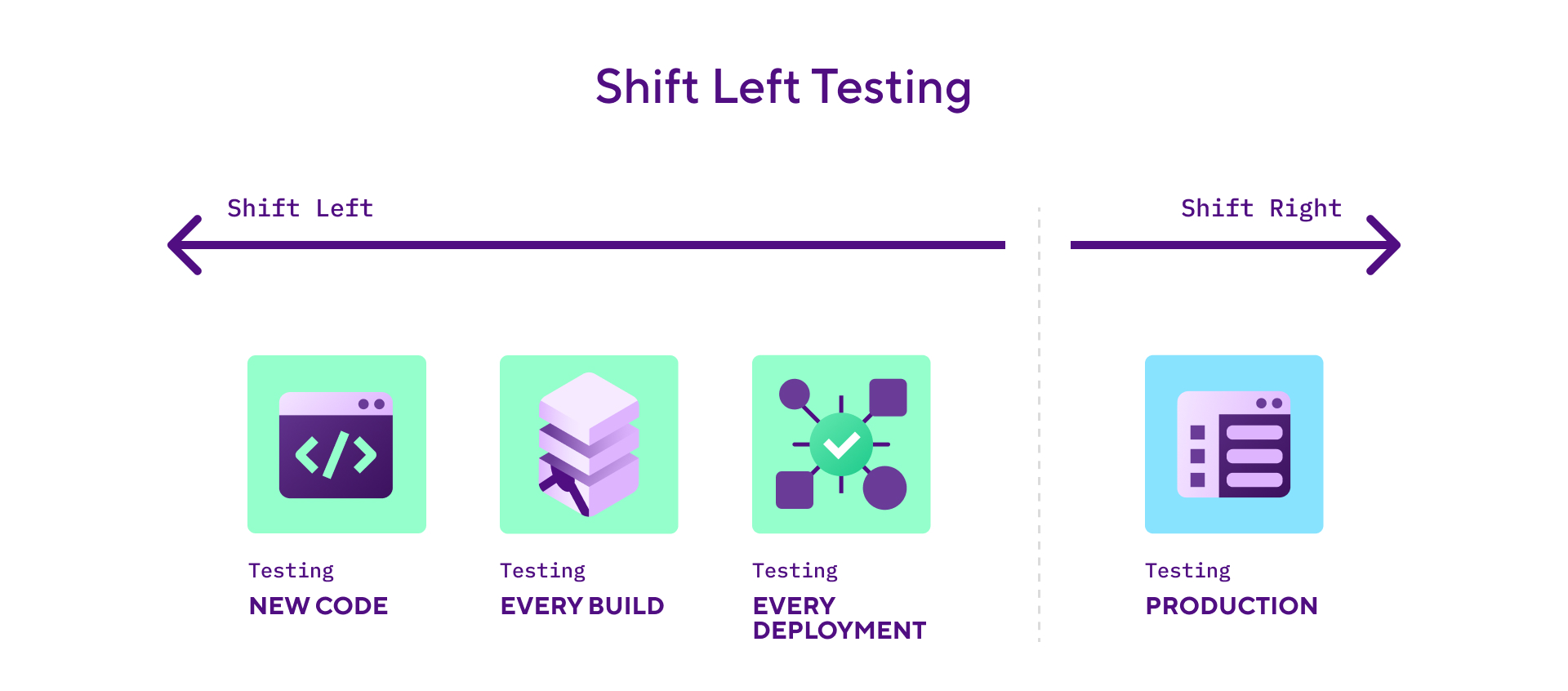
For a practical look at how shift-left security works for mobile teams, see how you can automate security tests with Bitrise.
2. Automate secrets detection in your repository
Use tools like Gitleaks or TruffleHog to catch credentials, API keys, and tokens before they reach the repository. In your Bitrise workflow, add a Script Step that runs gitleaks detect --source . and fails the build if secrets are found. Store all sensitive values as Secrets (encrypted environment variables) and mark them as Protected so they can't be read back after being set.
3. Pin your dependencies and scan them on every build
Don't rely on floating version ranges for third-party libraries. Use exact versions in your Podfile.lock, Package.resolved, or gradle.lockfile, and run SCA tools (Snyk, Dependabot, or OWASP Dependency-Check) on every build. Pay particular attention to SDKs that request broad permissions or include native code, as these are harder to audit manually.
4. Test on real devices, not just simulators
Security behaviour can differ between simulators and real hardware. Keychain access, biometric authentication, certificate pinning, and file system encryption all behave differently on physical devices. Include device testing in your CI workflow to catch issues that only surface on actual hardware.
5. Treat code signing as a security control, not just a build step
Code signing proves your binary hasn't been tampered with. For iOS, use the Manage iOS Code Signing Step with API key authentication to App Store Connect. This avoids storing Apple ID credentials and uses time-limited tokens instead. For Android, keep your upload keystore in Bitrise's Code Signing tab (encrypted, access-controlled) and never commit it to your repository.
6. Run OWASP Mobile Top 10 checks automatically
Don't treat OWASP compliance as a manual checklist. Integrate tools like NowSecure (which has a dedicated Bitrise Step) or Appdome Build-2Secure into your workflow so that every build is checked against the OWASP Mobile Application Security Verification Standard (MASVS). These tools test for insecure data storage, weak cryptography, and insufficient transport layer security automatically.
DevSecOps vs DevOps
DevSecOps builds on DevOps by adding security as a first-class concern rather than a final checkpoint. Here's how they compare:
DevOps without security is fast but risky. DevSecOps keeps the speed and adds the safety net. For mobile teams, where security mistakes can't be patched with a server-side hotfix, that matters even more.
How Bitrise handles DevSecOps
Bitrise is a mobile CI/CD platform, and its security model is built around the principle that every build should be isolated, every secret should be encrypted, and security checks should run automatically without slowing teams down.
Isolated build environments
Every build on Bitrise runs in a fresh virtual machine. When the build finishes, the entire VM is destroyed, including all source code, build artifacts, and cached data. No files carry over between builds, and no other user's build can access your environment. This means even if a build step is compromised, the blast radius is limited to that single build. For teams with stricter requirements, self-hosted runners let you keep builds inside your own VPC, so secrets never leave your network.
Secrets management
Bitrise stores secrets as encrypted environment variables. Mark any secret as Protected, and its value can't be read back through the UI or API after it's set. Secrets are only injected into builds at runtime, never printed in build logs (the platform automatically redacts them). Control whether secrets are exposed to pull request builds, which matters for open-source projects where PRs come from external contributors. For teams using external vaults (HashiCorp Vault, Doppler), add a Script Step at the start of your workflow to pull credentials at build time without storing them on Bitrise.
Mobile security testing integrations
Bitrise integrates with mobile security testing tools through its Step library. The NowSecure Platform Analysis Step runs automated assessments against the OWASP MASVS standard, covering data storage, network communications, authentication, and platform interaction. The Appdome Build-2Secure Steps (iOS and Android) add runtime protections (obfuscation, anti-tampering, anti-debugging) directly into the binary during the build. Both run as standard workflow Steps on every build without manual intervention.
Code signing security
The Manage iOS Code Signing Step connects to App Store Connect via API key authentication (not Apple ID credentials) to automatically manage provisioning profiles and certificates. Signing files uploaded to Bitrise are stored on encrypted Amazon S3 storage with time-limited, read-only access URLs. Android keystores follow the same model through the Code Signing tab. Signing credentials are never committed to source control, never exposed in logs, and are only accessible during the build itself.
See the Bitrise security and compliance page and the code security documentation for more on how these practices fit into a mobile DevOps workflow.
See what Bitrise can do for you
Confidently build, test, and ship high-quality mobile apps with Bitrise.
Frequently Asked Questions
Is DevSecOps the same as DevOps?
No, but they are related. DevOps focuses on accelerating software delivery through automation and collaboration between development and operations teams. DevSecOps builds on DevOps by embedding security throughout the lifecycle rather than treating it as a final gate. It becomes a shared responsibility, built in from the start and reinforced at every step.
What are the main DevSecOps tools?
DevSecOps tools fall into a few categories. SAST tools like SonarQube, Checkmarx, and Semgrep analyse source code without running it. DAST tools like OWASP ZAP and Burp Suite test running applications for exploitable weaknesses. SCA tools like Snyk and Dependabot scan third-party dependencies for known vulnerabilities. IAST tools sit between SAST and DAST, instrumenting a running app to trace findings back to specific code. For mobile specifically, NowSecure and Appdome add app-level protections like obfuscation and runtime integrity checks. All of these can run as automated Steps in a CI/CD workflow.
What is shift-left testing?
Shift-left testing moves testing and security checks earlier in the development workflow. Instead of waiting until code is ready for release, teams run automated tests, including security scans, as soon as code is committed. The term comes from visualising the development lifecycle as a left-to-right timeline: shifting testing "left" means doing it sooner. This catches vulnerabilities when they're easiest and cheapest to fix.
Why is DevSecOps especially important for mobile apps?
Mobile apps ship to devices you don't control, making them vulnerable to reverse engineering and tampering. Client-side data storage introduces risks like insecure token handling and unencrypted databases. Platform differences between iOS and Android mean the same app may have different vulnerabilities on each OS. And heavy reliance on third-party SDKs expands the attack surface. DevSecOps addresses these by automating security checks in the CI/CD workflow, catching mobile-specific vulnerabilities before they reach users.
How do I get started with DevSecOps on an existing project?
Start small. Add a SAST scanner (Semgrep is free and has good mobile rulesets) and a dependency scanner (Snyk or Dependabot) to your CI workflow, configured to run on every pull request. Then gradually add DAST testing and OWASP compliance checks as your team gets comfortable with the feedback loop. The goal is to make security checks part of every build, not a separate process that runs quarterly.