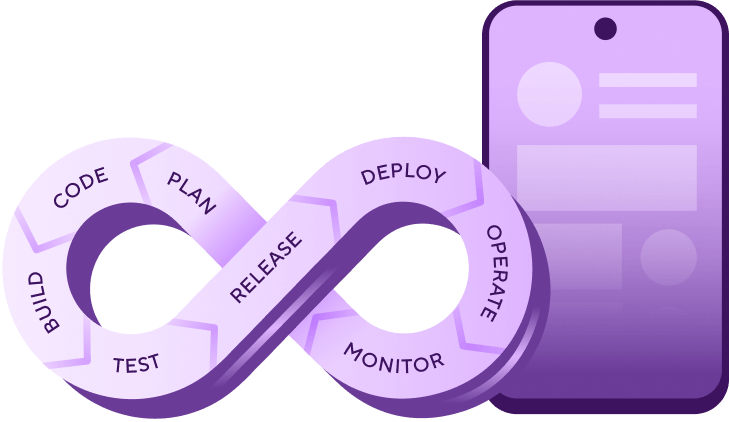
Mobile DevOps is the practice of automating the build, testing, and release workflows for iOS and Android applications. It extends traditional DevOps with mobile-specific capabilities: automated code signing, real device testing, app store distribution, and multi-device quality assurance. Where web DevOps deploys new code to servers you control, mobile DevOps has to work within the constraints of Apple and Google's platforms.
What is mobile DevOps?
Unlike web DevOps, mobile DevOps has to account for platform restrictions (iOS requires macOS to compile), app store approval delays, device fragmentation across thousands of configurations, and users running outdated app versions indefinitely. These constraints mean you can't take a standard CI/CD setup built for web services and apply it to mobile without a lot of manual configuration.
Mobile DevOps covers the full lifecycle: how code gets built into platform-specific binaries, how those binaries get signed with the right certificates, how they get tested across real devices, and how they reach users through Apple's App Store and Google Play. It also covers what happens after release: monitoring crash rates, tracking version adoption, and feeding production data back into development priorities.
The goal of mobile DevOps is to remove the manual steps and platform-specific friction that slow mobile teams down, so engineers spend more time building features and less time fighting their build system.
How does mobile DevOps work?
A mobile DevOps workflow moves code from a developer's commit through to a published app store listing. The engine behind it is a mobile CI/CD workflow that turns every commit into a store-ready build automatically. The stages are similar to web DevOps, but each one has mobile-specific requirements that add complexity.

Build: A developer pushes code and the CI system compiles platform-specific binaries. iOS builds require macOS with the correct Xcode version. Android builds use Gradle and the Android SDK. Both platforms need their own build configuration, and you typically run them as separate workflows triggered by the same commit.
Test: Automated tests run against the compiled binaries. Unit tests and integration tests run first (they're fast and catch most regressions). UI tests and end-to-end tests run on real devices or emulators to catch platform-specific issues like layout problems on different screen sizes.
Sign: Before an app can be installed on a device or submitted to a store, it needs to be cryptographically signed. iOS uses Apple-issued certificates and provisioning profiles while Android uses keystores. This step fails more often than any other in mobile CI/CD, usually because of expired certificates or mismatched profiles.
Distribute: Signed builds go to testers (via TestFlight, Google Play test tracks, or tools like Firebase App Distribution) or to production (via App Store Connect and Google Play Console). Store submissions must go through review before the latest version of the app is available to users.
Monitor: After release, teams track crash rates, version adoption, app store ratings, and performance metrics. This data feeds back into the next development cycle, closing the loop.
The key difference from web DevOps is that you can't skip or shortcut any of these stages. A broken web app can be rolled back in seconds. A broken mobile app could sit in the store for days while you wait for a fix to clear review.
Why is DevOps more complex for mobile?
Traditional DevOps pipelines weren't built with mobile in mind, and often overlook the complexity of platform-specific build requirements of iOS and Android, mandatory app store approvals, or supporting apps running on thousands of device configurations at once. Five core challenges make mobile different.
iOS builds require macOS infrastructure
You can't compile iOS apps on Linux servers. Most teams either use expensive Mac virtual machines or repurpose an old Mac Mini hidden in an IT closet. Neither option scales well over time.
Speed up your iOS builds
Build times are one of the biggest bottlenecks in iOS development. Learn proven tactics for faster compilation, test parallelisation, and caching in our guide to levelling up your iOS CI pipeline.
Code signing is fragile and complex
A single misconfigured certificate, provisioning profile, or device registration can break your build and halt your release entirely.
Testing spans hundreds of device configurations
Android alone runs across thousands of different models, OS versions, and screen sizes. iOS supports multiple iPhone and iPad generations, each with different hardware capabilities.
App store gatekeepers control your release timeline
Unlike web apps where you deploy instantly, mobile updates require store approval. Apple's review process typically takes 24-48 hours for most submissions, though complex apps may take longer. Google Play is faster, but still not instantaneous. A critical bug fix can take days to reach users, while negative reviews accumulate.
Long-tail version support
A large share of users don't enable auto-updates. This means you'll be supporting several older app versions simultaneously, each potentially calling deprecated APIs or expecting legacy backend behavior.
These challenges add up to friction that pulls engineers away from building features. The goal of mobile DevOps is to automate away as much of this overhead as possible.
Mobile DevOps vs DevOps: what's the difference?
Mobile DevOps adapts standard DevOps principles to two mobile-specific realities.
The first reality is platform-specific constraints. You must work within Apple and Google's SDKs, signing requirements, distribution channels, and approval workflows. Mobile DevOps platforms provide pre-configured environments that handle these automatically: maintained Xcode versions, updated Android build tools, integrated code signing workflows, and direct app store publishing APIs.
The second is that shift-left practices are critical. In web development, you can patch production bugs quickly. In mobile, a faulty release causes uninstalls, 1-star reviews, and monthly active user drops. Users rarely give your app a second chance. This makes early-stage quality assurance essential: automated testing on real devices, progressive rollout strategies, and pre-release validation gates. Bugs caught after app store release are far more expensive to fix: not in engineering time alone, but in user trust.
| Dimension | Traditional DevOps | Mobile DevOps |
|---|---|---|
Build environment |
Linux containers, any cloud provider |
macOS required for iOS; managed stacks for both platforms |
Deployment target |
Your own servers or cloud |
App Store and Google Play, with review gates you don't control |
Release cycle |
Deploy on merge, rollback in minutes |
Store approval delays of 24–48 hours, release management becomes critical |
Signing and credentials |
SSL certs, SSH keys |
Apple certificates, provisioning profiles, Android keystores |
Testing surface |
Browser matrix, API contracts |
Thousands of device/OS/screen size combinations |
Post-release control |
Feature flags, server-side rollback |
Users choose when (or whether) to update |
Mobile DevOps best practices
Once you have the right platform and pipeline in place, these practices help teams get the most from them.
| Practice | How to apply it |
|---|---|
Use feature flags for progressive rollouts |
Release new features to 5% of users first. Monitor crash rates and user feedback before expanding to 25%, then 50%, then 100%. This limits the blast radius of any issues. |
Maintain separate build variants |
Never test production builds directly. Use debug/staging builds for development, QA builds for internal testing, and production builds only for final validation. |
Automate repetitive tasks first |
If you're manually running builds more than once a day, automate it. If you're manually uploading to TestFlight weekly, automate it. Start with your biggest time sinks. |
Test on real devices, not emulators alone |
Emulators miss hardware-specific issues (GPS, camera, Bluetooth), OS-specific bugs, and real-world network conditions. Real device testing catches problems emulators can't. Watch for flaky tests that pass locally but fail on device. |
Monitor both technical and business metrics |
Track build success rates, test pass rates, and deployment frequency, plus app store ratings, crash-free user rates, and version adoption rates. Technical metrics tell you how your workflow performs; business metrics tell you how your app performs. |
Shift security left |
Run dependency and static analysis scans inside the workflow itself rather than at release time, so vulnerabilities surface while they're cheap to fix. That's the core idea behind DevSecOps. |
How to get started with mobile DevOps
Mobile DevOps looks different for every company, but these four steps make a solid starting point.
Automate your builds and tests
With continuous integration, your team can automatically build and test code whenever someone pushes changes. You get code checks, visual dashboards, and instant feedback on what's working and what's not.
For testing, use a mix of types: unit tests (fast, test individual functions), integration tests (test how components work together, using mock data where possible), UI tests (snapshot testing for visual regressions, or tools like Appium for interaction testing), and end-to-end tests (full user journeys, run at key points before releases rather than on every commit).
Set up a simple CI/CD pipeline
Once build and test automation is working, add continuous delivery. Automate how you get your app to staging environments and production. Fastlane is a popular open source tool for this. Make sure you're regularly sending versions to beta environments using TestFlight, Google Play test tracks, or third party platforms. This gets your app into the hands of testers faster and speeds up feedback.
Keep your CI/CD setup simple. Focus on creating, testing, and distributing builds. CI/CD doesn't solve everything, and if you're not careful, it can create more silos and make things less visible.
Create a release process you can repeat
Get input from everyone involved in releases. Review your tools and practices regularly to make sure they still work. For a deeper look at structuring this process for mobile, see our guide to mobile release management.
You'll need to choose between feature-based releases and release trains. Release trains tend to work better for DevOps: they break work into smaller chunks, create faster feedback loops, and give everyone a predictable schedule. Feature-based releases are often slower and more rigid.
Make mobile work visible
Mobile work involves lots of moving pieces but it's often not visible across the company. Create shared spaces where people can see what's happening with releases: live dashboards showing stability and adoption metrics, feeds of user reviews from app stores, and documentation explaining your release process and its dependencies across teams.
How Bitrise handles mobile DevOps
Bitrise is a mobile DevOps platform designed around the specific problems this article describes: code signing complexity, device fragmentation, app store deployment, and the need for macOS build infrastructure. Rather than adapting a server-focused CI/CD tool for mobile, Bitrise treats iOS and Android as first-class concerns at every layer.
Bitrise is built around two concepts: Workflows and Steps. A Workflow is a sequence of Steps defined in a bitrise.yml configuration file. Each Step is a self-contained build task (compile, test, sign, deploy) with defined inputs and outputs. Bitrise provides 400+ pre-built Steps for common mobile tasks, so you're configuring rather than scripting from scratch. You can also build Workflows visually using the drag-and-drop Workflow Editor, which is useful for teams that don't want to maintain YAML directly.
For build infrastructure, Bitrise runs managed macOS and Linux stacks that stay current with Xcode releases (typically within 24 hours of Apple shipping a new version) and Android toolchain updates. You don't manage VMs, install SDKs, or patch operating systems. Each build runs on a clean virtual machine, so there's no state leaking between runs.
Code signing is handled through a centralized credential store. You upload your iOS certificates, provisioning profiles, and Android keystores once. Bitrise injects them at build time through dedicated Steps like the Certificate and profile installer Step and the Android Sign Step. Developers never download signing credentials to their local machines, which removes a common security risk and the "it works on my machine" problem that plagues manual signing setups.
For testing, Bitrise integrates with real device labs including AWS Device Farm, Firebase Test Lab, Sauce Labs, and BrowserStack. These run automatically as Steps in your Workflow after a successful build, so you get test results on real hardware without maintaining a device lab yourself.
Once your build passes, Bitrise can deploy directly to App Store Connect, Google Play Console, TestFlight, or Firebase App Distribution as part of the same Workflow. Release Management adds a coordination layer on top: tracking version adoption across platforms, monitoring crash rates, and enabling paused rollouts and quick rollbacks for phased releases across app stores.
Bitrise Insights surfaces build performance data, flaky test detection, and credit usage so you can spot bottlenecks and optimizse your Workflows over time.
If you already use another CI system, the Bitrise CLI and API let you trigger Workflows from GitHub Actions, GitLab CI, or Jenkins while offloading the mobile-specific parts.
See what Bitrise can do for you
Confidently build, test, and ship high-quality mobile apps with Bitrise.
Frequently Asked Questions
Do I need separate CI/CD pipelines for iOS and Android?
Not necessarily, but you'll need platform-specific build and signing steps within your pipelines. Most mobile DevOps platforms (including Bitrise) let you define separate Workflows for iOS and Android that share common steps like version bumping and notification, then diverge for compilation, signing, and store deployment. The goal is to avoid duplicating logic while respecting each platform's requirements.
Is mobile DevOps worth it for small teams?
Small teams often benefit the most. When you only have a few engineers, manual builds, signing issues, and deployment steps eat a disproportionate amount of time. Automating your build-test-deploy cycle frees the team to focus on features. Starting with a basic CI pipeline that compiles and runs unit tests on every push can save hours per week, even for a two-person team.
How do mobile DevOps teams handle secrets like API keys and signing certificates?
A proper mobile DevOps setup uses centralized, encrypted secret management. CI/CD platforms store environment variables and signing credentials in secure vaults, then inject them into builds at runtime. Developers never need local access to production certificates or API keys. This reduces the risk of credential leaks and removes the "ask Dave for the signing certificate" bottleneck that slows down many teams.
Does the approach differ for cross-platform frameworks like Flutter or React Native?
The core principles are the same: automate builds, test on real devices, and deploy through a repeatable pipeline. The tooling and configuration differ, though. Flutter uses flutter build and flutter test commands instead of xcodebuild or gradle. React Native has its own bundling process. Choose a CI/CD platform that supports your framework's build commands and provides pre-configured environments for it. Bitrise, for example, has dedicated starter Workflows for Flutter and React Native alongside native iOS and Android.
What's the difference between mobile DevOps and mobile CI/CD?
Mobile CI/CD is the automation engine: it handles building, testing, and deploying your app. Mobile DevOps is the broader practice that wraps around CI/CD, including team culture, release management, monitoring, incident response, and the feedback loops that connect production data back to development priorities. You can have CI/CD without DevOps, but you can't do mobile DevOps without CI/CD.