
Continuous integration (CI) is a software development practice where developers merge code into a shared repository several times a day. Each merge triggers an automated build and test run, so conflicts and bugs are caught within minutes instead of days. CI is the foundation of CI/CD and modern software delivery.
What is continuous integration?
Continuous integration is the practice of merging every developer's work into a shared codebase frequently, and verifying every merge with an automated build and test run. It's the engineering discipline that keeps a codebase healthy when more than one person is working on it.
Without CI, teams rely on long-lived feature branches that drift further from the main branch every day. By the time the branch is ready to merge, the merge is painful: conflicts, surprise regressions, and tests that haven't run for weeks. Engineers call it "integration hell," and it's one of the reasons software releases used to take months. CI replaces the integration marathon with hundreds of small, automated check-ins.
The "continuous" part is the discipline. Developers commit code at least once a day, often more. Every commit is built and tested automatically. Failures get fixed before anyone moves on to the next thing. The codebase is always close to releasable.
CI is half of CI/CD. The other half, continuous delivery, takes the verified output of CI and prepares it for release. CI is what gets done first because it's the foundation. Once builds are reliable and tests are trusted, continuous delivery follows naturally. For the broader picture of how the two fit together, see our CI/CD guide. And for the testing discipline that runs across every stage of the pipeline rather than just the CI step, see our continuous testing guide.
How does continuous integration work?
A CI pipeline is the sequence of automated stages that runs on every commit or pull request. It's defined in a YAML configuration file that lives alongside the application code.
The typical CI pipeline runs four stages:
- Trigger. A developer pushes code or opens a pull request. The CI system detects the change and starts a pipeline run.
- Build. The system compiles the code and resolves dependencies. If the code doesn't compile, the pipeline stops here. Compilation failures are the cheapest possible bug to find.
- Test. Automated tests run against the build. Static analysis and linting come first because they're fast. Unit tests run next, then integration tests. Each step acts as a gate. Failures notify the developer immediately.
- Report. The pipeline reports back to the pull request. Green means safe to merge. Red means stop and fix. The whole loop usually takes a few minutes.
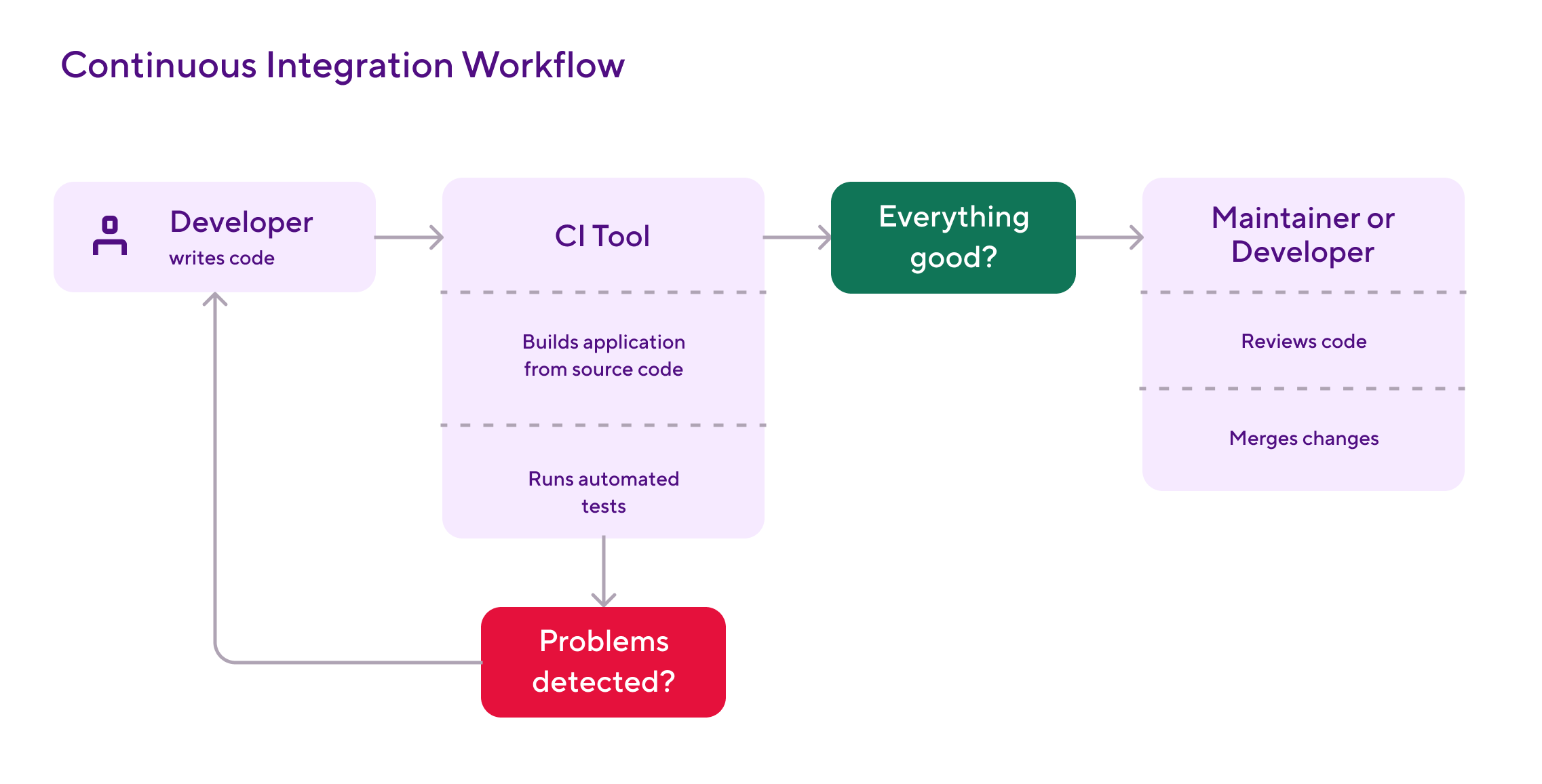
The whole pipeline is automated. There's no human in the loop unless something fails. That's the point. CI gives developers fast, reliable feedback without anyone having to ask for it. The faster the feedback loop, the more confidently developers commit.
The output of CI is a verified build artifact: code that has compiled, passed its tests, and is ready to move into the next stage. That handoff is where continuous delivery picks up.
Why continuous integration matters
CI changes how teams work, not just how they ship. The benefits are practical and compound over time.
Bugs get cheaper to fix. A bug found in the same hour it was written takes minutes to fix. The same bug found two weeks later, after the original developer has moved on, can take hours or days. CI catches bugs at the cheapest possible moment, every time.
Merge conflicts shrink. When everyone integrates daily, divergence stays small. Conflicts are easy to resolve because the changes are still fresh. Compare that to a long-running feature branch with hundreds of changes, where conflicts are a guessing game about what someone meant six weeks ago.
The main branch stays releasable. Without CI, the main branch is "main" only by name. It might compile. It might not. Nobody knows. With CI, every commit on main has been built and tested, so the team can ship from main at any time without ceremony.
Refactoring becomes safer. Refactoring without good tests is a leap of faith. Refactoring with CI and a strong test suite is a routine activity. Teams that trust their tests refactor more, which keeps the codebase clean, which keeps it easy to change.
The team gets shared ownership. When everyone's code goes through the same pipeline, the pipeline becomes shared infrastructure. Failed builds become a team problem, not an individual one. That changes the culture from "my code, your code" to "our code."
Continuous integration best practices
CI works when developers trust the pipeline. The practices below keep the pipeline trustworthy.
Commit small and often. Big commits are hard to review and harder to debug. Aim to integrate at least once a day, ideally more. Small commits are easier to test, easier to revert, and easier to understand months later.
Keep the main branch green. A failing main branch blocks everyone. The team's response when main breaks should be "stop everything and fix it," not "ignore it for now." Some teams enforce this with branch protection that blocks pushes when the build is red.
Make tests fast. A CI pipeline that takes 45 minutes to run is a CI pipeline that developers route around. Aim for under 10 minutes for the full pipeline on every commit. If you can't, split slow tests into a separate suite that runs less often, or shard them across parallel runners.
Quarantine flaky tests, don't ignore them. Flaky tests erode trust in the pipeline faster than anything else. Move them out of the main suite as soon as they're detected, then fix them as a priority. Our flaky tests guide covers the detection patterns and quarantine workflows in detail.
Run static analysis before unit tests. Linters and formatters catch issues in milliseconds. Unit tests take seconds. Integration tests take minutes. Run them in that order so the cheapest checks fail first.
Treat the pipeline as code. The pipeline definition lives in version control alongside the application. Changes go through pull requests like any other code change. This means pipeline changes are auditable, reviewable, and reversible.
Continuous integration vs continuous delivery
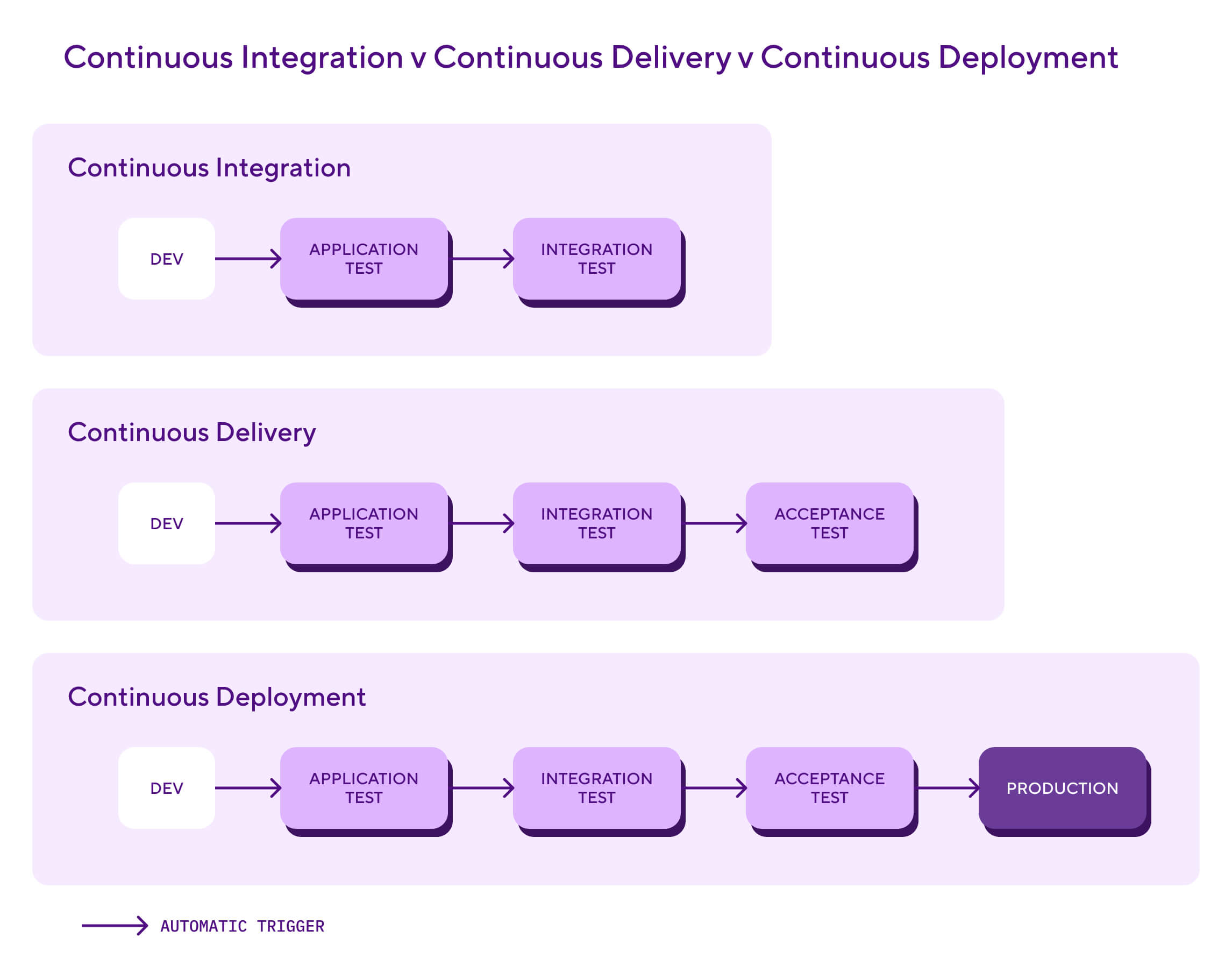
CI and CD are sometimes treated as one thing. They're not. They're sequential stages in the software delivery pipeline, and they solve different problems.
CI gets adopted first. It delivers value on its own by catching bugs early and keeping the main branch healthy. CD layers on top once the team trusts CI enough to automate the next stage. For the deep dive on what CD does, see our continuous delivery guide.
There's also continuous deployment, which goes a step further. In continuous delivery, the final push to production needs human approval. In continuous deployment, that approval is removed and every change that passes tests ships automatically. Most teams pick continuous delivery first and move to deployment when they're confident in their test coverage.
How Bitrise handles continuous integration
Bitrise is a CI/CD platform that runs workflows defined in a bitrise.yml file. Workflows are sequences of Steps that execute in order, and the platform offers more than 400 pre-built Steps for common CI tasks: cloning a repository with Git Clone Repository, restoring dependencies with Bitrise.io Cache:Pull, running tests with the appropriate test Step for your stack, and reporting status back to the pull request with GitHub Status or the equivalent provider Step.
Two pieces of the platform are worth knowing about. Bitrise Build Cache shares Gradle, CocoaPods, Swift Package Manager, and Bazel artefacts across builds and team members, which on a typical workflow takes total CI time from 20+ minutes down to under 10. Bitrise Insights tracks build metrics and test reliability across the team, with flaky test detection that surfaces tests failing inconsistently before they erode trust in the suite. AI Build Summary provides context-aware insights into build failures and code changes on each build, which cuts the time from "the build is red" to "here's what changed."
Environment variables like $BITRISE_SOURCE_DIR, $BITRISE_DEPLOY_DIR, and $BITRISE_GIT_BRANCH are exposed to every Step so configuration stays portable across apps and teams.
Bitrise is built specifically for mobile teams. CI for mobile apps has stages that don't exist in web or backend CI: macOS build environments, code signing on every build, real-device testing. If you're running CI for a mobile app, the mobile CI/CD guide covers the iOS- and Android-specific pipeline in detail. Otherwise, the Bitrise CI docs and the bitrise.yml reference cover the configuration details.
See what Bitrise can do for you
Confidently build, test, and ship high-quality mobile apps with Bitrise.
Frequently Asked Questions
What is a CI pipeline?
A CI pipeline is the automated sequence of stages that runs on every code commit or pull request. The typical pipeline triggers on a commit, builds the code, runs unit and integration tests, and reports the result back to the pull request. Pipelines are usually defined in a YAML configuration file that lives in the same repository as the application code, so the pipeline is version-controlled and reviewable in pull requests.
What's the difference between CI and a build server?
A build server (like Jenkins in its simplest form) compiles code on demand. Continuous integration is the practice of running automated builds on every commit, with automated tests that gate merges. A CI tool is the build server plus the discipline of running it on every change. Modern CI tools (GitHub Actions, GitLab CI/CD, Bitrise) bundle the build server with workflows, test reporting, and pull request integration.
How do you measure the success of a continuous integration pipeline?
The most useful CI metrics measure speed, reliability, and recovery. Build success rate (the percentage of builds that pass on first try) tells you whether the pipeline is healthy. Build duration shows whether feedback loops stay fast enough that developers don't start batching changes to avoid the wait. Mean time to recovery (MTTR) measures how quickly the team fixes a broken build, which matters more than just counting failures. Two of the four DORA metrics map directly to CI: deployment frequency and lead time for changes. Both improve as your pipeline gets faster and more reliable. Don't bother with vanity metrics like total builds run. They tell you the pipeline is busy, not whether it's working.
Which tests should run in CI?
A healthy CI pipeline runs tests in layers from fastest to slowest. Static analysis and linting come first because they catch syntax and style issues in milliseconds. Unit tests come next as the backbone of the pipeline. Integration tests follow to verify components work together. Security scans (SAST and dependency checks) catch known vulnerabilities. End-to-end tests come last because they're the slowest and most expensive to run. The principle is fail fast: catch what you can with cheap checks before running expensive ones.
Can I have CI without CD?
Yes, and many teams do. CI delivers value on its own by catching bugs early, keeping the main branch healthy, and giving developers fast feedback. Continuous delivery layers on top of CI to automate the path from a verified build to a release-ready artifact. Most teams adopt CI first, get it stable, and introduce CD when they're confident in their test coverage.