What is release management?

Release management is the process of planning, building, testing, approving and shipping a software change to users, with a way to roll it back if something goes wrong. It covers everything between "this feature is done" and "this feature is live", and it's what turns a stream of merged code into a predictable, repeatable release.
What is release management?
Release management is the set of decisions and checks that stand between code that's finished and code that's in users' hands. It decides what goes into a release, when it ships, who signs it off, and what happens if it breaks. The process is the same whether the release is a web deployment or an app store submission; what changes is how much coordination each one needs.
The distinction that matters most is between a deployment and a release. A deployment puts a build into an environment. A release makes a change available to users. On a web service the two often happen at the same moment. On mobile they're separated by an app store review and by users choosing when to update, which is why mobile teams think about release management differently from web teams. Continuous delivery gets a build ready to ship at any time; release management decides when it actually ships, and to whom.
Small teams often run release management from a checklist and a group chat. That works until a second platform or a compliance requirement arrives. At that point the ad hoc version breaks, and the cost shows up as missed launch windows and late-night rollbacks, with nobody sure which build is in production.
How does release management work?
Release management runs as a cycle of six stages. A change is requested, planned, built, tested, reviewed and deployed, and the results of that deployment feed the next cycle. Each stage has an owner and an exit condition, and a change can't move forward until the stage before it is done. Most teams run several of these cycles at once, at different stages.
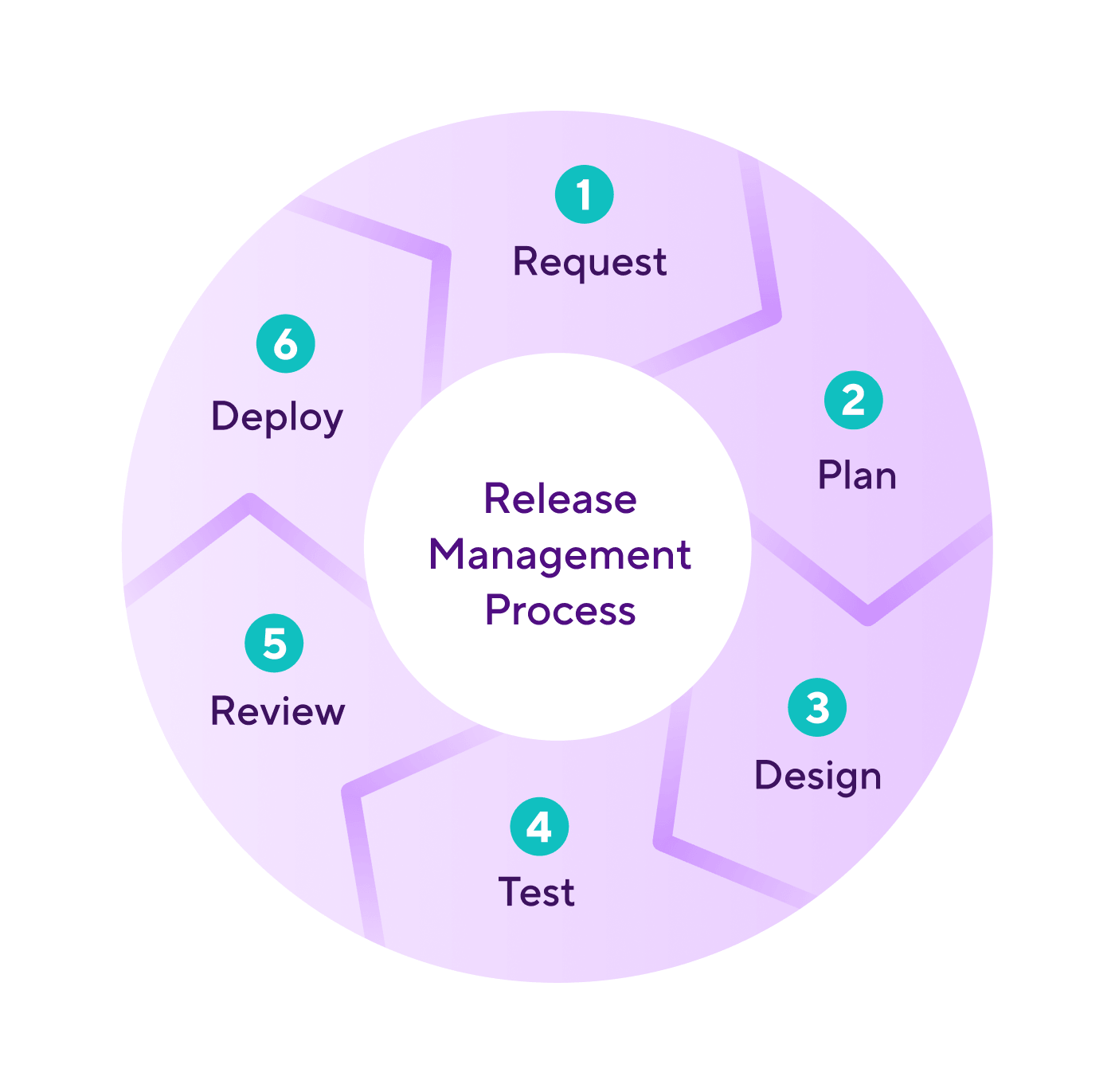
There are six core steps in the process:
1. Request a change. Someone identifies a need: a new feature, a bug fix, a dependency upgrade, a regulatory change. The request is checked for need and feasibility before anyone commits to it. Requests that fail this check stop here, which is cheaper than stopping them later.
2. Plan the release. The team defines the scope, the milestones, the owners and the deadline. If several changes are shipping together, this is where they're grouped into one release. The plan also names the CI/CD workflow that will build and test the release, so nobody is wiring up automation during the release itself.
3. Design and build. Engineers implement the change. In practice this overlaps with the next stage, because every merged pull request runs through automated tests before it lands on the release branch.
4. Test and iterate. The release candidate runs through functional and non-functional tests (performance and security, for example), plus whatever manual testing the team requires. Failures go back to build. The loop between stages 3 and 4 repeats until the candidate passes.
5. Final review and sign-off. Someone with authority to ship confirms that the release meets the plan. For regulated products this is a formal approval with an audit trail. For most teams it's a release manager or product owner ticking a box, but the box still matters, because it's the last point at which a bad release is cheap to stop.
6. Deploy to production. The release goes to users with release notes and support material, and with whatever monitoring the team needs to catch problems early. After the release, the team measures how it went and feeds that back into the next request.
Note: The stages are the same at any company size, and the coordination each stage needs is what grows. A five-person team can run all six in a day. A team shipping to iOS and Android with a legal review in the middle can't, and that's where tooling earns its place.
Why release management matters for mobile development
Release management matters more on mobile than on web because you can't take a mobile release back. Once a build is live on the App Store or Google Play and users have updated, the only way to fix it is to ship another release, and that release has to go through review before anyone sees it.
Three constraints make mobile different.
The app stores are a gate you don't control. Apple says App Review typically handles at least 50% of submissions in under 24 hours and 90% in under 48 hours, which is fast, but it's still a delay you can't schedule around, and a rejection sends you back to the start. A web team can deploy a fix in minutes. A mobile team can't.
Rollback isn't an option. Web deployments can be reverted by redeploying the previous version. App store releases can only be halted or replaced. If you catch a crash at 10% of a phased rollout you can pause it (or halt it on Google Play), but the 10% who already have the build keep it until the next update. That's why mobile teams lean on phased rollouts and feature flags rather than on rollback, and why a hotfix on mobile is a release in its own right.
Users update on their own schedule. Even after a release reaches 100%, some users will be on the previous version for weeks. Every release has to work alongside the one before it, and backend changes have to tolerate old clients.
Add two platforms with different review processes and mandatory code signing on both, plus a release calendar that has to line up with marketing and support, and the six-stage cycle stops being a nice-to-have. The mobile release management guide covers the mobile-specific version of the process in detail, including the seven-stage app release process and how phased rollouts work on each store.
Release management best practices
The practices below are the ones that separate teams who ship on a schedule from teams who ship when the fire is out. Pick the ones that match your constraints; a two-platform mobile team needs all of them.
Fix the cadence before you fix anything else. A release train that leaves every two weeks, with or without a given feature, removes most release-day arguments. Features that miss the train catch the next one. Teams that ship "when it's ready" ship less often and with more risk per release, because more changes pile into each one.
Decouple deployment from release. Ship the binary with new code behind feature flags, then turn features on for a percentage of users once the build is live. This is the core idea of progressive delivery: the deployment becomes routine, and the release becomes a controlled, reversible decision. On mobile it's the closest thing you have to rollback.
Roll out in stages, every time. Apple's phased release sends an update to 1% of users on day one and reaches 100% on day seven, and you can pause it for up to 30 days in total. It only paces automatic updates; anyone can still install the new version manually from the App Store. Google Play's staged rollouts work the same way, except the percentage is under your control and doesn't increase unless you (or your tooling) change it. Use them for every release, not only the risky ones, because the risky ones are the ones you didn't expect.
Automate everything between merge and store. Builds, signing, tests, version bumps, changelog generation and store upload should run from a workflow, not from a laptop. A release that depends on one engineer's machine is a release that stops when that engineer is on holiday.
Make approvals explicit and visible. Write down who signs off on what, and record the sign-off where the whole team can see it. The common mistake is treating approval as a Slack message. Six weeks later, when someone asks why a change shipped, the Slack message is gone and the audit trail with it.
Measure the release, not only the feature. The DORA metrics are the standard yardstick: lead time for changes, deployment frequency, change failure rate and failed deployment recovery time (previously called time to restore). In the 2024 Accelerate State of DevOps Report, elite performers ran a change failure rate of 5% and recovered in under an hour; low performers ran 40% and took between a week and a month. On mobile, deployment frequency is bounded by the store cadence, so change failure rate (measured as rollout halts and crash-free sessions) is the number to watch.
Release management vs change management
Release management and change management are often used interchangeably, and they aren't the same thing. Change management controls individual changes: it decides whether a change should happen, then assesses its risk and records the approval. Release management moves approved changes into production as a coordinated package. A release usually contains many changes, and a change can go through several releases before it reaches everyone.
In ITIL-style organisations, change management is a formal gate that every release passes through. In most product engineering teams it's folded into the planning and sign-off stages of the release cycle. Either way, the release process is where the change reaches users, and that's the part this guide covers.
How Bitrise handles release management
Bitrise Release Management is the layer between your CI/CD workflows and the app stores. It takes the builds your workflows produce and moves them through a defined set of stages to TestFlight or Google Play, through approvals, through store review, and out to users on a staged rollout. The six-stage cycle above maps onto it directly: the request and plan stages happen in your planning tools, the build and test stages happen in Bitrise CI, and the review and deploy stages happen in Release Management.
Setup starts by adding an app to Release Management and connecting it to App Store Connect or Google Play. From then on, each release is a run through five stages on iOS and four on Android (there's no separate store review stage for Google Play), in order:
- Release candidate: You name the release branch and the workflow that produces the IPA or AAB. New builds from that branch become the candidate automatically, or a release manager can lock a specific artifact. Either way the artifact has to be signed, so signing belongs in the workflow, not in a later step.
- TestFlight (iOS) or Google Play upload and testing (Android): The candidate is uploaded to the store's testing channel and distributed to testers. Auto upload sends each new candidate without anyone clicking a button.
- Approvals: You create a task per stakeholder whose sign-off is needed, with an optional assignee and due date. If a task is assigned, only that person can approve it. The stage completes when every task is ticked, which gives you the audit trail the best-practice section asked for.
- App Store review (iOS): The build is submitted for review and its status is tracked in the same place.
- Release: The app goes to all users at once, or on a staged rollout.
For Google Play staged rollouts, Release Management can run the whole seven-day schedule for you (on iOS, Apple paces the phased release itself). Select "Automatically change rollout percentage over a 7-day period", pick a start time at least ten minutes ahead, and the percentage steps up on schedule. If a step fails it retries three times in an hour, and you can pause, resume or cancel the automation from the Release stage at any point after the first step has completed.
Each stage also emits events that can trigger a Bitrise workflow or pipeline (this needs a paid plan). release_candidate_set fires when a new candidate is locked, approvals_completed fires once all tasks are done, review_cancelled fires if an App Store review is pulled, and release_percentage_changed fires at each Google Play rollout step after the first. Triggered workflows receive $RM_EVENT_ID so they know which event started them, which is how teams wire up things like posting rollout status to Slack or running smoke tests at each percentage.
The Release Management docs walk through setup, the release process page covers each stage, and the product page has the overview. For JavaScript and asset fixes that can't wait for review, Bitrise CodePush sits alongside Release Management and ships over-the-air updates to React Native apps.
What's in this guide
Release management is the process of planning, building, testing, approving and shipping a software change to users, with a way to roll it back if something goes wrong. It covers everything between "this feature is done" and "this feature is live", and it's what turns a stream of merged code into a predictable, repeatable release.
What is release management?
Release management is the set of decisions and checks that stand between code that's finished and code that's in users' hands. It decides what goes into a release, when it ships, who signs it off, and what happens if it breaks. The process is the same whether the release is a web deployment or an app store submission; what changes is how much coordination each one needs.
The distinction that matters most is between a deployment and a release. A deployment puts a build into an environment. A release makes a change available to users. On a web service the two often happen at the same moment. On mobile they're separated by an app store review and by users choosing when to update, which is why mobile teams think about release management differently from web teams. Continuous delivery gets a build ready to ship at any time; release management decides when it actually ships, and to whom.
Small teams often run release management from a checklist and a group chat. That works until a second platform or a compliance requirement arrives. At that point the ad hoc version breaks, and the cost shows up as missed launch windows and late-night rollbacks, with nobody sure which build is in production.
How does release management work?
Release management runs as a cycle of six stages. A change is requested, planned, built, tested, reviewed and deployed, and the results of that deployment feed the next cycle. Each stage has an owner and an exit condition, and a change can't move forward until the stage before it is done. Most teams run several of these cycles at once, at different stages.
There are six core steps in the process:
1. Request a change. Someone identifies a need: a new feature, a bug fix, a dependency upgrade, a regulatory change. The request is checked for need and feasibility before anyone commits to it. Requests that fail this check stop here, which is cheaper than stopping them later.
2. Plan the release. The team defines the scope, the milestones, the owners and the deadline. If several changes are shipping together, this is where they're grouped into one release. The plan also names the CI/CD workflow that will build and test the release, so nobody is wiring up automation during the release itself.
3. Design and build. Engineers implement the change. In practice this overlaps with the next stage, because every merged pull request runs through automated tests before it lands on the release branch.
4. Test and iterate. The release candidate runs through functional and non-functional tests (performance and security, for example), plus whatever manual testing the team requires. Failures go back to build. The loop between stages 3 and 4 repeats until the candidate passes.
5. Final review and sign-off. Someone with authority to ship confirms that the release meets the plan. For regulated products this is a formal approval with an audit trail. For most teams it's a release manager or product owner ticking a box, but the box still matters, because it's the last point at which a bad release is cheap to stop.
6. Deploy to production. The release goes to users with release notes and support material, and with whatever monitoring the team needs to catch problems early. After the release, the team measures how it went and feeds that back into the next request.
Note: The stages are the same at any company size, and the coordination each stage needs is what grows. A five-person team can run all six in a day. A team shipping to iOS and Android with a legal review in the middle can't, and that's where tooling earns its place.
Why release management matters for mobile development
Release management matters more on mobile than on web because you can't take a mobile release back. Once a build is live on the App Store or Google Play and users have updated, the only way to fix it is to ship another release, and that release has to go through review before anyone sees it.
Three constraints make mobile different.
The app stores are a gate you don't control. Apple says App Review typically handles at least 50% of submissions in under 24 hours and 90% in under 48 hours, which is fast, but it's still a delay you can't schedule around, and a rejection sends you back to the start. A web team can deploy a fix in minutes. A mobile team can't.
Rollback isn't an option. Web deployments can be reverted by redeploying the previous version. App store releases can only be halted or replaced. If you catch a crash at 10% of a phased rollout you can pause it (or halt it on Google Play), but the 10% who already have the build keep it until the next update. That's why mobile teams lean on phased rollouts and feature flags rather than on rollback, and why a hotfix on mobile is a release in its own right.
Users update on their own schedule. Even after a release reaches 100%, some users will be on the previous version for weeks. Every release has to work alongside the one before it, and backend changes have to tolerate old clients.
Add two platforms with different review processes and mandatory code signing on both, plus a release calendar that has to line up with marketing and support, and the six-stage cycle stops being a nice-to-have. The mobile release management guide covers the mobile-specific version of the process in detail, including the seven-stage app release process and how phased rollouts work on each store.
Release management best practices
The practices below are the ones that separate teams who ship on a schedule from teams who ship when the fire is out. Pick the ones that match your constraints; a two-platform mobile team needs all of them.
Fix the cadence before you fix anything else. A release train that leaves every two weeks, with or without a given feature, removes most release-day arguments. Features that miss the train catch the next one. Teams that ship "when it's ready" ship less often and with more risk per release, because more changes pile into each one.
Decouple deployment from release. Ship the binary with new code behind feature flags, then turn features on for a percentage of users once the build is live. This is the core idea of progressive delivery: the deployment becomes routine, and the release becomes a controlled, reversible decision. On mobile it's the closest thing you have to rollback.
Roll out in stages, every time. Apple's phased release sends an update to 1% of users on day one and reaches 100% on day seven, and you can pause it for up to 30 days in total. It only paces automatic updates; anyone can still install the new version manually from the App Store. Google Play's staged rollouts work the same way, except the percentage is under your control and doesn't increase unless you (or your tooling) change it. Use them for every release, not only the risky ones, because the risky ones are the ones you didn't expect.
Automate everything between merge and store. Builds, signing, tests, version bumps, changelog generation and store upload should run from a workflow, not from a laptop. A release that depends on one engineer's machine is a release that stops when that engineer is on holiday.
Make approvals explicit and visible. Write down who signs off on what, and record the sign-off where the whole team can see it. The common mistake is treating approval as a Slack message. Six weeks later, when someone asks why a change shipped, the Slack message is gone and the audit trail with it.
Measure the release, not only the feature. The DORA metrics are the standard yardstick: lead time for changes, deployment frequency, change failure rate and failed deployment recovery time (previously called time to restore). In the 2024 Accelerate State of DevOps Report, elite performers ran a change failure rate of 5% and recovered in under an hour; low performers ran 40% and took between a week and a month. On mobile, deployment frequency is bounded by the store cadence, so change failure rate (measured as rollout halts and crash-free sessions) is the number to watch.
Release management vs change management
Release management and change management are often used interchangeably, and they aren't the same thing. Change management controls individual changes: it decides whether a change should happen, then assesses its risk and records the approval. Release management moves approved changes into production as a coordinated package. A release usually contains many changes, and a change can go through several releases before it reaches everyone.
In ITIL-style organisations, change management is a formal gate that every release passes through. In most product engineering teams it's folded into the planning and sign-off stages of the release cycle. Either way, the release process is where the change reaches users, and that's the part this guide covers.
How Bitrise handles release management
Bitrise Release Management is the layer between your CI/CD workflows and the app stores. It takes the builds your workflows produce and moves them through a defined set of stages to TestFlight or Google Play, through approvals, through store review, and out to users on a staged rollout. The six-stage cycle above maps onto it directly: the request and plan stages happen in your planning tools, the build and test stages happen in Bitrise CI, and the review and deploy stages happen in Release Management.
Setup starts by adding an app to Release Management and connecting it to App Store Connect or Google Play. From then on, each release is a run through five stages on iOS and four on Android (there's no separate store review stage for Google Play), in order:
- Release candidate: You name the release branch and the workflow that produces the IPA or AAB. New builds from that branch become the candidate automatically, or a release manager can lock a specific artifact. Either way the artifact has to be signed, so signing belongs in the workflow, not in a later step.
- TestFlight (iOS) or Google Play upload and testing (Android): The candidate is uploaded to the store's testing channel and distributed to testers. Auto upload sends each new candidate without anyone clicking a button.
- Approvals: You create a task per stakeholder whose sign-off is needed, with an optional assignee and due date. If a task is assigned, only that person can approve it. The stage completes when every task is ticked, which gives you the audit trail the best-practice section asked for.
- App Store review (iOS): The build is submitted for review and its status is tracked in the same place.
- Release: The app goes to all users at once, or on a staged rollout.
For Google Play staged rollouts, Release Management can run the whole seven-day schedule for you (on iOS, Apple paces the phased release itself). Select "Automatically change rollout percentage over a 7-day period", pick a start time at least ten minutes ahead, and the percentage steps up on schedule. If a step fails it retries three times in an hour, and you can pause, resume or cancel the automation from the Release stage at any point after the first step has completed.
Each stage also emits events that can trigger a Bitrise workflow or pipeline (this needs a paid plan). release_candidate_set fires when a new candidate is locked, approvals_completed fires once all tasks are done, review_cancelled fires if an App Store review is pulled, and release_percentage_changed fires at each Google Play rollout step after the first. Triggered workflows receive $RM_EVENT_ID so they know which event started them, which is how teams wire up things like posting rollout status to Slack or running smoke tests at each percentage.
The Release Management docs walk through setup, the release process page covers each stage, and the product page has the overview. For JavaScript and asset fixes that can't wait for review, Bitrise CodePush sits alongside Release Management and ships over-the-air updates to React Native apps.
See what Bitrise can do for you
Confidently build, test, and ship high-quality mobile apps with Bitrise.
Author
Frequently Asked Questions
What is the difference between release management and change management?
Release management focuses specifically on planning, building, testing, and deploying software releases to production. Change management is a broader ITIL discipline that governs how all changes to IT services are evaluated, approved, and tracked. Release management usually sits within an overall change management policy framework, handling the technical delivery of new features to end users, while change management handles the governance and risk assessment around it.
What are the key stages of the release management process?
The release management process typically follows six stages: requesting a change, planning the release, designing and building the feature, testing and iterating, final review and sign-off, and deploying to production. After deployment, teams monitor performance and feed improvements back into the next cycle.
What does a release manager do?
A release manager owns the release calendar and the process around it. They decide what goes into each release, coordinate the teams involved, make sure testing and approvals happen on time, and run the deployment and any rollback. On small teams the role is shared between an engineering lead and a product owner rather than being a job title.
What tools do teams use for release management?
Teams combine a CI/CD platform to build and test with a release management tool to coordinate approvals and rollouts, then ship through the store or hosting consoles. For mobile, the release management tool needs to understand TestFlight, Google Play tracks, phased rollouts and store review, which general-purpose deployment tools don't.
Is release management part of DevOps?
Yes. DevOps treats delivery as a continuous flow from commit to production, and release management is the part of that flow that decides when a change reaches users. The DORA metrics that DevOps teams track, such as deployment frequency and change failure rate, are release management metrics.