
Mobile release management is the process of planning, building, testing, and shipping app updates to iOS and Android users through app stores, reliably and at scale. It covers everything from managing platform-specific builds and code signing through to app store submissions, phased rollouts, and post-release monitoring.
The constraints are unique to mobile. App store review processes, platform fragmentation, code signing infrastructure, and users who update on their own schedule all mean your release process needs to be tighter, more deliberate, and more automated than a web deployment. If you need a primer on release management as a general discipline, our guide covers the fundamentals. This guide focuses on where mobile diverges.
Below, we cover how the mobile app release process works end to end, the challenges you'll hit, the practices that help you ship faster without breaking things, and how CI/CD tooling fits into the picture.
How does mobile release management work?
The mobile app release process has seven stages: release planning, code freeze, building platform-specific artifacts, multi-stage testing, app store submission, phased rollout, and post-release monitoring. Each stage follows the same broad flow as general release management, but with mobile-specific concerns at every step.
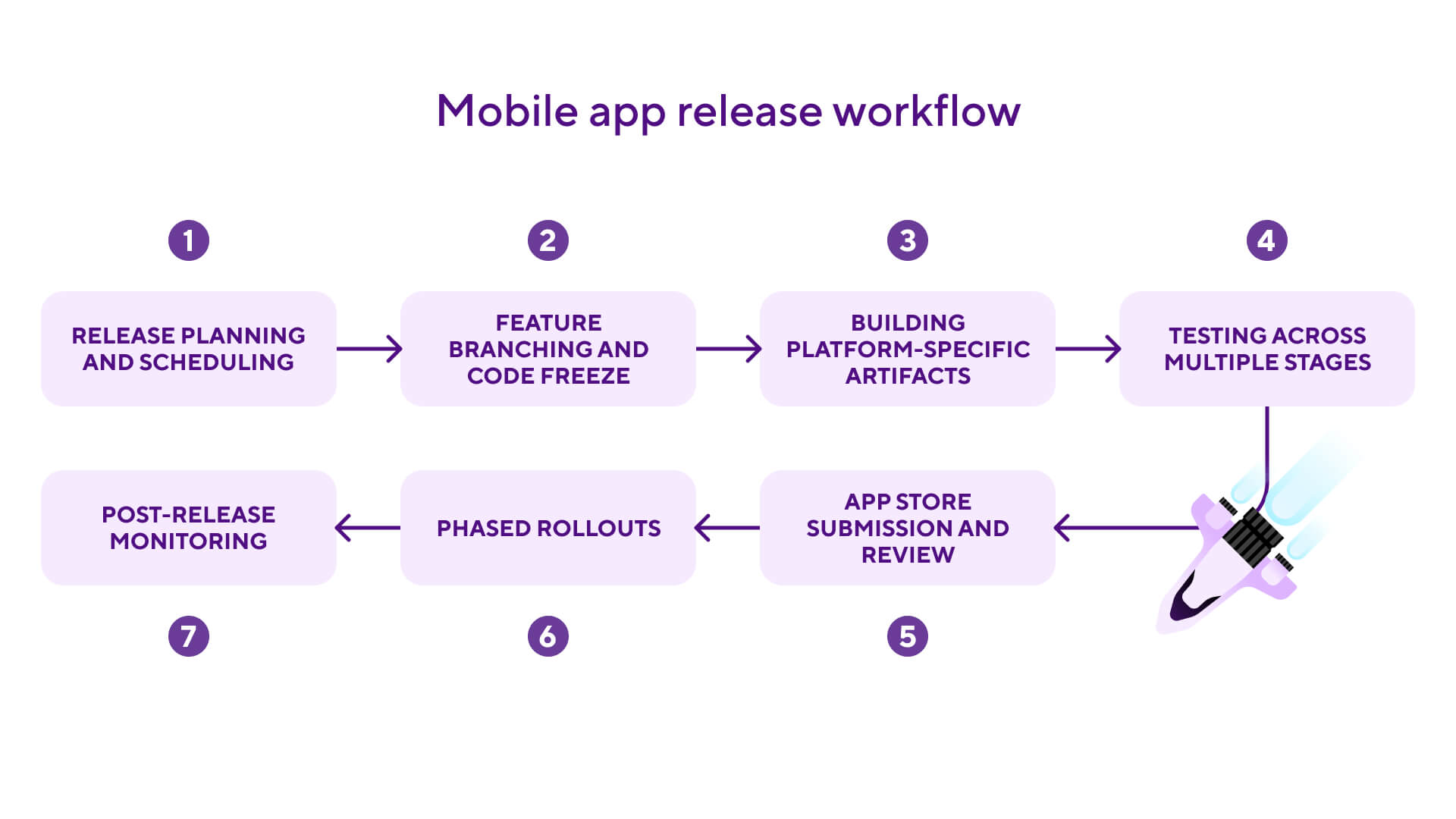
Release planning and scheduling
Release management picks up where continuous delivery ends: the build is ready, and now someone decides when and how it ships. Mobile releases need more lead time than web deployments. You're working around app store review windows, coordinating across platforms, and often syncing with marketing or support teams.
Assign a clear owner for each release, whether that's a dedicated release manager or a rotating role. Set a release cadence (weekly, bi-weekly, or sprint-based) and stick to it. Many mature mobile teams run a "release train" model: the train leaves on schedule regardless of what's on it, and features that aren't ready wait for the next one.
Code freeze and feature branching
At a defined point before release, you cut a release branch from your main branch and enter a code freeze. From that point, only bug fixes and release-critical changes go into the release branch. Feature flags let you merge code continuously without worrying about half-finished features shipping to users. Code behind a flag can sit in the release branch safely turned off until it's ready for production.
Building platform-specific artifacts
Once your release branch is stable, you produce the actual artifacts: an IPA file for iOS and an Android App Bundle (.aab) for Google Play. Google has required AAB format for all new apps since August 2021 and for existing apps since November of that year. APKs are still useful for sideloading and third-party distribution, but you'll need an AAB to ship through the Play Store. Each platform has its own build toolchain, dependencies, and configuration.
Code signing happens at this stage too. iOS builds must be signed with the correct certificate and provisioning profile for your distribution method (App Store, TestFlight, or enterprise). Android builds need to be signed with your upload key for Google Play. Getting this wrong is one of the most common reasons mobile releases stall, and automating it through your CI/CD pipeline is one of the highest-value investments a mobile team can make.
Here's what a Bitrise workflow for building and deploying an Android release looks like in bitrise.yml (if you're new to YAML, our guide covers the syntax):
# Bitrise workflow: build, sign, and deploy an Android release
workflows:
  release-android:
    steps:
    - git-clone@8: {}
    - install-missing-android-tools@3: {}
    - android-build@1:
        inputs:
        - variant: release
        - module: app
    - android-sign@1:
        inputs:
        # Keystore credentials stored as Bitrise secrets
        - keystore_url: $BITRISEIO_ANDROID_KEYSTORE_URL
        - keystore_password: $BITRISEIO_ANDROID_KEYSTORE_PASSWORD
        - keystore_alias: $BITRISEIO_ANDROID_KEYSTORE_ALIAS
    - google-play-deploy@3:
        inputs:
        - service_account_json_key_url: $BITRISEIO_SERVICE_ACCOUNT_JSON_KEY_URL
        - package_name: com.example.app
        - track: production
        # Start with 10% rollout
        - user_fraction: "0.1"
Testing across multiple stages
Mobile app testing typically happens in layers. Internal builds and dogfooding catch the obvious issues, with dedicated internal distribution tools keeping that process separate from public-facing channels. Beta distribution through TestFlight on iOS or Google Play's Internal, Closed, and Open testing tracks on Android covers more device types, OS versions, and usage patterns. Automated testing on real devices is essential for performance, memory management, and platform-specific behaviour that simulators miss. Most teams run framework-driven test suites here using Espresso for Android and XCUITest for iOS, with cross-platform tools like Appium and Maestro covering end-to-end flows. Finally, regression testing verifies that new changes don't break backward compatibility or existing functionality.
App store submission and review
You submit your IPA through App Store Connect and your AAB through the Google Play Console. Apple's review typically takes 24-48 hours (Apple reports 90% are reviewed within 24 hours), though apps in regulated categories can take longer. Google Play reviews are usually faster, a few hours to a couple of days.
Rejections happen. Common reasons include crashes on review devices, missing privacy disclosures, and guideline violations. Having a fast turnaround process for rejection fixes saves days.
Phased rollouts
Both stores support phased rollouts, and you should use them for every release.
On iOS, phased release distributes your update over seven days at fixed percentages: 1%, 2%, 5%, 10%, 20%, 50%, then 100%. Apple controls the pace. You can pause for up to 30 days if issues surface, but you can't adjust the percentages manually. On Android, you have full control over the rollout percentage and timing.
"Rollback" on mobile doesn't work like web. There's no way to pull a version off a user's device once they've installed it. Your options are to halt the phased rollout so no new users get the update, then push a fix through review. For React Native teams, an OTA update through CodePush is often the faster path for any fix that doesn't touch native code (more on that below).

Post-release monitoring
After release, monitor crash-free rates (typical release gates sit between 99.5% and 99.9%, with the industry median at 99.95%, app performance (launch time, memory usage, battery impact), store ratings for spikes in negative reviews, and business metrics (retention, engagement, conversion) compared to previous versions.
Over-the-air updates
There's a way around the "no instant hotfixes" problem on mobile. Over-the-air (OTA) updates let teams push certain changes directly to users without going through app store review, which brings mobile release timelines closer to web speeds. For teams where it applies, it's one of the most powerful tools you have for fixing critical bugs or shipping minor updates in minutes instead of days.
OTA isn't universally available, though. It's most commonly used for JavaScript bundle updates in React Native and Expo apps, and both Apple and Google have specific rules about what you can change outside the review process. Crossing those lines comes with real penalties, including app removal, so it's worth knowing exactly where the limits sit before you start. We've broken down what the app stores actually allow with OTA updates in a separate post.
For React Native teams, CodePush is available as a managed service on Bitrise following the deprecation of Microsoft App Center. It supports modern React Native projects including the New Architecture and Expo. If you want the full picture of how it fits into a release workflow, our post on shipping React Native updates in minutes with CodePush on Bitrise walks through the setup.
Why mobile release management matters for mobile development
Mobile release management is harder than web release management because of app store review gates, multi-platform builds, code signing requirements, and user-controlled updates. Teams who try to handle app release management with web-oriented tooling or processes tend to hit walls fast. Here are the key differences:
- App store gatekeeping means every release goes through a third-party review before it reaches users. Rejections send you back to the start of the queue.
- No instant hotfixes means a fix goes through build, re-submission, review, and user update, a path that can take days or weeks.
- Multi-platform complexity means separate codebases (or platform-specific builds from a shared codebase), separate build toolchains, separate code signing, and separate store submissions.
- User-controlled updates mean multiple app versions running in production at any time, requiring backward compatibility and API versioning.
The cost of getting release management wrong on mobile is higher than on web, because every mistake takes longer to fix. And nothing stalls a go/no-go decision faster than flaky tests muddying the signal from your release candidate. And the cost shows up in revenue, not just engineering time. A two-star drop in App Store rating correlates with a 50% lower conversion rate, which is why a few bad releases can affect the business for months. That's why the process needs to be tighter, more automated, and more deliberately designed than a typical web deployment workflow.
Mobile release management best practices
The most impactful mobile release management practices are: setting a fixed release cadence, automating code signing, using feature flags, always running phased rollouts, investing in real-device testing, and automating your CI/CD workflow end-to-end.
Set a fixed release cadence. Whether it's weekly, bi-weekly, or monthly, a predictable release train reduces coordination overhead and creates healthy deadlines. The cadence matters less than the consistency.
Automate code signing. Don't manage certificates and provisioning profiles manually. Use your CI/CD platform to handle code signing automatically so that any team member can trigger a build without needing local credentials. In Xcode, enable the "Automatically manage signing" checkbox in the Signing & Capabilities tab for development builds. For distribution, configure your CI to handle provisioning profiles and certificates centrally.
Use feature flags to decouple deployment from release. Merge code continuously, deploy it with the build, but control visibility with flags. Your release branch stays releasable at all times and you're never scrambling to revert half-finished features at code freeze.
Always use phased rollouts. Ship to a small percentage first, monitor, then expand. The cost of a phased rollout is a few days of patience. The cost of a bad release at full rollout is user trust.
Invest in real-device testing. Run your automated test suite on a matrix of real devices and OS versions, not just simulators. This is especially important for Android, where device fragmentation means behaviour varies widely across manufacturers.
Monitor crash-free rates as a release gate. Set a minimum crash-free threshold (most teams pick somewhere between 99.5% and 99.9% depending on app category) and treat it as a go/no-go signal for expanding your rollout. If it drops, halt and investigate before pushing further.
Build a pre-submission checklist. Before submitting to any store, verify: code signing is correct, metadata and screenshots are updated, privacy declarations are current, new permissions are documented, and the app passes your internal QA bar.
Automate your CI/CD workflow end-to-end. From build triggers on release branch commits through automated testing, code signing, and store submission, every manual step in mobile app deployment is a potential bottleneck and a source of error.
Mobile release management vs web release management
Our release management guide covers the high-level differences between mobile and web. Here's what those differences mean in practice, and where they hit hardest:
The core difference is the feedback loop. Web teams can deploy, observe, and fix within the same day. Mobile teams operate on longer cycles where each iteration costs more time, so getting it right before submission matters more.
How Bitrise handles mobile release management
Bitrise Release Management is purpose-built for mobile teams shipping to iOS and Android. It sits between your CI/CD workflows and your users, handling the coordination layer that's hardest to manage manually.
On the build and signing side, Bitrise automates code signing for both platforms. You upload your iOS certificates and provisioning profiles (or use automatic provisioning, which pulls them from Apple's developer portal at build time) and your Android keystore once. From that point, every workflow that builds a release artifact signs it automatically. No local credentials needed, no undocumented setup steps.
For testing, Bitrise runs test suites across simulators and real devices (via Firebase Test Lab integration) in parallel within your workflow. You can configure test steps for unit tests, UI tests, and screenshot tests, and set them as required gates before the build proceeds to distribution.
The release coordination layer is where Bitrise Release Management adds the most value. You create a release in the Release Management dashboard, attach builds from your CI workflows, and manage the full lifecycle from there: stakeholder review and approval workflows (QA sign-off, product owner approval, legal review), TestFlight uploads for iOS beta distribution, Google Play submissions with configurable rollout percentages, and cross-platform release tracking so you can see the status of both your iOS and Android releases in one place. Bitrise also provides build artifact management, so every release candidate is versioned, traceable, and downloadable from a single dashboard. You always know exactly which build went to which store, and when.
For teams using React Native, Bitrise also offers CodePush as a managed service (following the deprecation of Microsoft App Center), letting you push OTA JavaScript bundle updates without a store submission. You can also use Bitrise for beta distribution to internal testers and stakeholders before store submission.
See what Bitrise can do for you
Confidently build, test, and ship high-quality mobile apps with Bitrise.
Author

Frequently Asked Questions
How long does the app store review process take?
Apple’s App Store typically reviews submissions within 24-48 hours, with Apple reporting that 90% are reviewed within 24 hours. In practice, end-to-end times can be longer depending on the time of year and the complexity of your app. Google Play reviews are usually faster, ranging from a few hours to a couple of days. Apps in sensitive categories (health, finance, kids), first-time submissions, and apps that trigger policy flags can take longer on both platforms.
What is a phased rollout for mobile apps?
A phased rollout releases your app update to a small percentage of users first, then gradually increases the percentage over time. On iOS, Apple controls the pace over a seven-day schedule. On Android, you control the percentage manually. Yes, you should always use phased rollouts. They’re your main safety net against shipping a bad release to your entire user base.
Can I push updates to a mobile app without going through the app store?
For certain types of changes, yes. Over-the-air (OTA) updates allow teams to push JavaScript bundle changes directly to users’ devices without app store review. This is most commonly used with React Native apps via tools like CodePush (available as a managed service on Bitrise) or Expo Updates. OTA can’t modify native code, and both Apple and Google have guidelines limiting what can be changed outside the review process.
What is an acceptable crash-free rate for a mobile app?
There's no universal standard, but Luciq's 2025 Mobile App Stability Outlook puts the median crash-free sessions rate at 99.95%, with top-performing teams hitting 99.99%. In practice, teams pick a release gate threshold based on category and risk tolerance: 99.5% to 99.9% is common as a minimum floor, and finance and healthcare apps tend to sit at the higher end. The way most teams use it is the same: if a new version drops below the threshold during phased rollout, the rollout is paused and the team investigates before expanding further.
What’s the best release cadence for a mobile app?
There’s no universal answer, but most mature mobile teams release weekly or bi-weekly. The key is consistency: a fixed release train reduces coordination overhead and gives every team a predictable window to ship their work. Smaller, more frequent releases are generally lower-risk than large, infrequent ones because each release contains fewer changes, making issues easier to isolate.