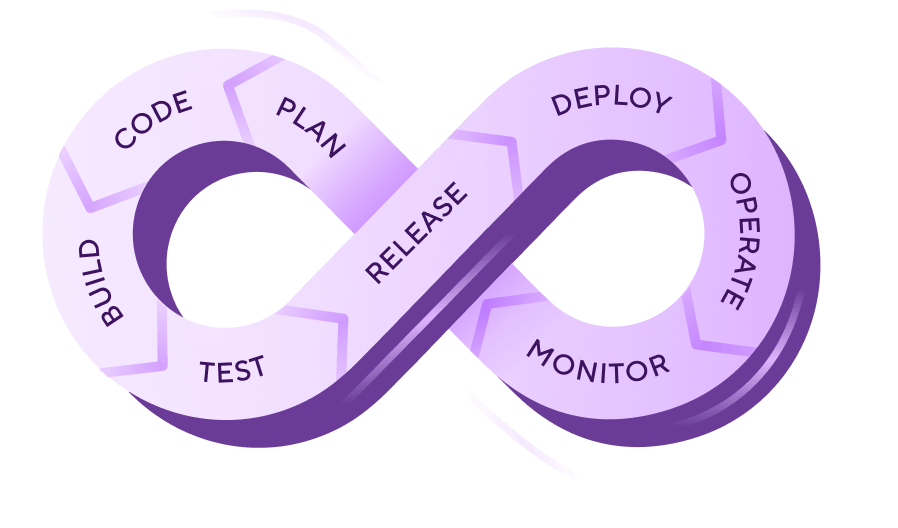
DevOps is a set of cultural practices, automation tools, and collaborative ways of working that unify software development (Dev) and IT operations (Ops) into a continuous workflow. It replaces the traditional model of developers building features and throwing them to a separate ops team, creating shared ownership of the full software lifecycle through automated workflows and fast feedback loops.
What is DevOps?
DevOps combines Development (coding, building, testing) and Operations (deployment, infrastructure, maintenance, stability). It emerged because Agile practices made developers faster, but operations struggled to keep pace. As a result, code sat in staging for days. Friday deployments became firefights. Silos between development teams building software and operations teams running it in production led to slow handoffs, blame cultures, and unowned incidents.
These silos are eliminated with DevOps. It brings development and operations together to work as one team with shared tools, shared accountability, and a shared goal: delivering working software to users as quickly and safely as possible. Five core principles govern DevOps:
How does DevOps work?
DevOps combines a set of practices (CI/CD, version control, infrastructure as code, configuration management, and monitoring) into a framework that helps teams plan, build, test, and deliver software in continuous cycles rather than big-bang releases.
The DevOps lifecycle is often visualised as an infinity loop (∞), with eight continuous phases that feed into each other.
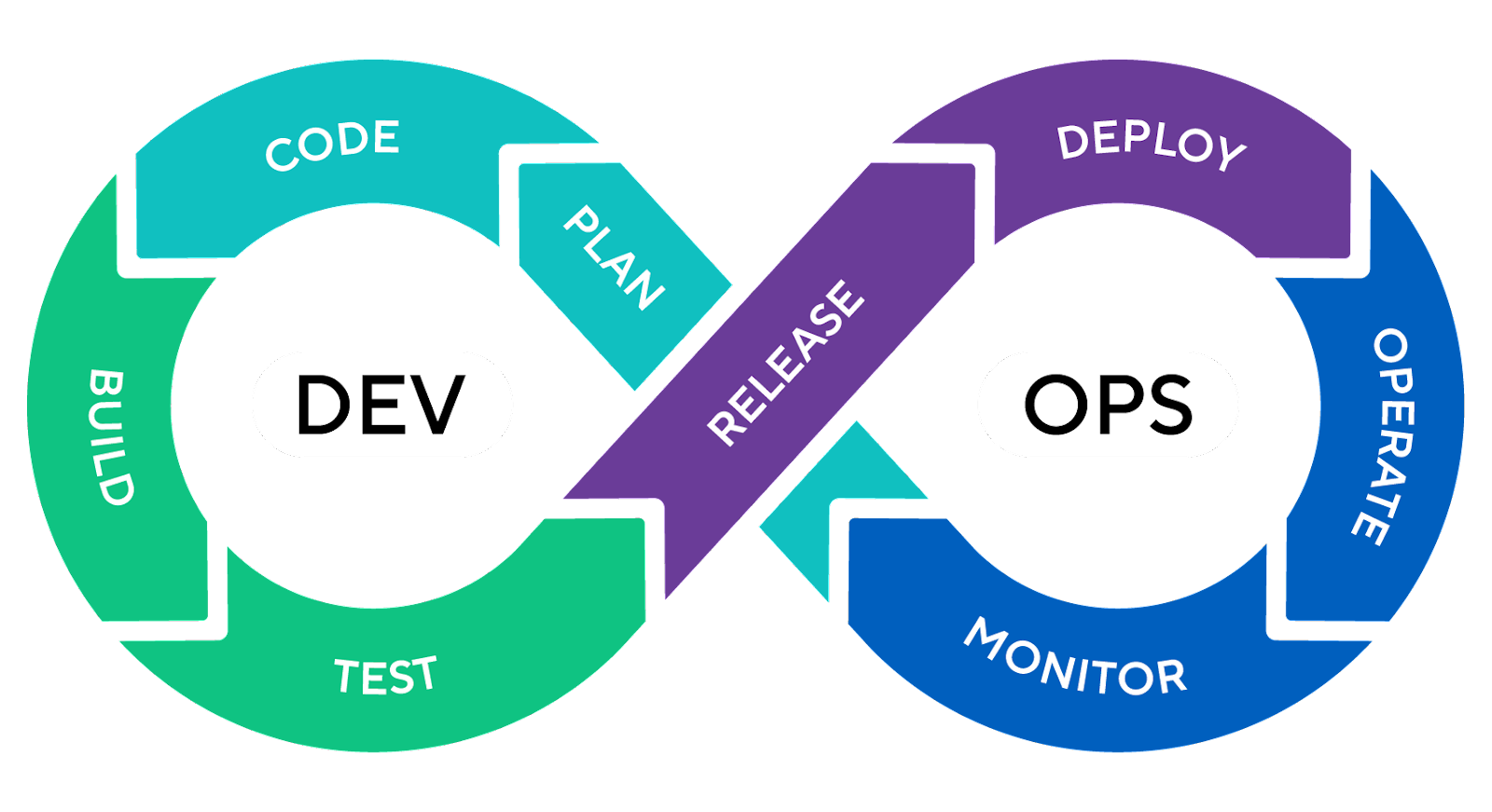
Plan defines what to build and when. This is the roadmap that keeps the team aligned before anyone writes a line of code.
Code is where developers write application code using version control systems to track changes. Multiple developers can work on different features simultaneously without overwriting each other's work.
Build compiles source code, bundles dependencies, and packages the application into deployable artifacts. Build automation makes sure that what works on a developer's laptop works identically in production.
Test validates that code works correctly and meets security standards through automated unit tests, integration tests, security scans, and code quality analysis. Adding security as a shared responsibility across the workflow is called DevSecOps.
Release prepares validated builds for deployment through release gates, artifact promotion, and orchestration steps.
Deploy pushes code changes to production. Modern deployments happen continuously using strategies like blue-green deployments and canary releases that gradually shift traffic to new versions.
Operate maintains running applications and infrastructure, including server configurations, access controls, security policies, and automated guardrails.
Monitor tracks application performance, infrastructure health, and user behaviour in production. Monitoring data flows back into planning, creating continuous improvement loops.
Why DevOps matters for mobile development
Mobile teams face problems web teams don't: iOS builds need macOS, code signing breaks more builds than anything else, real device testing is non-negotiable, app store reviews block your release schedule, and native compile times are long enough to bottleneck the whole team.
The core DevOps principles (automation, collaboration, continuous improvement) all apply. The tooling and workflows just have to account for these mobile-specific constraints, which is why generic DevOps platforms often fall short.
For the full picture, including the five mobile-specific challenges in depth and best practices for shipping iOS and Android apps reliably, read our guide to mobile DevOps or our guide to mobile release management for the release management process specifically.
DevOps best practices
These are the proven methodologies that high-performing teams use to ship software faster and more reliably.
If you do it twice, automate it
If a task is manual and you've done it more than once, automate it. Start with builds and tests (CI), then extend to deployments (CD), infrastructure provisioning (IaC), and environment setup. Automation removes human error and frees your team to focus on work that relies on critical insight and decision making.
Implement infrastructure as code from day one
Manage all infrastructure through version-controlled code files. Tools like Terraform, Ansible, and Pulumi let you spin up identical environments on demand, track every change, and roll back mistakes. Never configure a server manually in production.
Measure with DORA metrics
Track the four DORA metrics: deployment frequency, lead time for changes, change failure rate, and mean time to recovery. These are the industry-standard measures of DevOps performance, validated by years of research. They give you an objective baseline and show whether your improvements are working.
Shift security left
Integrate security scanning into your CI/CD workflow rather than leaving it as a gate at the end. Run static analysis, dependency vulnerability checks, and secret detection on every commit. This catches issues when they're easy and affordable to fix, the foundational idea behind DevSecOps.
Use feature flags for progressive rollouts
Decouple deployment from release. Ship code to production behind feature flags, then gradually enable features for increasing percentages of users. This limits the blast radius of any issues and lets you gather real user feedback before full rollout.
Establish blameless post-mortems
When incidents happen, focus on the system failures that created the problem, not the person who triggered it. Blame cultures drive problems underground.
DevOps vs CI/CD
DevOps is the cultural philosophy and organisational strategy; CI/CD is the technical automation engine that makes DevOps practices possible.
CI/CD is the engine that converts DevOps culture into measurable results. Without CI/CD automation, DevOps principles remain theoretical: teams may want to collaborate and ship faster, but manual builds and deployments create the same bottlenecks. For a deeper look at each side, see our guides to continuous integration and continuous delivery.
DevOps vs Agile
Agile and DevOps are complementary. Agile focuses on what to build and how to organise the work. DevOps focuses on how to deliver it reliably and continuously.
Both Agile and DevOps complement each other. Agile focuses on what to build and how to organise the work. DevOps focuses on how to deliver it effectively and reliably.
DevOps vs DevSecOps
DevSecOps extends DevOps by integrating security as a first-class priority throughout the entire development lifecycle, rather than treating it as a gate at the end.
The same automation and fast feedback loops that help you ship quickly also power security checks at every stage of development. Instead of catching vulnerabilities late (or not at all), you address them as they come up, building a stronger security posture without slowing down delivery. For a deeper look at how this works for mobile teams, see our guide to DevSecOps.
How Bitrise handles DevOps
Bitrise is a purpose-built DevOps platform for mobile teams. Where traditional DevOps platforms treat iOS and Android as afterthoughts, often forcing you to script custom solutions for code signing, device testing, and app store deployment, Bitrise provides native mobile workflows that work out of the box.
The Workflow Editor is where you define your DevOps workflow visually or in YAML. Each workflow is a sequence of Steps (400+ pre-built integrations at bitrise.io/integrations) that handle everything from cloning your repo to deploying to the App Store. You can chain workflows together, run them in parallel, and trigger them automatically on code push, pull request, or tag.
Automated code signing removes one of the biggest friction points in mobile DevOps. Instead of manually managing certificates and provisioning profiles across your team, Bitrise handles code signing for both iOS and Android as part of the workflow. Upload your signing assets once, and every build uses the right credentials automatically.
Real device testing is built into the platform. You can run your test suites on real iOS and Android devices in the cloud, not just simulators, catching device-specific issues before they reach users.
Bitrise Release Management extends your DevOps workflow beyond CI/CD into release management. You can manage staged rollouts, track release status across both app stores, and roll back if something goes wrong, all from one dashboard.
Bitrise Insights gives you visibility into your DevOps performance with built-in analytics. Track build times, test success rates, and workflow reliability over time. Use DORA metrics to measure your DevOps maturity and identify where your workflows need attention.
Mobile teams using Bitrise ship faster because the platform handles the hard parts natively: no custom scripts, no stitching together web-focused tools that weren't built for mobile.
See what Bitrise can do for you
Confidently build, test, and ship high-quality mobile apps with Bitrise.
Frequently Asked Questions
Is DevOps a job title or a methodology?
Both. DevOps started as a methodology: a set of cultural practices and principles for unifying development and operations. Over time, "DevOps engineer" became a common job title for the people who implement and maintain the automation, tooling, and infrastructure that make DevOps practices possible.
What tools do DevOps teams use?
DevOps teams typically use a combination of version control (Git), CI/CD platforms (Bitrise, Jenkins, GitHub Actions), infrastructure as code tools (Terraform, Ansible, Pulumi), container platforms (Docker, Kubernetes), and monitoring tools (Prometheus, Grafana, Datadog). The specific tools matter less than how well they're integrated into a continuous workflow.
How long does it take to adopt DevOps?
There's no fixed timeline. Some teams see improvements within weeks by automating their build and test processes. A full cultural transformation, including breaking down silos, shifting to continuous delivery, and building internal platforms, typically takes one to three years depending on organisation size. Start small, measure with DORA metrics, and build momentum through quick wins.
What's the difference between DevOps and SRE?
Site Reliability Engineering (SRE) is a specific approach to operations that applies software engineering principles to infrastructure and reliability problems. Google, which created SRE, describes it as "a specific implementation of DevOps." SRE teams focus heavily on error budgets, service level objectives (SLOs), and automation to reduce manual operations work. DevOps is the philosophy; SRE is one way to practise it.
Do I need a different DevOps approach for mobile apps?
Yes, in several important ways. Mobile development introduces challenges that don't exist in web or server-side development: code signing, app store review processes, real device testing, fragmented OS versions, and longer release cycles. The core DevOps principles still apply, but the tooling and workflows need to account for these differences.