
Code signing is the process of attaching a cryptographic signature to an app or binary so that operating systems can verify who built it and that nobody has tampered with it since. The developer signs with a private key, and the OS checks the matching certificate before allowing the app to install or run.
What is code signing?
Code signing is the mechanism that lets a phone, a laptop, or an app store answer one question with confidence: did this app really come from the developer it claims to, and is it byte-for-byte the build they shipped? Without a valid signature, iOS won't run your app at all, and Android refuses to install unsigned APKs.
For mobile teams, this is a hard gate not just an optional security step. Apple and Google both require every app to be signed before it can reach a device, whether that's a tester's phone or a production release in the App Store or Google Play. So if your signing setup is broken, you can't ship. Full stop. The build compiles (most of the time), the tests pass, and then the release dies at the signing step with an error about an expired certificate or a missing provisioning profile.
That's why senior mobile engineers tend to care less about the cryptography and more about the operations: where the keys live, who can use them, and how signing runs reliably inside a mobile CI/CD workflow. The crypto is the easy part. Keeping a team of twenty developers shipping signed builds every day without leaking a private key is the hard part.
How does code signing work?
Code signing combines hashing and public-key cryptography to produce a signature that's cheap to verify and practically impossible to forge. Here's the flow:
- Hash the code - The signing tool computes a cryptographic hash (typically SHA-256) of the app binary and its resources. Change a single byte and the hash changes completely.
- Sign the hash with a private key - A signature algorithm (RSA or ECDSA in practice) combines that hash with the developer's private key, producing the digital signature. Only the holder of the private key can create a signature that the matching public key will validate.
- Attach the certificate - A code signing certificate binds the public key to an identity. The two platforms handle this differently: Apple acts as a certificate authority and issues distribution certificates through its developer program, while Android certificates are self-signed; the key pair you generate is the identity, and Play App Signing lets Google hold that key for you.
- The OS verifies the signature - At install time (and on iOS, again at launch), the operating system recomputes the hash and checks it against the signature using the public key. iOS also walks the certificate chain up to Apple's root, which it already trusts. Android instead pins the app to its certificate: there's no trusted root, but every update must be signed with the same key as the installed version.
- The app runs, or it doesn't - A valid chain means the app installs and launches. A broken chain (modified binary, expired certificate, untrusted issuer) means the OS rejects it.
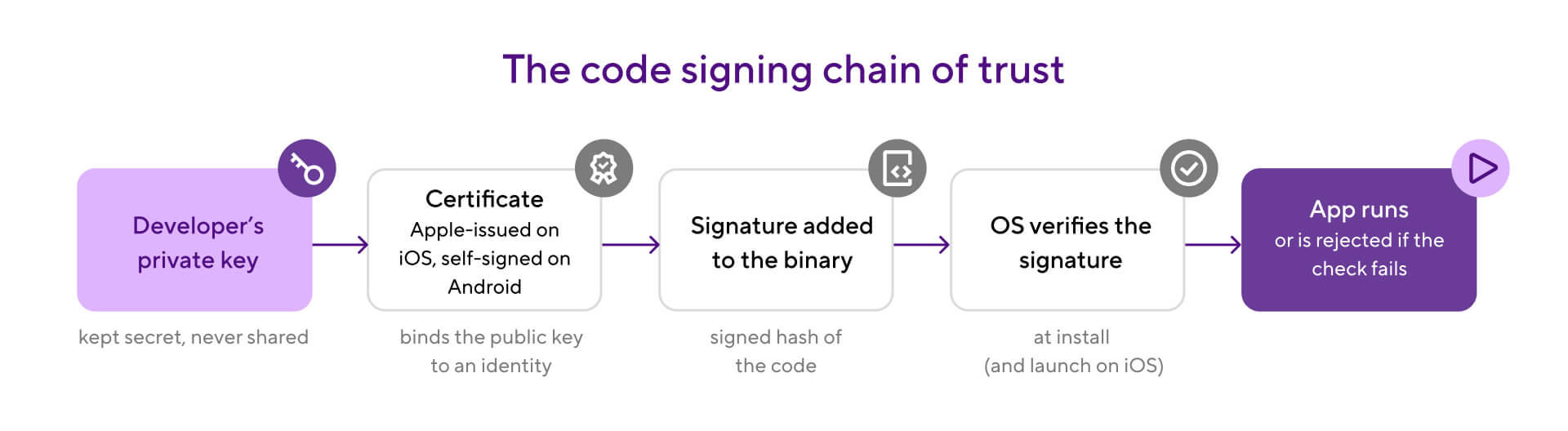
You can inspect a signature yourself. On macOS, codesign verifies an app bundle; on Android, apksigner does the same for an APK:
# macOS / iOS
codesign --verify --deep --strict MyApp.app

# Android
apksigner verify --print-certs my-app.apk
Each platform layers its own machinery on top of this shared model. iOS adds provisioning profiles that tie certificates to app IDs and devices, which the iOS code signing guide covers in detail. Android wraps the key pair in a keystore file and adds multiple signature schemes (V1 through V4), covered in the Android keystore guide. The underlying model, a signed hash verified against a certificate, works the same way on both.
Why code signing matters for mobile development
Code signing decides whether your release ships on time, because both app stores treat a valid signature as a non-negotiable entry requirement. App Store Connect rejects unsigned or incorrectly signed IPAs at upload. Google Play won't accept an unsigned AAB. There's no appeal process and no workaround: fix the signature or don't release.
The practical pain shows up in CI. Signing is the most common reason a green mobile build turns red at the release stage. Certificates expire (Apple distribution certificates last about a year), provisioning profiles drift out of sync with device lists and entitlements, and a keystore password typo can block a hotfix for hours. When that happens during a release window, a critical fix sits in the queue while someone hunts down whoever has the signing certificate on their laptop. On a weekly release train, one signing failure can push a feature back seven days.
Signing also matters beyond the store gate. The signature is your supply chain guarantee to users: the build they install is the build your CI produced, not something modified in transit or repackaged with malware. That makes signing one of the foundational controls in a mobile DevSecOps practice. Android ties app updates to the signing key, so an update signed with a different key is treated as a different app and users can't be silently switched to an impostor build. That makes signing a core piece of any DevSecOps practice for mobile, not just a distribution formality.
And there's a darker reason to take key custody seriously: a leaked signing key lets an attacker publish malware that looks exactly like your app. Treat signing keys like production database credentials, because the blast radius is similar.
Code signing best practices
Good code signing hygiene comes down to treating keys as critical infrastructure and removing humans from the signing path. Here's what works:
Never commit signing assets to the repo
No .p12 files, no .jks keystores, no keystore passwords in gradle.properties. Repos get cloned, forked, and cached in too many places. Store keys in your CI provider's secrets management or a dedicated secrets manager, and add *.p12, *.jks, and *.keystore to your global .gitignore.
Sign in CI, not on laptops
Local signing means the release depends on one person's machine, one person's keychain, and one person being awake. Move signing into your workflow so any authorized build produces a correctly signed artifact, with an audit trail of which build used which certificate.
Centralize signing assets for the whole team
One shared, access-controlled store for certificates and keystores beats five copies in five Slack DMs. When a certificate needs renewal, you update it once and every workflow picks it up.
Audit certificate expiry before it bites
Put Apple certificate expiry dates in the team calendar and set a reminder 30 days out. security find-identity -v -p codesigning lists the signing identities on your machine that are still valid, and the Apple Developer portal shows expiry dates for the team's certificates. An expired certificate discovered mid-release is the most preventable outage in mobile.
Use Play App Signing and let Google hold the production key
For Android, enrolling in Play App Signing means Google stores the app signing key and you only manage an upload key, which can be reset if lost. That single setting removes the scariest failure mode in Android signing.
Make signing part of your release checklist, not an afterthought
Certificate renewal, profile regeneration, and key rotation belong in the same planning rhythm as your release trains. Teams with a solid mobile release management process treat signing health as a release-readiness check, not a fire to fight on ship day.
iOS code signing vs Android code signing
Both platforms use the same cryptographic model but run it very differently. The short version: Apple controls iOS certificates end to end, while Android puts you (or Google) in charge of self-generated keys.
The differences run deep enough that each platform deserves its own setup guide. The iOS code signing deep dive walks through certificates, provisioning profiles, and automatic vs manual signing. The Android keystore guide covers keystore creation, Gradle signing configs, and Play App Signing. Apple's own code signing documentation and the Android app signing docs are the authoritative references for platform specifics.
How Bitrise handles code signing
Bitrise stores your signing assets centrally and injects them into builds at runtime, so signing happens in CI instead of on someone's laptop. You upload certificates and keystores once, through the Code Signing page under Project Settings, and every Workflow that needs them can use them. The full setup is documented in the Bitrise code signing docs.
For iOS, there are two paths. With automatic provisioning (the recommended one), you upload your signing certificates and connect Bitrise to Apple through an App Store Connect API key or an Apple ID. At build time, Bitrise downloads, creates, or renews the provisioning profiles for you and handles App ID and test device registration. That removes the most fragile part of iOS signing: keeping profiles in sync by hand. With manual provisioning, you upload both the certificates and the provisioning profiles yourself and keep them updated as your project changes. Manual mode exists for teams that can't connect an Apple account to Bitrise, handle signing files in their own way, or work across multiple Apple Developer accounts.
For Android, you upload your keystore file along with its password, alias, and key password on the same Code Signing page. Bitrise exposes the keystore to builds through environment variables like BITRISEIO_ANDROID_KEYSTORE_URL. The Android Sign Step picks those up automatically: add it to your Workflow after the build Step, and it produces a signed APK or AAB using apksigner or jarsigner (AABs always use jarsigner). If your build.gradle already defines a signing config, the Android Build or Gradle Runner Step signs the output during the build instead, though the Android Sign Step keeps keystore credentials out of your Gradle files.
In both cases, the signed artifact flows straight into deploy Steps such as Deploy to App Store Connect or Google Play Deploy, so a single Workflow takes your code from commit to store-ready binary with no manual signing in between.
See what Bitrise can do for you
Confidently build, test, and ship high-quality mobile apps with Bitrise.
Frequently Asked Questions
What is a code signing certificate?
A code signing certificate is a digital document that binds a developer's public key to an identity. When the OS validates an app's signature, the certificate is what tells it who signed the code. On iOS, Apple issues these certificates through the Developer Program and the OS verifies them against Apple's root; on Android, developers generate self-signed certificates inside a keystore, and the OS pins the app to that certificate for all future updates.
What happens if an app isn't signed?
It won't reach users. iOS refuses to install or run unsigned apps, and App Store Connect rejects unsigned uploads. Android requires a signature on every APK and AAB, and Google Play won't accept unsigned releases. Even sideloaded Android apps must carry a signature, though it can be self-signed.
Is code signing the same as encryption?
No. Encryption hides content so only authorized parties can read it. Code signing leaves the app fully readable and instead proves two things: who published it (authenticity) and that it hasn't changed since signing (integrity). They use related cryptographic building blocks, but they solve different problems.
How much does a code signing certificate cost?
For mobile, the cost is bundled into platform fees. Apple's certificates come with the Apple Developer Program at $99 per year. Android signing keys are free, since you generate them yourself; Google Play's one-time $25 registration covers publishing. The commercial certificates sold for hundreds of dollars a year target Windows software, not app store distribution.
Can I change my signing key after my app is published?
On iOS, yes, because Apple re-signs apps for distribution; renewing or replacing your certificate doesn't affect installed apps. On Android, updates must be signed with the same key the app was published with, so enroll in Play App Signing: Google then holds the app signing key and can reset your upload key if you lose it.