Mobile CI/CD is the automated pipeline that takes mobile app code from a developer's commit through build, test, code signing, and distribution to TestFlight, Google Play, or the App Store. It applies general CI/CD principles to mobile-specific stages that don't exist in web development: macOS build environments, mandatory code signing, real-device testing, and store review.
What is mobile CI/CD?
Mobile teams adopted CI/CD later than web teams, and for good reason. Mobile pipelines have stages that don't exist in web:
- iOS builds need macOS machines and current Xcode versions.
- Both platforms require code signing on every build.
- Tests need real devices or simulators.
- Releases go through Apple or Google review queues.
Mobile CI/CD is the practice of automating these mobile-specific stages alongside the standard build-test-deploy work while sitting inside the broader practice of mobile DevOps, which also covers monitoring, release management, and team workflows. This guide focuses on the pipeline itself.
The continuous integration part of CI/CD means developers merge code into a shared branch frequently (at least daily), and every merge triggers an automated build and test run. The continuous delivery part means the pipeline can produce a signed, tested binary ready for release at any point, without manual steps.
What makes mobile CI/CD different is the way the pipeline works. A web CI/CD pipeline pushes code to a server and users see changes in seconds. A mobile CI/CD pipeline produces a binary that must be cryptographically signed, submitted to Apple or Google, reviewed, and then downloaded by users who may or may not have auto-updates on. That difference affects every stage of the pipeline.
If you're new to CI/CD, our CI/CD guide covers the fundamentals. This page focuses on the changes mobile brings to the pipeline when you're shipping through app stores instead of deploying directly to a server.
How does mobile CI/CD work?
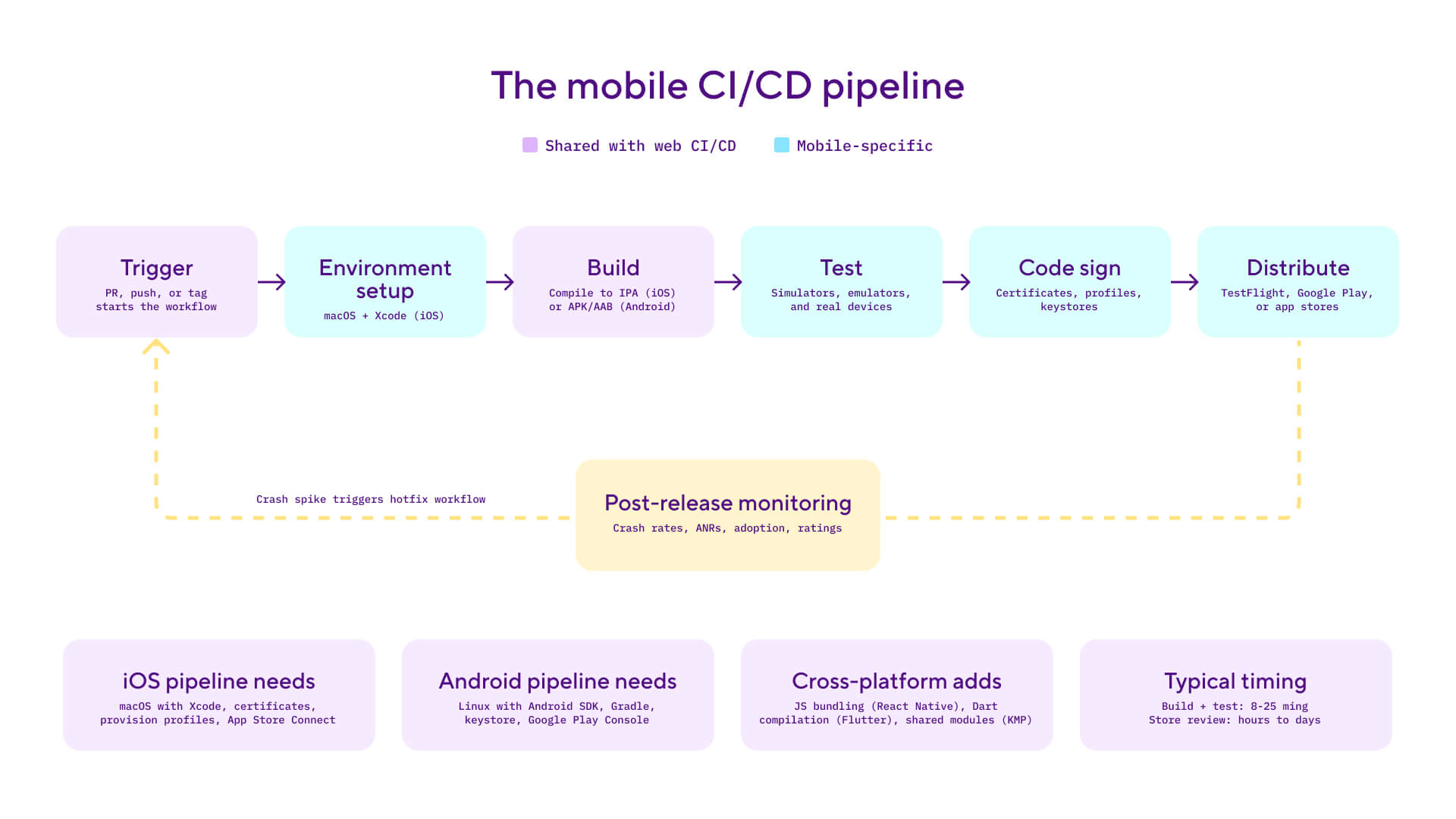
There are seven stages to a mobile CI/CD pipeline. The first two (trigger and build) are similar to web CI/CD pipelines. The remaining steps are unique to mobile.
Trigger and source control
The pipeline starts when a developer pushes code, opens a pull request, or creates a tag. The CI system detects the change and runs the appropriate workflow. Mobile teams typically maintain separate workflows for iOS and Android, triggered from the same repository but running on different machines.
Environment setup
Web builds run in standardised Linux containers. Mobile builds need platform-specific machines: macOS with a specific Xcode version for iOS, Linux with the Android SDK and Gradle for Android. Xcode version management matters more than most teams expect. A point release from Apple can introduce breaking changes, and if your CI environment isn't running the right version, the build fails before it starts.
Build and compilation
The build stage compiles source code into a binary: an IPA for iOS, an APK or AAB for Android. Most teams maintain multiple build variants (debug, staging, release), each pointing to different backends with different signing configurations. Cross-platform frameworks like React Native, Flutter, and Kotlin Multiplatform add an extra compilation step before the native build: JS bundling, Dart compilation, or shared module compilation respectively.
Automated testing
Unit and integration tests run on the build machine, same as web. But UI tests need a simulator, emulator, or real device. iOS UI tests run in the Xcode simulator; Android UI tests run on an emulator or through a device farm like Firebase Test Lab. Real-device testing catches hardware-specific problems (GPS, camera, Bluetooth, rendering on specific screen sizes) that simulators miss. It also exposes flaky tests that pass on a developer's laptop but fail under CI load. This stage is typically the slowest, and test sharding across parallel devices is the most effective way to keep it running efficiently. Running tests at every stage of the pipeline rather than as a final gate is the practice behind continuous testing, and it's what separates a mobile CI/CD workflow that ships reliably from one that just ships fast.
Code signing
This stage has no web equivalent. Every iOS app must be signed with a distribution certificate and provisioning profile from Apple's Developer Portal. Android apps must be signed with a keystore. If any signing credential is misconfigured, expired, or missing, the build produces an artifact that can't be installed. Automating code signing in CI (rather than relying on developer laptops) removes the most common source of "works on my machine" failures.
Distribution
In web CI/CD, "deploy" means pushing to a server. In mobile, distribution splits into two paths. Internal/beta distribution sends builds to testers through TestFlight (iOS) or Google Play test tracks (Android). Production release means submitting to the App Store or Google Play, where review takes anywhere from a few hours to a few days. Both Apple and Google support phased rollouts on production releases, allowing you to release to a percentage of users first before expanding to everyone. TestFlight does not support phased rollouts; it's for beta testing only. The mobile equivalent of progressive delivery lives in these store-side controls rather than the CI/CD platform. For React Native apps there's a third path: JavaScript changes can ship between store releases via CodePush, an over-the-air update lane that runs through the same CI workflow.
Post-release monitoring
Once a release is live, crash-free rates, ANRs (Android Not Responding events), version adoption, and app store ratings tell you whether it's stable or not. This feedback loop matters more in mobile than web because fixes take longer to reach users: you need a new build, a new review, and for users to install the update. Post-release tracking is where mobile CI/CD hands off to release management practices.
Here's what a basic iOS build-test-distribute workflow looks like in a Bitrise bitrise.yml:
workflows:
  primary:
    steps:
    - git-clone: {}
    - xcode-test:
        inputs:
        - scheme: MyApp
    - manage-ios-code-signing:
        inputs:
        - distribution_method: app-store
        - scheme: MyApp
    - xcode-archive:
        inputs:
        - scheme: MyApp
        - distribution_method: app-store
    - deploy-to-bitrise-io: {}
    - deploy-to-itunesconnect-deliver:
        inputs:
        - ipa_path: "$BITRISE_IPA_PATH"
Step versions are omitted here for readability. In your real workflows, pin each Step to a specific major version (for example, xcode-test@5) so builds stay reproducible when Steps update.
Why mobile CI/CD matters for mobile development
The cost of getting a mobile release wrong is higher than web, and the fix cycle is slower. That combination makes automation essential rather than optional.
Broken releases are expensive to fix. A web team can redeploy a fix in minutes. A mobile team needs to build, sign, submit for review, wait for approval, and then wait for users to update. A critical bug that takes 5 minutes to fix in code might take 48 hours to reach users. During that time, negative reviews accumulate, crash rates rise, and user churn increases
Code signing breaks silently. Expired certificates and mismatched provisioning profiles are the most common cause of mobile CI failures. Without automation, signing credentials live on individual developer machines, creating bottlenecks and single points of failure. When the developer who "owns" the certificates goes on holiday, releases stop.
Device fragmentation multiplies risk. Web apps target a handful of browser engines. Mobile apps run on thousands of device and OS combinations. Manual testing can't cover this surface. Automated test suites running across simulators, emulators, and real devices catch layout, performance, and hardware-specific issues before they reach production.
Build times affect team velocity directly. A slow pipeline discourages frequent commits. Developers start batching changes to avoid waiting, which defeats the purpose of continuous integration and makes every merge riskier. Keeping your pipeline under 10-15 minutes for a commit-level build preserves the fast feedback loop that makes CI valuable.
App store review adds a gate you can't skip. Unlike web deployment, you can't bypass the store review process. Every submission counts. A pipeline that catches problems early (through linting, compilation, testing, and signing validation) means fewer rejected submissions and more predictable release cycles.
Mobile CI/CD best practices
Automate code signing from day one. Store certificates and provisioning profiles in your CI system, not on developer machines. On iOS, use automatic provisioning so profiles are generated and updated at build time. On Android, store your keystore securely in CI and inject it during the signing step. Developer machines should never be the source of truth for signing credentials.
Cache dependencies aggressively. CocoaPods, Swift Package Manager, Gradle dependencies, and Xcode derived data should all be cached between builds. Invalidate caches when lockfiles change. Effective caching cuts build times by 30-50%. In Gradle, make sure org.gradle.caching=true is set in your gradle.properties file.
Fail fast by ordering stages cheaply. Run linting and compilation first, unit tests second, and device testing last. If a build fails a syntax check, there's no reason to spend 30 minutes of device lab time. This ordering gives developers the fastest possible feedback on the most common failures.
Shard UI tests across parallel devices. If your UI test suite takes 40 minutes on a single simulator, split it across four parallel simulators and it drops to roughly 10 minutes. Both Xcode and Android's test orchestrator support test sharding natively. Configure your CI to distribute tests across available simulators or devices.
Set build time budgets and treat regressions as bugs. Track your pipeline duration. A workflow that was 8 minutes and has crept to 25 will erode CI discipline. Developers will start batching changes, which makes merges riskier and defeats the point of continuous integration.
Run both platform workflows in parallel. If you support iOS and Android, trigger both workflows from the same commit and run them concurrently. Running them sequentially doubles your feedback time with no real benefit.
Mobile CI/CD vs web CI/CD
The core idea between mobile CI/CD and web CI/CD is the same: automate the path from code to production. The pipeline stages are structurally different, and the differences shape every part of how the pipeline works.
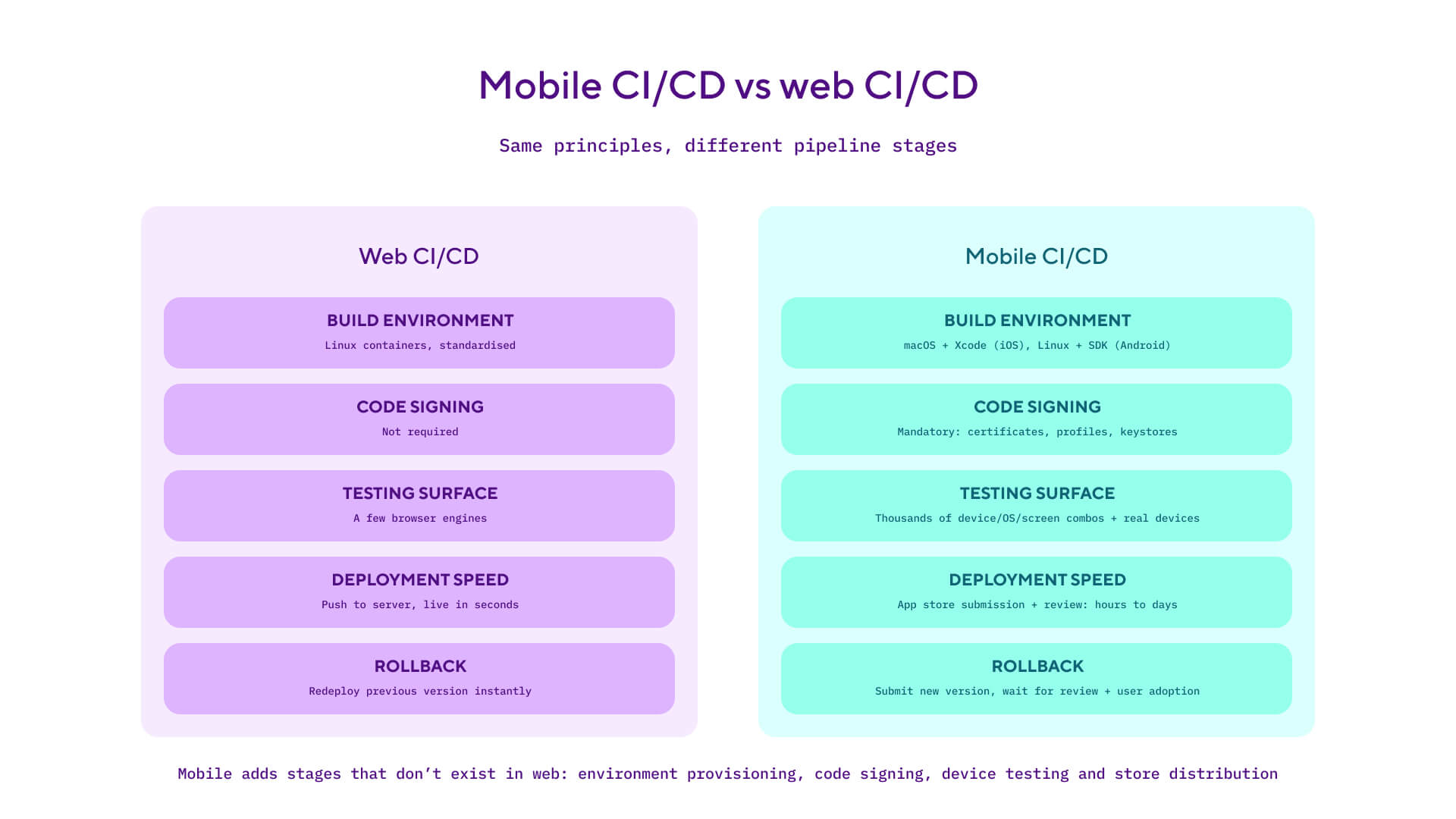
The comparison isn't about which one is hardest. Web CI/CD has its own set of challenges around infrastructure orchestration and zero-downtime deploys. But the stages are different enough that mobile teams using generic CI/CD tools often resort to patching the gaps themselves by writing custom scripts for signing automation, device farm testing, app store submission, and phased rollouts.
For teams that want progressive rollouts (canary releases, percentage cohorts, feature flags), mobile platforms have their own equivalents through TestFlight cohorts, Google Play staged rollouts, and feature flag SDKs. The continuous delivery guide covers progressive delivery in detail; the mobile-specific mechanics live in app store consoles rather than the CI/CD platform.
How Bitrise handles mobile CI/CD
Bitrise is a CI/CD platform built for mobile. Where generic platforms need custom scripting for mobile-specific stages, Bitrise comes with with pre-built Steps and managed infrastructure.
Build environments: Bitrise provides managed macOS and Linux machines running on Apple Silicon. Xcode updates are available within 24 hours of Apple's releases. Android SDKs come pre-installed. Stacks follow a lifecycle (Edge, Stable, Frozen) so teams can pin to a known-good environment or opt into the latest toolchain. Developers select a stack in their app's settings and Bitrise handles the provisioning.
Automated code signing: The Manage iOS Code Signing Step downloads and installs certificates uploaded to Bitrise, generates or updates provisioning profiles, and registers test devices on the Apple Developer Portal, all before the build runs. Developers configure the distribution_method input (development, app-store, ad-hoc, or enterprise) and the Step handles the rest. It outputs environment variables like $BITRISE_EXPORT_METHOD and $BITRISE_PRODUCTION_CODESIGN_IDENTITY that downstream Steps use automatically. For Android, the Android Sign Step signs APKs and AABs with a keystore stored securely on Bitrise, outputting $BITRISE_SIGNED_APK_PATH_LIST.
Testing: The Xcode Test for iOS Step runs XCTest suites on simulators with results exported to the Tests tab. For Android, the Android Unit Test Step runs Gradle-based tests, and the Virtual Device Testing for Android Step runs instrumentation and robo tests on Firebase Test Lab devices directly from the workflow.
Distribution: The Deploy to App Store Connect with Deliver Step uploads signed IPAs (using $BITRISE_IPA_PATH) to App Store Connect for TestFlight builds and production releases, and can submit metadata and screenshots in the same run. The Google Play Deploy Step handles AAB and APK uploads to any Google Play track. Both Steps fit into the workflow after signing, with no manual uploads required.
Bitrise provides 400+ pre-built Steps and starter workflows for iOS, Android, React Native, Flutter, and KMP. Build caching (including Swift Package Manager and Gradle caches) reduces build times by 50% or more. Most teams get their first mobile build in under an hour.
See what Bitrise can do for you
Confidently build, test, and ship high-quality mobile apps with Bitrise.
Frequently Asked Questions
Do I need mobile CI/CD if I have a small team?
Yes. Even a two-person team benefits from automating builds, tests, and code signing. The time spent manually building, signing, and uploading binaries adds up, and the risk of human error grows with every release. Start by automating your build and test workflow, then add automated distribution as your release cadence increases.
How long does it take to set up a mobile CI/CD pipeline?
With a mobile-first platform like Bitrise withpre-configured environments, code signing automation, and pre-built Steps, most teams get a passing build within 30 minutes to a few hours. With a generic platform (Jenkins, GitHub Actions, GitLab CI), expect 20-40 hours of custom scripting for signing, device testing, and app store deployment before the pipeline is production-ready.
Should I use cloud-based or self-hosted mobile CI/CD?
For most teams, cloud-based is the optimal choice. Self-hosted means maintaining macOS build machines, keeping Xcode and Android SDK versions current, and handling hardware costs and security updates. Cloud platforms handle this for you with environments that update within hours of new toolchain releases. Self-hosted can make sense for enterprises with strict data residency requirements, and some platforms offer hybrid options where builds run on your infrastructure while orchestration is managed for you.
How are mobile CI/CD and mobile DevOps different?
Mobile CI/CD is the automation engine: the pipeline that builds, tests, signs, and ships your app. Mobile DevOps is the broader practice: the team culture, release management, monitoring, and feedback loops that wrap around the pipeline. You can run mobile CI/CD without fully adopting Mobile DevOps, and for some teams that works fine. But for mature Mobile DevOps teams, mobile CI/CD is a foundational part of the setup.