A flaky test is an automated test that produces inconsistent results: passing on one run and then failing the next, without any code changing. Flaky tests slow down developers and also erode trust in the CI pipeline, because failures stop being meaningful. The best approach is to detect them, quarantine them so they don't block merges, and fix them as a priority.
What is a flaky test?
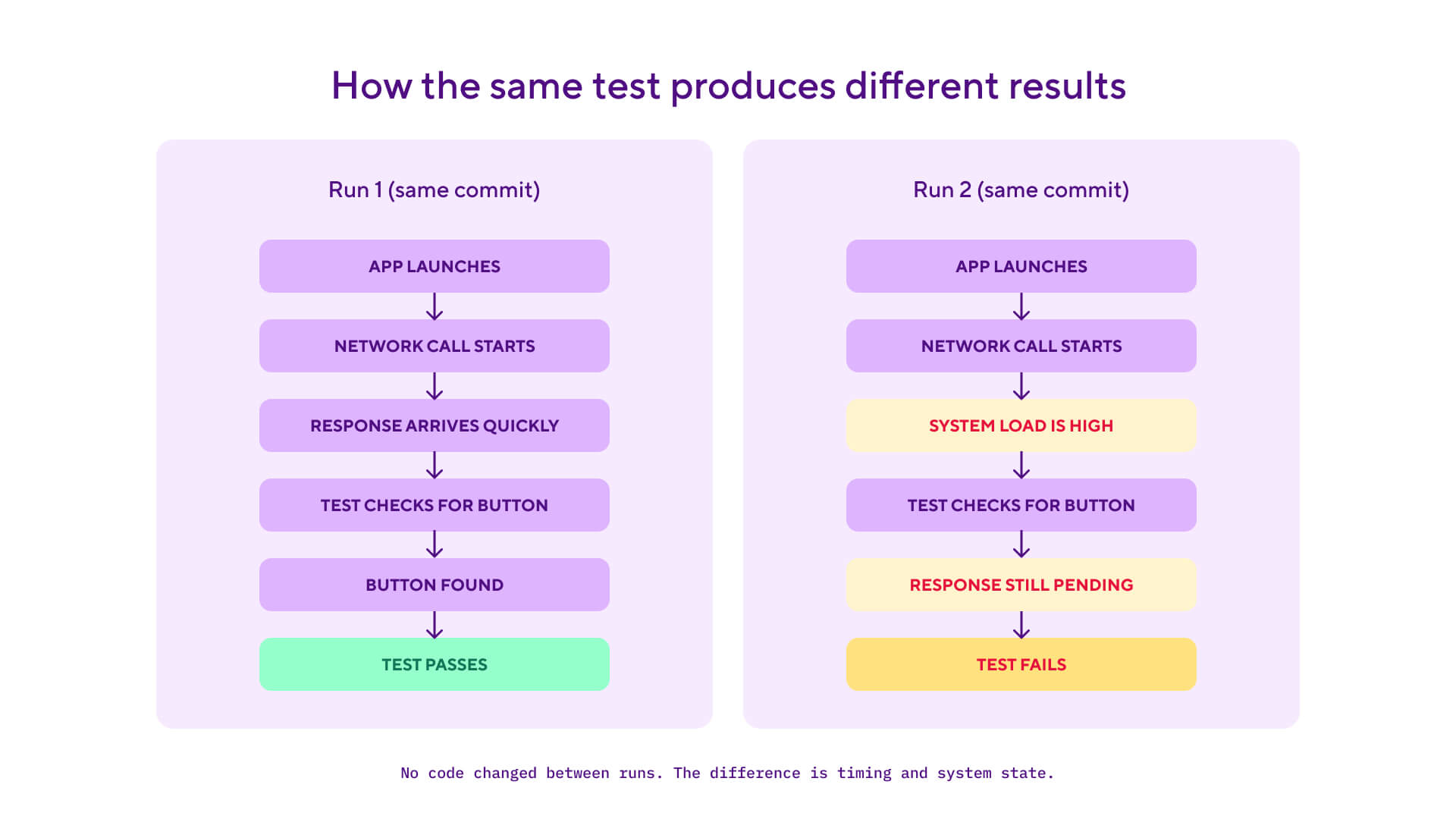
A flaky test is when an automated test produces different results between runs even when nothing in the code has changed. The same commit can produce a green build at 9am and a red build at 9.10am, with no code, configuration, or test changes in between. In other words, the test is unreliable and its results, pass or fail, can't be trusted either way.
Flaky tests are one of the most expensive bugs a team can carry, because the cost is hidden. Each individual flake looks like a minor inconvenience: the test failed, you re-run it, it passes, you move on. But the compound effect across a team is severe: developers stop trusting the pipeline. They retry failed builds without investigating, which trains them to ignore real failures in the same way. The CI signal becomes noise.
Flakiness is also self-reinforcing. Once a few tests in a suite are flaky, every red build is ambiguous. Was that a real regression, or just the same flaky test misfiring again? Engineers spend time on triage that should have been spent on building. The pipeline that was supposed to give fast, reliable feedback now needs a human to dig into the logs on every red.
This is why mature engineering teams treat flaky tests as a class of bug in their own right, not as a symptom of "tests being a bit unreliable." A flaky test is a test that lies. The fix is to detect them automatically, isolate them so they don't block the team, and rewrite them with the same priority as a production bug.
CI is where flaky tests cause the most damage and where the discipline of fixing them lives. Reliable flaky test detection is also one of the practices that makes a CI/CD pipeline trustworthy at scale. For broader context on how testing fits into the pipeline, see our continuous testing guide, and for the wider CI/CD picture, our continuous integration guide.
How do flaky tests happen?
Most flaky tests trace to one of six causes. Knowing which cause you're looking at is the first step toward the fix.
1. Race conditions in the code under test
When the test exercises code that runs concurrently, the order of operations between threads or coroutines can vary between runs. The test sometimes catches the right state, sometimes catches a transient one. These are the hardest flakes to diagnose because they often only show up under CI load, not on a developer's laptop.
2. Timing-dependent assertions
Tests that use sleep, fixed timeouts, or "wait two seconds for this animation" will flake whenever the CI machine is slower or faster than the test author assumed. A test that's reliable on the dev's laptop with no other load will fail on a CI runner that's also building three other apps in parallel. The fix is to wait on a condition (the element appears, the request returns) rather than on a clock.
Here's the same iOS UI test written two ways. The flaky version uses a fixed sleep that depends on the CI host being fast enough. The fixed version waits for the actual condition the test cares about, with a generous timeout:
import XCTest

class CheckoutUITests: XCTestCase {
    var app: XCUIApplication!

    override func setUp() {
        super.setUp()
        continueAfterFailure = false
        app = XCUIApplication()
        app.launch()
    }

    // Flaky: relies on the CI host being fast enough to render the
    // confirmation screen within 2 seconds. Will fail under load.
    func testCheckoutFlaky() {
        app.buttons["place_order"].tap()
        sleep(2)
        XCTAssertTrue(app.staticTexts["order_confirmed"].exists)
    }

    // Fixed: waits for the actual condition the test cares about.
    // Returns as soon as the element appears, fails after 10 seconds.
    func testCheckoutFixed() {
        app.buttons["place_order"].tap()
        let confirmation = app.staticTexts["order_confirmed"]
        XCTAssertTrue(confirmation.waitForExistence(timeout: 10))
    }
}
The fixed version is faster on average (it returns the moment the element appears rather than always waiting the full timeout), more reliable (the timeout is generous enough to absorb CI variance), and clearer about intent (the test is explicitly waiting for order_confirmed, not just hoping it appears). For Espresso on Android, the equivalent pattern uses IdlingResource to register an idle state with the test runner.
3. External dependencies that aren't mocked
Tests that call third-party APIs, hit a real database, or read from a filesystem that other tests are also writing to will flake whenever those external systems are slow, unavailable, or in an unexpected state. The standard remedy is to mock the dependency in unit tests and use isolated, hermetic test environments for integration tests.
4. Shared mutable state between tests
These are flakes caused by the order that tests run in. Test A might leave the database, cache, or test environment in a different state than test B expects, causing it to fail inconsistently. These are particularly nasty because the code will pass when run through each test individually, and only fail when run as part of the suite. The fix is to ensure every test sets up its own state and tears it down cleanly.
5. Non-deterministic ordering
When test runners parallelise or shuffle test execution, tests that implicitly depend on each other expose those dependencies. It’s the same pattern as the shared mutable state: a hidden coupling between tests that only shows up when the order changes.
6. Date and time assumptions
Tests that hardcode "today is 15 March" or "the next business day is Monday" will flake when reality moves past those assumptions. The fix is to inject a clock dependency the test can control rather than calling the system clock directly.
Why flaky tests matter for mobile development
Flaky tests are bad in any codebase. In mobile app testing they're worse, because mobile workflows have built-in flakiness that other platforms don't.
Real devices and simulators add variance. Web tests run in a controlled headless browser. Mobile end-to-end tests run on simulators, emulators, or real device farms, all of which behave slightly differently from each other and from a developer's local machine. A test that's stable on the M2 Mac mini in the office can flake on the Apple silicon CI runner because of timing differences in how the simulator launches.
The fix cycle is slower. When a flaky test masks a real regression and it slips into a release branch, you can't just hotfix it. You build a new version, sign it, submit it to the App Store and Google Play for review, wait for approval, and then wait for users to install the update. Every step of that mobile release process adds time. A flaky test that masks a real regression in a web codebase costs you a 10-minute redeploy. In mobile, it can cost you a 48-hour window where users have a broken app.
Pipeline times amplify the cost. A mobile build with simulator UI tests can take 20-30 minutes. Re-running it because of a flaky test isn't a minor inconvenience, it's a significant chunk of an engineer's day. Multiply that across a team and the loss of throughput is real.
Device fragmentation surfaces edge cases. Tests that pass on an iPhone 15 simulator can fail on an iPhone SE because of screen size differences, animation timing, or layout assumptions. Tests that pass on a Pixel 8 can fail on a Galaxy device because of OEM-specific behaviour. The mobile test surface is bigger than web by an order of magnitude, and flakes hide in the corners.
How to fix flaky tests
There's no single silver bullet for flakiness, but the best teams converge on the same playbook. A trustworthy CI signal is the foundation of continuous delivery, and flake detection is where that trust starts.
Detect them automatically. Don't rely on developers noticing. CI systems can track which tests fail intermittently across runs of the same commit and surface those tests as flaky candidates. Detection is the foundation of every other fix, because you can't quarantine or rewrite what you haven't identified.
Quarantine, don't auto-retry. When a test is flagged as flaky, the temptation is to wrap it in a retry that masks the problem. Don't. Retries train developers to ignore failures and let the underlying flakes multiply and fester. Instead, move flaky tests out of the main pipeline into a separate suite that runs but doesn't block merges. The team can keep shipping while the flake is investigated.
Fix flakes as a priority. Treat a flaky test the way you'd treat a production bug, not the way you'd treat a stale linting warning. Set an expectation that flakes get assigned to an owner and fixed within a sprint, not parked in the backlog forever. The longer a flake lives, the more developers it trains to ignore CI failures.
Reduce shared state. Database isolation, in-memory caches, environment variables, and filesystems are the most common sources of test pollution. Aim for tests that set up their own state and tear it down cleanly, with no carry-over between cases. For mobile UI tests, this means resetting the app to a known state before each test, not relying on the previous test's state.
Wait on conditions, not on time. Replace Thread.sleep(2000) with proper synchronisation primitives. For Espresso on Android, use IdlingResource to tell the test runner when the app is idle. For XCUITest on iOS, use waitForExistence or XCTestExpectation with a reasonable timeout. These wait until the condition you actually care about, not until an arbitrary clock has elapsed. The same discipline shapes how to write reliable end-to-end tests.
Mock external dependencies. Network calls, third-party APIs, payment processors, push notification services: any external dependency the test doesn't own should be mocked. Real network calls in tests are a guaranteed source of flakes. Mocks make the test fast, deterministic, and reproducible.
How to measure and track flaky tests
The metric that makes flakiness visible is your test failure rate: the share of test runs that fail, tracked over time and broken down by app, suite, and test case. A rising failure rate with no matching code change is an early warning that flaky tests are spreading.
Measuring it well is a repeatable process:
- Track your test failure rate over time. Count failed runs against total runs per week. The trend matters more than any single number: a suite that moves from 3% to 8% failures with stable code has a flakiness problem, not a code problem.
- Break the number down by level. Start at workspace level, then filter by app, then by test suite, then by individual test case. Aggregate failure rates hide the two or three tests causing most of the pain.
- Separate flaky failures from legitimate ones. A test that fails and passes on the same commit is flaky; a test that fails consistently after a change is doing its job. Comparing results across runs of the same commit is what splits the two.
- Review the run history of your worst offenders. For each frequently failing test, look at its recent executions, durations, and pass/fail pattern. Slow-and-flaky tests cost twice: they fail often and each retry is expensive.
- Act on what you find. Feed those tests into the quarantine workflow above, and set a service-level objective for fixing them so the list shrinks instead of growing.
Frequently failing tests also have a direct time cost. Every failed run means a developer debugging, fixing, retrying, and waiting, so reducing your test failure rate cuts the time your team spends blocked on CI. For more information check out our video.
Flaky tests vs legitimately failing tests
Both produce a red build, but they require very different responses. Knowing the difference tells you whether you need to fix the test or fix the code.
The simplest signal is consistency: if you re-run the build with no code change and the result flips, the test is flaky. If it fails again, you have a real bug. CI systems with flaky test detection automate this signal so engineers don't have to make the call by gut feel on every red build.
How Bitrise handles flaky tests
Bitrise Insights detects flaky tests automatically, using two methods. When builds carry commit hash information, Insights flags any test that produces different results across builds of the same commit. When they don’t (manual or scheduled builds), it flags tests that run more than once within a single build with inconsistent results. Either way, detection needs no configuration; it operates on the test results your builds already report.
The findings appear in two places. The Bottlenecks page lists the test cases with the most flaky runs over the last 7 days, so the worst offenders are visible without any digging. For the full picture, the Tests page under Explore has a dedicated Flaky runs metric: an upper chart showing your filtered data and a breakdown chart one level deeper, so you can move from workspace to app to suite to individual test case. Test case tables sort by Flaky rate or Flaky runs, and a Related test case runs view shows each inconsistent execution with links back to the build. The docs cover how to track flaky tests in Bitrise Insights [link: https://docs.bitrise.io/en/insights/insights-tutorials/tracking-flaky-tests] step by step.
The same Tests page handles the measurement process described above: a Failure rate view tracks failed runs over time at every level, which is how you monitor your test failure rate [link: https://docs.bitrise.io/en/insights/insights-tutorials/tracking-test-failure-rate] and separate the flaky tests from the legitimately failing ones.
The platform also reduces the conditions that make tests flaky in the first place. Parallel test execution across shards runs each shard on its own virtual machine, which shortens total runtime and cuts the resource contention that timing-sensitive tests trip over, and consistent build infrastructure narrows the machine-to-machine differences that make results vary between runs. For how testing fits into the wider workflow, see our mobile CI/CD guide.
See what Bitrise can do for you
Confidently build, test, and ship high-quality mobile apps with Bitrise.
Author

Frequently Asked Questions
How is a flaky test different from an intermittent bug?
A flaky test is unreliable as a test, even when the underlying code is fine. An intermittent bug is a real bug that only manifests under certain conditions. Telling them apart is the work: if you can re-run the build on the same commit and get a different result, the test is flaky. If the bug reproduces in production or under specific user conditions, it's an intermittent bug in the code, and the test is doing its job by catching it sometimes.
Should I retry flaky tests automatically?
Generally no. Auto-retries hide the underlying problem and train developers to ignore failures. A test that fails 5% of the time will only fail twice in a row 0.25% of the time, so retries make the flakiness almost invisible. But the test is still flaky, and the root cause never gets fixed. Worse, teams stop investigating first-time failures because "it'll probably pass on retry." The right response is to quarantine the test and fix it. Auto-retries are a tactical patch for a release-day deadline, not a long-term strategy.
What's a quarantine workflow for flaky tests?
A quarantine workflow moves flagged flaky tests out of the main pipeline so they don't block merges, while keeping them running so the team has visibility. A typical setup runs quarantined tests in a separate workflow that produces a report but doesn't fail the build. Tests stay in quarantine until they're either fixed (and moved back) or determined to be testing the wrong thing (and deleted). The point is to keep the team shipping without losing the test entirely.
How long should I tolerate a flaky test before fixing it?
The shorter the better. The longer a flake lives in the pipeline, the more it trains developers to ignore CI failures. A flake that lives for a month is part of the team's learned behaviour and harder to remove than the original cause. Most mature teams set a service-level objective: any flagged flake gets quarantined within a day and fixed within a sprint. If a flake survives that window, it gets escalated like any other production bug.
Are failed tests always indicative of process failures?
No. A failed test can mean three different things: a real regression the test correctly caught, a flaky test producing noise, or a genuine process problem such as untested merges or environment drift. The same commit's run history separates these cases: consistent failures point to code, inconsistent ones point to flakiness, and only patterns across many tests point to process.