Namespace, Avrea, and Blacksmith are among the fastest GitHub Actions runner providers on the market right now. According to Avrea's August 2026 benchmarks, they all score within about 1% of each other on raw CPU. The same benchmark shows warm builds (populated cache) beating GitHub's default cold start (cache disabled) by anywhere from 5x to more than 140x, depending on the project.
In other words, once you're near the top of the CPU leaderboard, a warm build is what separates a fast pipeline from a fast machine. And on ephemeral VMs, caching is what lets you skip the cold boot and start build execution immediately in a pre-warmed environment.
That's the story on the general-purpose side of GitHub Actions: web apps, backend, and the monorepos everyone benchmarks. But no one is talking about mobile, which has an even more severe version of the same cold boot problem.
The Mac side of the benchmark
Avrea's CPU benchmark excludes macOS, so there’s no XcodeBenchmark number to compare against GitHub's Mac runners.
We publish ours, since mobile is our core focus at Bitrise.
Bitrise's top Mac tier finishes in well under half the time of GitHub's own Mac runner, 124 seconds against 268. Even our mid-tier M2 Pro Large ties GitHub's largest machine.
The same pattern holds on the Linux side for Android. A Thunderbird Android build on a 14-vCPU Build Hub machine finishes in 4 minutes 58 seconds. The same build on GitHub's 16-vCPU runner takes 7 minutes 12 seconds: two cores more and still 31% slower.
Why GitHub’s cache runs out fast on mobile
Every GitHub repository gets 10 GB of cache storage to support the GitHub Actions workflows. That number was set for the average project. As any mobile team can tell you, it was definitely not set for Xcode workloads.
A single iOS project's DerivedData folder can run 5 to 20GB on its own. CocoaPods adds another 1 to 5GB. A React Native project's node_modules folder adds 500MB to 2GB more, and that's before Swift Package Manager or Gradle dependencies. In other words, most mobile repos blow through GitHub's 10GB limit on a single branch. This means the cache evicts old entries to make room for new ones, so your "cached" build effectively starts cold anyway.
There's also a distance problem. GitHub's cache storage isn't physically next to the runner executing your job, so every cache hit still has to travel across a network. A web team building a small Node service will never notice that latency. A mobile team compiling a two-million-line Swift codebase will.
And then there’s the AI piece: a growing share of the pull requests hitting CI right now come from agentic coding tools iterating in small, fast commits rather than a developer pushing 2-3 times a day. More commits means more CI runs, and more CI runs means a cache that can’t keep up and starts thrashing: evicting entries it'll need again within the hour, rebuilding them from scratch over and over.
Dependency caching and build caching are not the same thing
"Cache" gets used as one word for two different use cases, and mixing them up is where most GitHub Actions setups lose time.
Dependency caching (the kind GitHub's native actions/cache handles) stores things you downloaded: CocoaPods, npm packages, Gradle dependencies. It saves you a download, not a compile.
Build caching, sometimes called compilation caching, stores the actual compiled output, so a function that hasn’t changed doesn't get rebuilt just because it sits in the same target as one that has. Gradle and Bazel have had this for years. Xcode did not have anything equivalent until Xcode 26 shipped Apple's Swift Compilation Caching feature, which finally lets iOS teams cache compiled build artifacts instead of just downloaded dependencies.
A lot of teams add actions/cache to their workflow, watch download times drop, and assume that’s all the speed gain they are going to get from caching. But the compile step, usually the slowest part of an iOS or Android build, is still running cold every time.
What actually closes the gap
This is where Bitrise Build Hub and Build Cache come in.
Build Hub keeps GitHub Actions as your CI orchestrator. Nothing about your workflow triggers, secrets, or YAML structure changes: you're just upgrading the execution layer underneath. On Xcode's own benchmark suite, Build Hub's M4 Pro machines complete in 2 minutes 4 seconds what GitHub's Mac runner takes 4 minutes 28 seconds to do. That's 54% difference, with Xcode 26.3 on both sides. On Android, a Thunderbird Gradle build finishes in 4 minutes 58 seconds on a 14-vCPU Build Hub machine versus 7 minutes 12 seconds on GitHub's 16-vCPU runner. Fewer cores, faster result.
Then Build Cache closes the gap between fast machines and fast builds: a co-located remote cache for Xcode, React Native, Gradle, and Bazel, sitting in the same data center as the machine running your build, plus 100GB of KV storage for dependencies (versus GitHub's 10GB). Bitrise was also the first to support Xcode 26's compilation caching for iOS builds, which is currently the only way to get true build caching on Xcode at all.
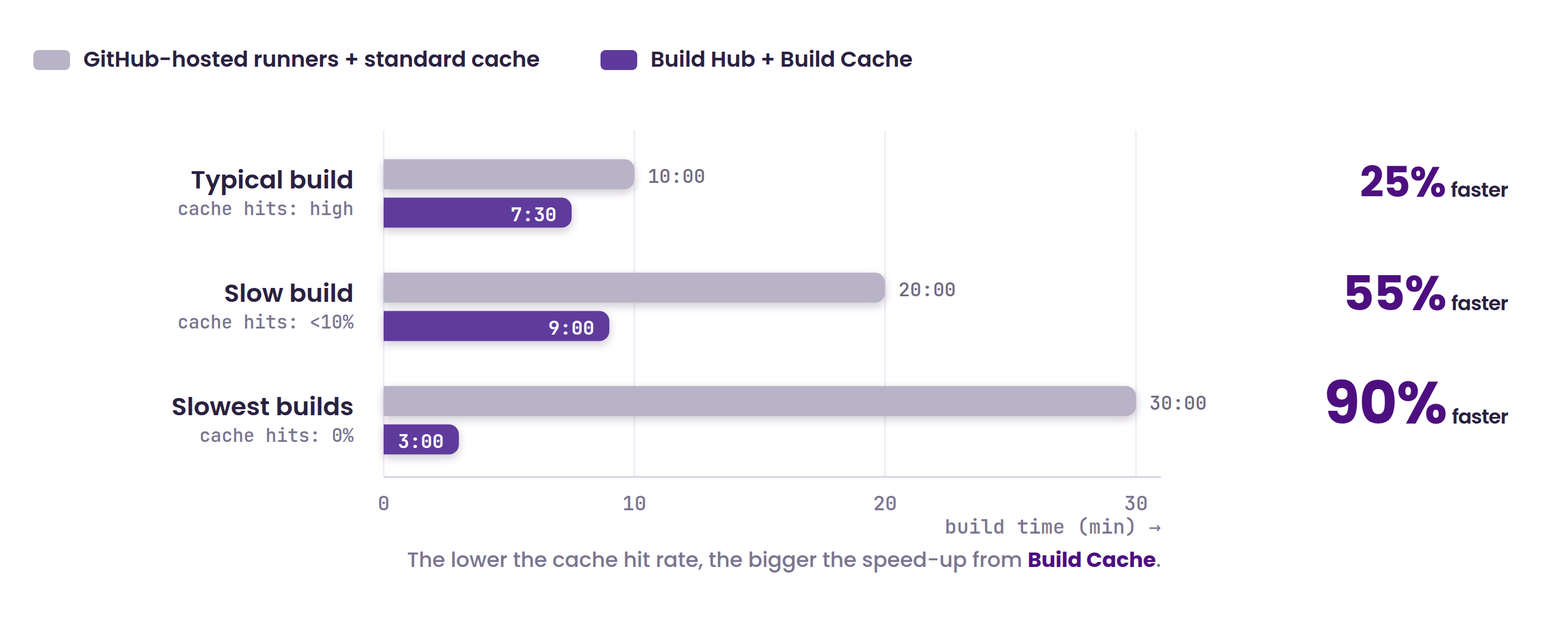
With both Build Hub and Build Cache in play, teams can see up to a 90% reduction in total build time. Build caching alone, without the dependency layer, delivers a 25% reduction in median build time, and even more on slower builds in a pipeline. Maven Clinic cut their build times by almost half using Build Cache, even as their codebase was rapidly expanding.
How to check whether cache is your actual bottleneck
Before you spend a budget cycle on faster machines, it's worth fifteen minutes to check whether hardware is even the constraint. Pull your last twenty CI runs and look at three things:
1. Your cache hit rate (most CI dashboards surface this, GitHub's included).
2. Whether your cache storage sits in the same region as your runners
3. Whether you're caching compiled output or only downloaded dependencies.
If the hit rate is low, the cache is remote. If you're only caching dependencies, a faster runner will still feel slow: you’re just paying more for the same cold build.
Most teams find out their cache hit rate is worse than they assumed the first time they actually check it.
Bitrise's caching docs cover setup for Xcode, Gradle, and Bazel projects end to end, without touching the rest of your GitHub Actions workflow.
If you're still choosing a runner provider in the first place, our comparison of the fastest GitHub Actions runners in 2026 covers that ground from a mobile perspective, including the pricing traps most teams don't see coming until the invoice arrives.
FAQ
What's the difference between GitHub Actions cache and a build cache? GitHub Actions cache (actions/cache) stores files you'd otherwise have to download again, like CocoaPods or npm packages. A build cache (also called a compilation cache) stores compiled output, so unchanged code doesn't get recompiled. You can have a fast dependency cache and a completely cold build cache at the same time.
Why does my GitHub Actions cache keep getting evicted? GitHub caps cache storage at 10GB per repository. Mobile projects routinely exceed that with DerivedData, CocoaPods, and node_modules combined, so older cache entries get evicted to make room, and your next build starts from scratch on whatever got pushed out.
Does GitHub Actions support Xcode build caching? Not natively as a build caching feature. Apple added Swift Compilation Caching in Xcode 26, which is what makes true build caching possible on iOS for the first time. Bitrise Build Cache was first to support it.
Can I speed up Android builds on GitHub Actions with Gradle's remote cache? Yes. Gradle has supported remote build caching for years, independent of GitHub Actions. You still need somewhere to host that cache, ideally co-located with your runner to avoid network latency on every cache hit.
Does fastlane cache anything on its own? Not build output. fastlane orchestrates other tools (Xcode, Gradle, CocoaPods) but doesn't provide caching itself, so the caching strategy still comes from whatever's underneath it.
Get started for free
Get a 30-day free trial and join the 400,000+ mobile developers who already love Bitrise.
Start free trial