At Bitrise, we work with thousands of mobile engineering teams, from high-growth startups to some of the world’s biggest brands. Having that unique vantage point gives us a deep understanding of the challenges teams face day to day, and the strategies that deliver the best results. Across every team we work with, one thing holds true:
Mobile success starts with a build environment you can rely on.
When mobile teams have a stable, well-maintained environment with consistent checks on dependencies, scripts, and tooling, they experience fewer failures and better overall performance. Our recent Bitrise Mobile Insights report backs this up, showing that teams that optimize their build environments and improve visibility see the biggest gains in build times, success rates, and release consistency.
So how do you choose the right build environment to keep you ahead?
In this post, I’ll break down the core components of a reliable mobile build environment and the key factors to consider when choosing the right setup for your needs.
The challenges of choosing the right build environment
Choosing how to set up your build environment is a crucial first step. But it can be a complex undertaking. The mobile development landscape is inherently dynamic with new tools, frameworks and approaches emerging all the time. This can open the door to many challenges you will have to navigate, including:
- Constant technological change: The rapid evolution of programming languages, libraries, operating systems and deployment targets means that a build environment that is considered cutting-edge one day, can be outdated the next. To keep ahead of these changes you need to put processes in place to monitor and evaluate continuously and adapt as you need to.
- Different projects have different needs: Each comes with its own dependencies, build tools, test frameworks, and deployment pipelines. A mobile app, for example, has very different build-environment requirements than a backend service or a web frontend. You need an environment that can handle those differences smoothly.
- Team dynamics and preferences: Depending on the team’s maturity, there may be no standard guidance for setting up local environments or aligning them with CI. With so many options available (devcontainers, Nix, ad-hoc scripts, makefiles, etc.) standardization is hard. A strong build environment needs to be able to handle those differences while staying consistent and efficient.
- Resource constraints: The availability of hardware, licences, and expertise in the team can significantly influence the choices you can make when designing your build environment. Trade-offs may be unavoidable.
- Security: Your build environment is a core part of your software supply chain and must be protected from vulnerabilities and unauthorized access. To do this, you need to manage dependencies, control access to build servers, and safeguard the integrity of the process. It’s also important to make a distinction between local dev, CI, and production environments as this helps to make things simpler and more secure (ideally, no engineer should have access to the prod API keys).
- Scalability: As projects grow, your build environment needs to be able to scale up to meet demand without compromising performance. Slow builds can significantly impact developer productivity and happiness!
- Maintainability and reproducibility: You need to ensure your build environment is designed to be easy to maintain, update, and troubleshoot. Crucially, it must also be reproducible, ensuring that the same code always produces the same artifacts, regardless of when or where it is built.
- Integration complications: Your build environment must work smoothly with your version control, package repos, CI/CD, and other DevOps systems. If your team manages artifacts well already, that’s great. If not, this is an infrastructure investment you will need to consider.
Against this constantly changing backdrop, you have to think about your build environment carefully. There’s no perfect solution, only the one that suits your needs best.
Different environments, different tradeoffs
In the table below I have outlined some common build strategies and their pros and cons. For example, scripting is often a popular choice due to its simplicity and scalability across multiple languages. But it's not without its challenges. With more complex needs, it can become increasingly hard to maintain.
You can often get a better experience using automation provided by tool version managers but there is a caveat with this approach too as it can introduce another layer of dependency.
Container images (Linux) offer fast and reproducible environments along with enhanced control and security. But again there is a catch, as they are restricted to Linux only.
Finally, the Bring-Your-Own-Runner strategy lets you have total control but requires significant setup and maintenance efforts.
As you can see, you need to consider the benefits of each and the tradeoffs you will need to make to land on the right solution for your needs.
Benchmarking setup speed across build environments
We ran a comprehensive benchmarking exercise on a widely used open-source React Native project to understand the time required to set up a working build environment. We focused on React Native due to its inherent complexities that often require specific and synchronized dependencies.
Our goal was simple: to precisely measure the time each approach needs to go from the initial state to a fully functional build environment, ready to compile. For every setup methodology we recorded the advantages and disadvantages. The result is a detailed analysis with valuable insights to help you optimize your React Native Development workflows.
A few observations that stood out from our benchmarking exercise:
- Linux docker is by far the fastest (by 2X) and most stable choice.
- Caching helps reduce setup time and CPU usage.
- Besides container setup, Linux isn’t always the faster option.
Docker for Mobile Builds: Key points to consider
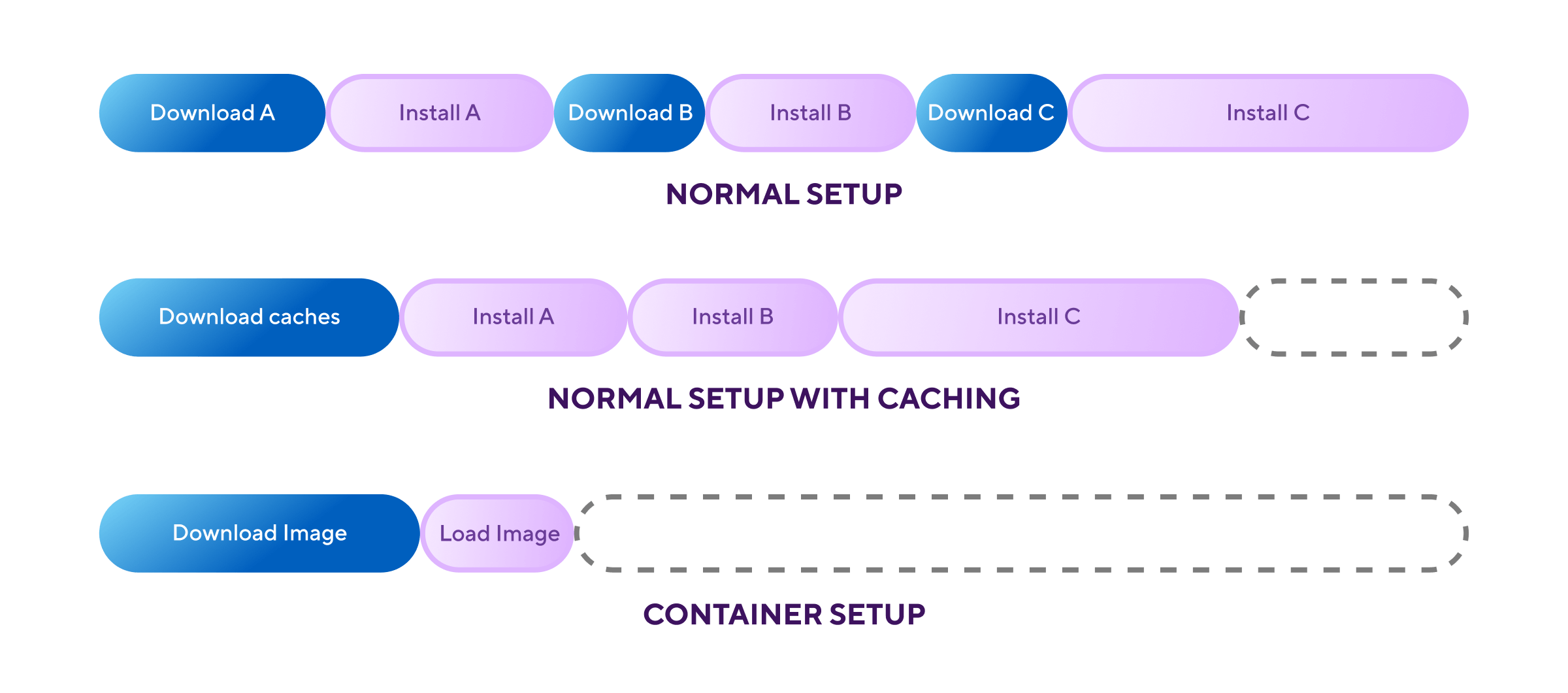
Docker-based build environments can provide a significant boost to build speed and efficiency. The reason for this is that unlike traditional methods that repeatedly download and install tools, instead of downloading and installing tools on every run, Docker pre-packages a fully configured environment into a single image. As a result, when a build starts, it downloads this ready-to-use image which dramatically reduces setup time. Other techniques involve sequential downloading, installation, and complex dependency management for each build, ultimately leading to longer build times. In contrast, the container approach offers an "instant-on" air-gap environment, enabling faster feedback, consistent builds, and a more productive CI/CD pipeline.
However, there are important trade-offs to be aware of. For starters, this approach requires expertise in container orchestration and image creation/management, along with dedicated infrastructure which can be a significant investment. Most critically, Docker cannot run on macOS CI environments because Apple prohibits nested virtualization. For teams targeting the Apple ecosystem, this limitation can be a deal-breaker.
Choosing the right strategy for your build environment can feel like a minefield. There’s a lot to weigh up to ensure you get the level of performance you need but that won’t restrict you further down the line. Every option comes with its own trade-offs. The key is understanding which trade-offs you are able (and willing) to make. Ultimately, the right approach is the one that balances speed, maintainability, security, and the unique needs of your team and project.
Four top tips to get started:
- Think about your dependencies: Consider any compromises or trade-offs you might need to make based on your requirements.
- Agree on the plan: Align on which strategy your team is moving to next, and make sure every team member is onboarded. A clear one-page guide is a good start.
- Start small and build from there: Migrate workflows piece by piece to avoid disruption, but stay disciplined and don’t let the migration stretch out too long.
- Capture your metrics: Record key metrics before and after the migration to track impact.
Still can’t decide? We’ll help you pinpoint what matters and find the right setup for you. Chat with our team today.
Get started for free
Get a 30-day free trial and join the 400,000+ mobile developers who already love Bitrise.
Start free trial