End-to-end testing (E2E) is automated testing that runs against a fully integrated application, simulating real user flows from start to finish. E2E tests check that the user interface (UI), backend services, and external integrations work together as expected. They're the slowest and most expensive tests but the closest match to actual user behaviour.
What is end-to-end testing?
End-to-end testing is the practice of testing an application the way a user would: by exercising the full stack from the entry point (UI, API endpoint, mobile app launch) all the way through to the systems on the other side (database, third-party APIs, file storage). The test isn't checking one component in isolation. It's checking that the whole chain works together.
The defining characteristic of an E2E test is integration. A unit test calls one function and checks the return value. An integration test calls a few connected components and checks if they work together. An E2E test launches the application, navigates through it like a user would, and verifies that the actual outcome matches what a user would expect. If any of the components in the chain are not functioning properly or have been wrongly configured, the E2E test will catch it.
As E2E tests touch everything in the mobile app, they're often the slowest and most expensive tests of any test suite. For example, a unit test can run in milliseconds. An E2E test might take 30 seconds or longer because it has to launch the app, wait for screens to render, simulate interactions, and validate the UI state. Across hundreds of tests, that time adds up quickly, and the E2E suite can easily become a pipeline bottleneck if it isn’t designed carefully.
E2E tests sit at the top of the testing pyramid for this reason: many fast unit tests at the base, fewer integration tests in the middle, a small focused set of E2E tests at the top. The pyramid shape isn't just aesthetic, it reflects the cost-to-coverage ratio of each test type. Our mobile app testing guide covers every layer of the pyramid and when to use each.
For broader context on how testing fits across the pipeline, see our continuous testing guide.
How does end-to-end testing work?
An E2E test follows the path of a real user through the application. The test framework drives the UI, performs actions, and validates the achieved state. The exact mechanics depend on the platform, but the shape is consistent. Where E2E sits alongside unit, integration, and UI tests is covered in our mobile app testing guide.
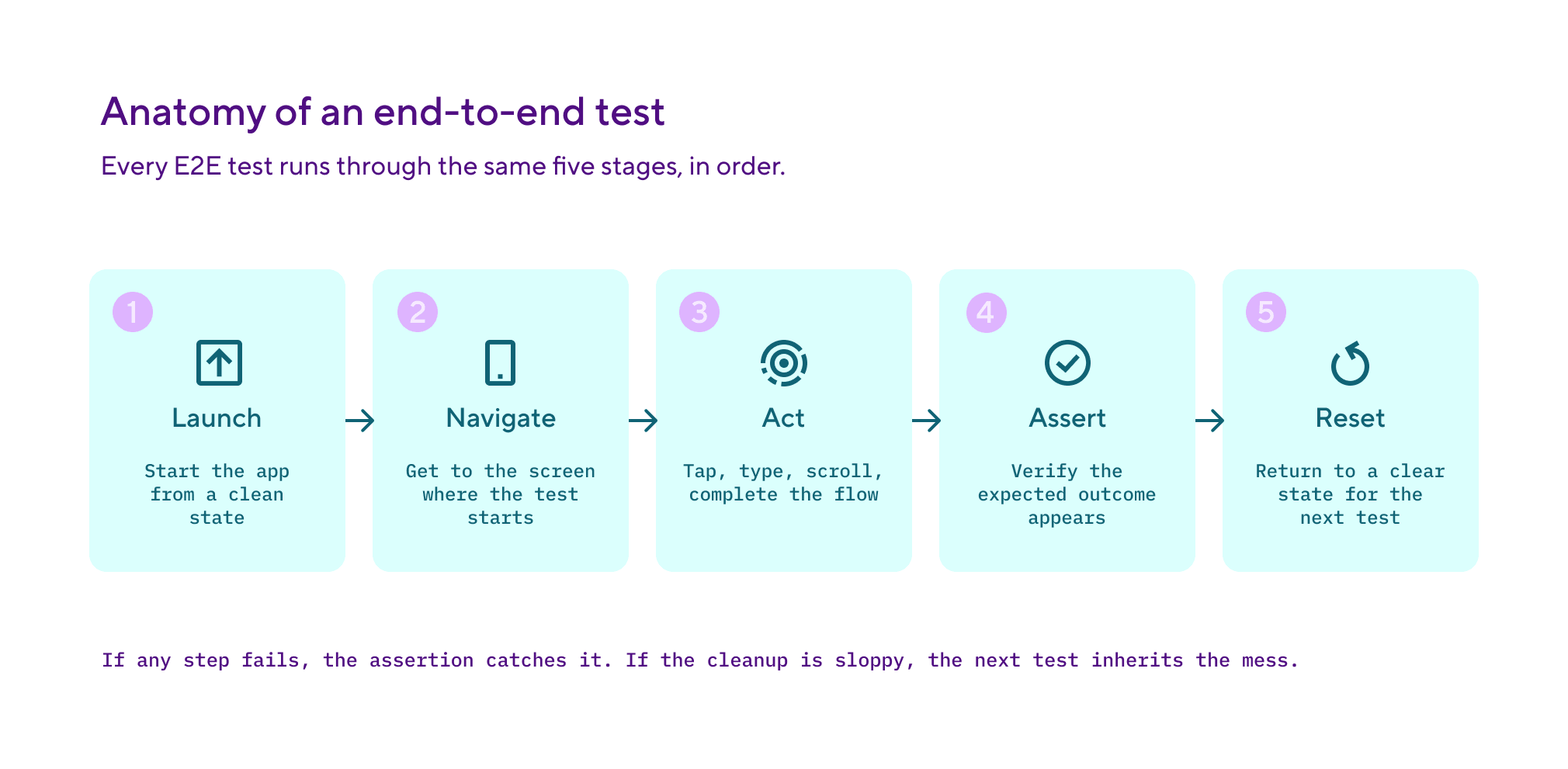
A typical E2E test runs in this sequence:
- Launch the application. The test starts the app from a known state, usually a fresh install with default data. Note, mobile tests launch on a simulator, emulator, or real device. Web tests launch a headless or headed browser.
- Navigate to the test starting point. The test taps, clicks, or swipes its way to the screen where the actual test begins. It will sign in if needed. Navigate to the right tab. And set up any preconditions.
- Perform the actions under test. Tap a button, fill a form, scroll a list, complete a checkout. The test simulates whatever the user would do.
- Assert on the outcome. The test checks that the expected screen appears, the right text is visible, the network call was made, the database was updated. The assertion is what makes a test a test rather than just a script.
- Clean up. After the check is complete, the test logs out, resets the state, and closes the app. Each test should leave the environment in a clean state so the next test can start reliably.
The infrastructure under all of this matters. E2E tests need a real environment to run against: a deployed staging API, a populated database, mocked or sandbox payment gateways. Tests that pass against an in-memory mock but fail against the real backend are not doing their job at testing the end to end flow. In the same way, that pass using a sanitised local database but fail with production-like data are catching the wrong problems.
For mobile specifically, E2E tests run on simulators, emulators, or real-device farms. Each option trades off speed, accuracy, and cost. Simulators and emulators are fast but don't catch hardware-specific issues. Real-device farms catch hardware issues but are slower and more expensive to operate. Most mature mobile teams run a tiered approach: most E2E tests on simulators, a critical subset on real devices.
Common frameworks for E2E testing include Cypress and Playwright for web, Selenium for cross-platform browser automation, XCUITest for iOS, and Espresso for Android. The framework determines how tests are written, but the underlying discipline is the same regardless of the tool.
Here's what that shape looks like in XCUITest, the iOS framework. The test launches the app, navigates to the sign-in screen, performs the actions a user would, and asserts on the result.
import XCTest

 final class SignInE2ETests: XCTestCase {

     func testSignInWithValidCredentials() {
         let app = XCUIApplication()
         app.launch()

         // Navigate to the sign-in screen
         app.buttons["Sign in"].tap()

         // Perform the actions under test
         app.textFields["Email"].tap()
         app.textFields["Email"].typeText("[email protected]")
         app.secureTextFields["Password"].tap()
         app.secureTextFields["Password"].typeText("correct-horse-battery-staple")
         app.buttons["Continue"].tap()

         // Assert on the outcome
         XCTAssertTrue(app.staticTexts["Welcome back"].waitForExistence(timeout: 5))
     }
 }
Why end-to-end testing matters for mobile development
E2E tests are valuable in any codebase, but mobile teams rely on them more heavily for the following reasons:
Mobile apps run in environments you don't control. A web app runs in a browser you can roughly predict. A mobile app runs on thousands of device and OS combinations, each with their own quirks. E2E tests on real devices catch the hardware-specific behaviour (camera, GPS, Bluetooth, network conditions) that simulators miss. Without them, those issues only surface when users report them.
The fix cycle is slow. A web team that ships an E2E-untested change can hotfix in minutes. A mobile team has to build, sign, submit for review, wait for approval, and wait for users to update. A bug that an E2E test would have caught might take 48 hours or more to fix once it's in users' hands. The cost of skipping E2E tests on mobile is much higher than on web.
App store review acts as an unforgiving E2E reviewer. Apple and Google review teams test the binary you submit. If your release build fails on a basic flow, it can get rejected, often requiring a wait of several days before resubmission. Catching the issue with your own E2E tests before submission is much cheaper than discovering it through an app storerejection.
Mobile users update on their own schedule. Even after you fix a bug and release it, users have to install the new version. Auto-updates help but are not universal. A regression that's been in production for a week may still affect users a month later. E2E tests reduce the chance of a regression reaching production in the first place.
E2E tests are often where flakiness shows up first. UI animations, network timing, real-device variance. All the things that make E2E tests valuable also make them more prone to flakiness than unit or integration tests. The mobile teams that get the most from E2E testing also invest in keeping the suite reliable. For more on managing test reliability, see our flaky tests guide.
End-to-end testing best practices
E2E tests are valuable when used well and costly when used poorly. Six practices keep the suite useful.
Use E2E tests sparingly. Cover the critical user flows, not every interaction. A typical mobile app might have 20-50 E2E tests covering the paths that account for 80% of user behaviour: sign up, sign in, complete a transaction, the main feature loop. Trying to E2E-test every screen produces a slow, brittle suite that erodes the team's trust.
Run them in parallel. E2E tests are expensive but mostly independent. A 30-minute serial test suite split across four parallel runners drops to roughly 8-10 minutes. Most modern CI platforms support parallel test execution and test sharding natively.
Wait on conditions, not time. Replace sleep(2) with proper synchronisation primitives. For Espresso on Android, use IdlingResource to tell the test runner when the app is idle. For XCTest on iOS, use XCTestExpectation with a reasonable timeout. Time-based waits are the most common cause of flaky E2E tests.
Use the page object pattern. Encapsulate the UI structure in dedicated objects so tests describe what the user does ("tap the sign-in button") rather than how the test framework finds the button ("find element with id sign_in_btn and tap"). When the UI changes, the test code stays the same, only the page object updates.
Isolate test environments. Tests that share data with each other or with the real production environment will produce false failures and obscure real ones. Each E2E test run should start from a known clean state and not affect any other test or environment.
Quarantine flakes aggressively. A flaky E2E test is worse than a missing E2E test, because it actively erodes trust in the pipeline. Detect flakes automatically, quarantine them so they don't block merges, and fix them as a priority. Don't let flakes linger. The full discipline is covered in our flaky tests guide.
End-to-end testing vs unit and integration testing
E2E tests are one layer of a healthy test suite. The fastest way to understand them is to compare them to the other layers.
The right ratio is the test pyramid: a wide base of unit tests, a smaller middle layer of integration tests, and a small focused tip of E2E tests. Inverting that ratio (lots of E2E tests, few unit tests) is the fastest way to a slow, brittle, expensive test suite. Each layer catches what the others can't, but they're not interchangeable.
E2E tests are also what catches the kind of bug users actually experience. A unit test passes, an integration test passes, but the screen flickers when the user taps a button because of a race condition between the data fetch and the UI update. Only an E2E test catches that, because only an E2E test runs the full stack the way a user would.
How Bitrise handles end-to-end testing
Bitrise is a CI/CD platform built specifically for mobile teams, and E2E testing is one of the workflows the platform handles natively. Mobile E2E testing has requirements that web E2E doesn't: simulators, emulators, real-device farms, platform-specific test frameworks, and the long pipeline times that come with running tests on real hardware. Generic CI tools cover the basics but leave teams writing custom scripts for the mobile-specific parts.
For iOS E2E tests written with XCUITest, the Xcode Test for iOS Step runs them on managed simulators with results posted to the Tests tab and as pull request comments. The Step accepts inputs for the scheme, destination, and test plan. For Android, the Android Instrumented Test Step handles Espresso tests and other instrumented tests on emulators, and the Virtual Device Testing for Android Step extends coverage to real devices through Firebase Test Lab. The Tests tab in each build surfaces results, screenshots, and videos, so when an E2E test fails the engineer gets the full context without leaving the platform.
Test sharding splits the E2E suite across multiple simulators or emulators running in parallel, which is the difference between an E2E suite that takes 30 minutes serially and one that takes 8-10 minutes across four runners. Build caching for CocoaPods, Swift Package Manager, and Gradle reduces the setup time before tests start running, which compounds the saving on every build. Build environments run on managed Apple Silicon machines for iOS and Linux runners for Android, with Xcode and Android SDK updates available within hours of vendor releases.
Flaky test detection in Bitrise Insights surfaces E2E tests that pass and fail inconsistently across runs, which matters most for E2E because flakes hide there more easily than in unit tests. The Bottlenecks view in Insights shows the team's most failing, slowing, and flaky tests in one place. Each flagged test links through to the failure history and the pull request that introduced it, so engineers can trace the root cause without leaving the platform.
If you're running mobile CI/CD, the mobile CI/CD guide covers the full pipeline context where E2E testing fits.
See what Bitrise can do for you
Confidently build, test, and ship high-quality mobile apps with Bitrise.
Frequently Asked Questions
What's the difference between end-to-end testing and integration testing?
Integration testing checks that two or more components work together correctly: an API endpoint and the database it queries, a service layer and the API it calls, a UI component and the data layer behind it. End-to-end testing extends that to the full application stack from the user's perspective: the UI, every layer underneath, and any external services. A test that calls one API and checks one database response is integration. A test that signs up a user, completes a transaction, and verifies the receipt email is end-to-end.
Should every feature have an E2E test?
No. E2E tests are expensive and brittle, so use them sparingly. Cover the critical user flows that account for the majority of user behaviour and the highest-risk paths (payments, sign-up, anything that costs you money or trust if it breaks). Lower-risk features should have unit and integration test coverage but may not need an E2E test of their own. The test pyramid principle: many cheap tests, few expensive ones.
What are the most common E2E testing frameworks?
For web, Cypress and Playwright are the dominant modern choices, with Selenium still common in older codebases. For mobile, XCUITest is the standard for iOS UI tests, Espresso for Android, and Appium for cross-platform mobile testing. React Native and Flutter teams often use a mix of platform-native frameworks and cross-platform tools. The right framework depends on your stack, your team's familiarity, and how much custom infrastructure you want to maintain.
Why are E2E tests so flaky?
E2E tests touch every part of the system, so they're vulnerable to every kind of timing, environment, and dependency issue. UI animations, network latency, real-device variance, and shared test state all produce intermittent failures that don't reflect real bugs. The fix is to detect flakes automatically, isolate them, and address the root cause (proper synchronisation, hermetic environments, mock external services). Auto-retrying flakes makes the problem worse, not better.
How long should E2E tests take to run?
The total suite should fit within your team's tolerance for build time, which is typically under 30 minutes for a per-commit pipeline. If E2E tests alone exceed that, look at parallelisation, sharding, or moving lower-priority E2E tests to a nightly suite. A 60-minute E2E suite that runs on every commit will train developers to skip CI; the same suite running 10 minutes in parallel won't.