When agents write the code, the pipeline is the trust mechanism.
Most AI coding tools run in a Linux container somewhere. Codespaces is Linux. Copilot’s coding agent works in an ephemeral, Actions-powered Linux environment. Nearly every agent framework assumes a container that spins up in seconds.
None of them can build your iOS app, or have build cache to speed up the builds, or have simulators that can run tests that you can view.
If your product ships on mobile, you’ve watched the agentic engineering wave arrive with a familiar feeling: the tooling is impressive, but it wasn’t built with you in mind.
But the gap isn’t really about tools. It’s about the pipeline. When AI writes the code, CI/CD stops being a safety net and becomes the thing the whole loop stands on. This article is about that new development loop, why it demands CI/CD that is dramatically faster and smarter, and what that looks like in practice for mobile teams.
The new development loop
The old loop was human-shaped: a developer writes code on their laptop, pushes, waits for CI, reads the result, repeats. Every tool in the chain (the IDE, the runner, the review process) assumed a person at the center, working at person speed.
The new loop has three parts: AI does. RDE powers. CI/CD validates.
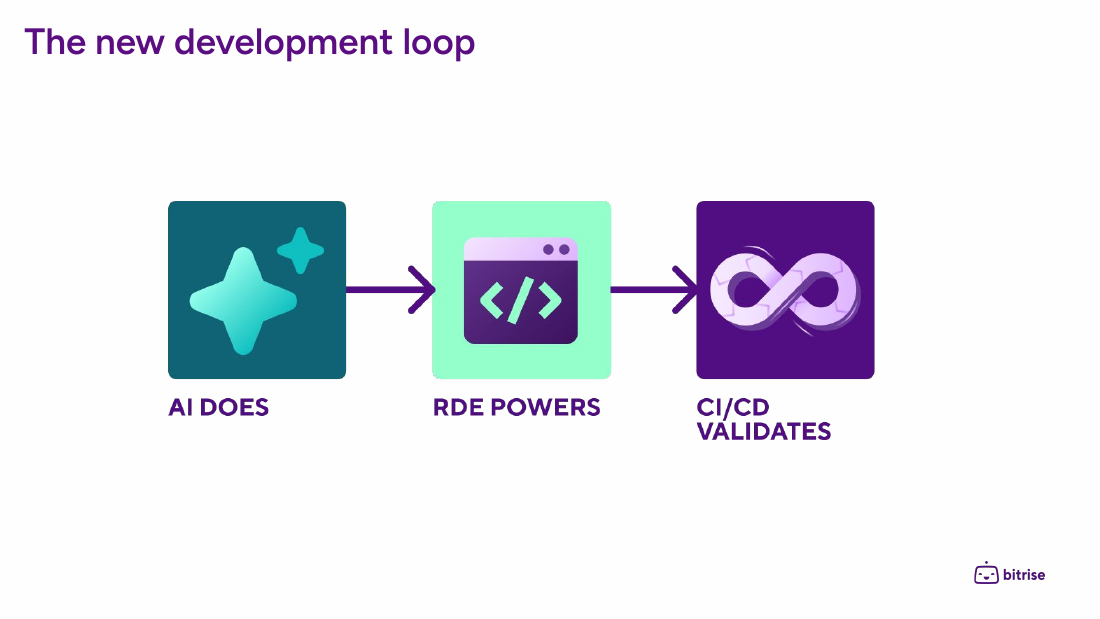
An AI agent picks up the work, from a ticket, a Slack mention, or a webhook. A Remote Development Environment (RDE) gives it a real machine with the full toolchain: repository, dependencies, simulators, Xcode. CI/CD validates the result.
That validation part is where the inversion is happening. When the code author is an agent, the pipeline is the only trust mechanism you have left. You can’t rely on the author’s judgment, because the author is a language model that will confidently assert its work is done. It falls to the pipeline to validate the claim, and that means the pipeline itself has to be faster and smarter.
Faster: the loop is only as fast as its verifier
Two main things change the economics of CI once agents start committing.
First, it’s not just humans anymore, it’s N agents too. More authors means more runs, and not just marginally more. Also, agent-generated PRs tend to arrive in bursts, unscheduled, and each one triggers the full pipeline.
Second, agents iterate in seconds, so every wait now costs N × W (W = wait time). A human waits on CI once per push. An agent loop is fix, CI, fix, CI: it can only move as fast as its feedback arrives. A 20-minute build turns a four-iteration fix into an 80-minute fix. Wait time is no longer a cost you pay once per commit. It’s multiplied by every iteration of every agent.
For mobile teams, the W is the expensive part: heavyweight Xcode builds need macOS runners and real simulators. There are three levers you can pull to help bring costs and wait times down.
1. More powerful runners. Raw hardware is the simplest and most effective lever. Apple silicon machines with serious memory turn a 25-minute build into a 10-minute one before you’ve changed a line of configuration. For Bitrise Build Hub users running GitHub Actions workloads, that’s a one-line runs-on change.
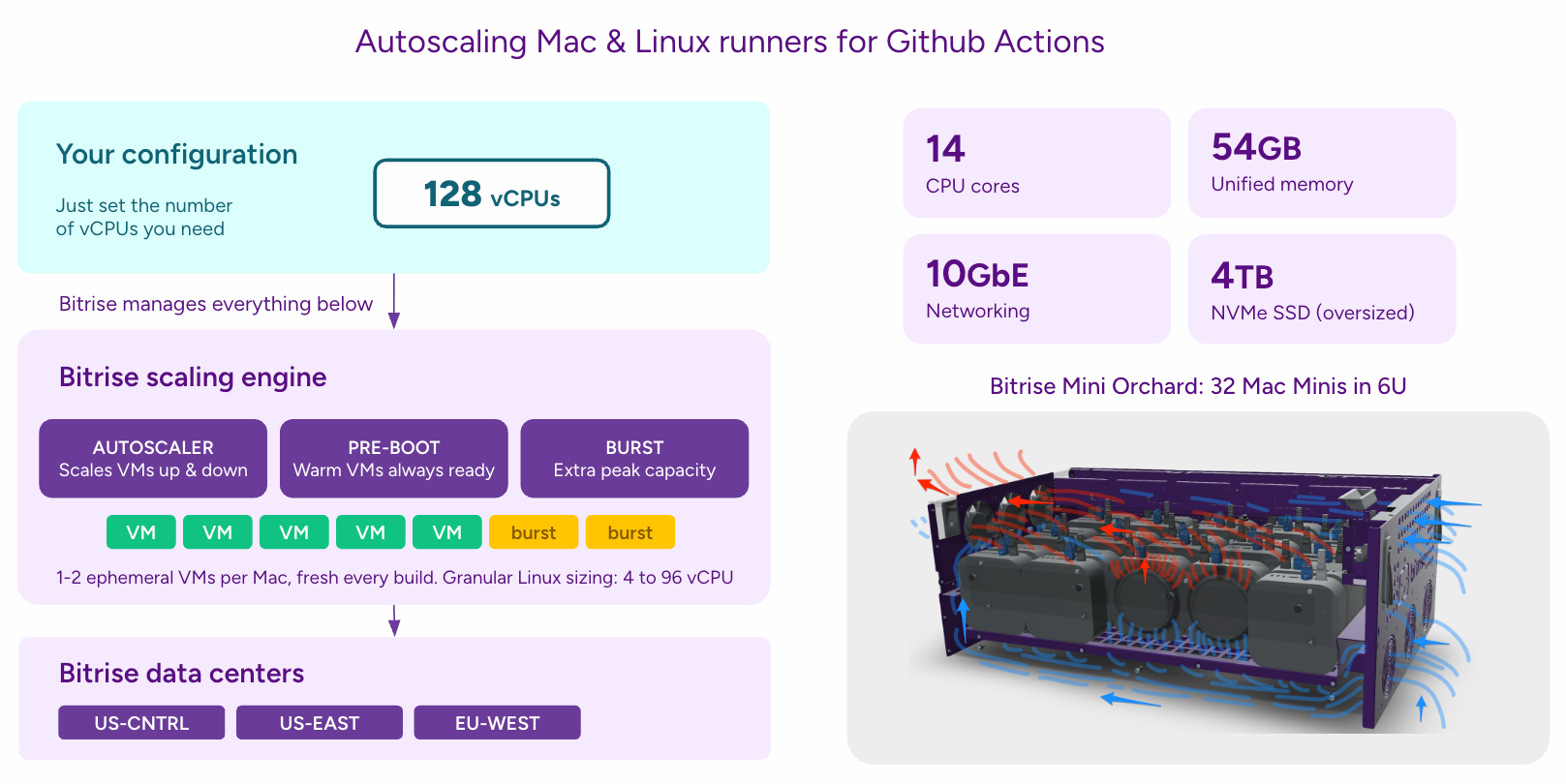
2. Build caching. Agent retries are nearly identical builds: the same dependencies, most of the same compilation units, one small diff. That’s the ideal workload for build caching. The economics of caching actually improve with agents, because the hit rate improves as build traffic gets more repetitive.
3. Parallelization and smarter test execution. Split the suite across parallel runners, and then get smart about which tests run at all. Selective testing runs only the tests affected by the change, which is exactly the kind of fast signal an agent needs on every retry. Test prioritization orders the full suite so likely failures surface first, so even a full run tells you the bad news in minutes instead of at the end.
Do all three and the loop hums. Agents iterate in minutes, PRs go green quickly, throughput jumps. And then you discover the problems speed can’t fix.
Smarter: AI working inside the pipeline, at every stage
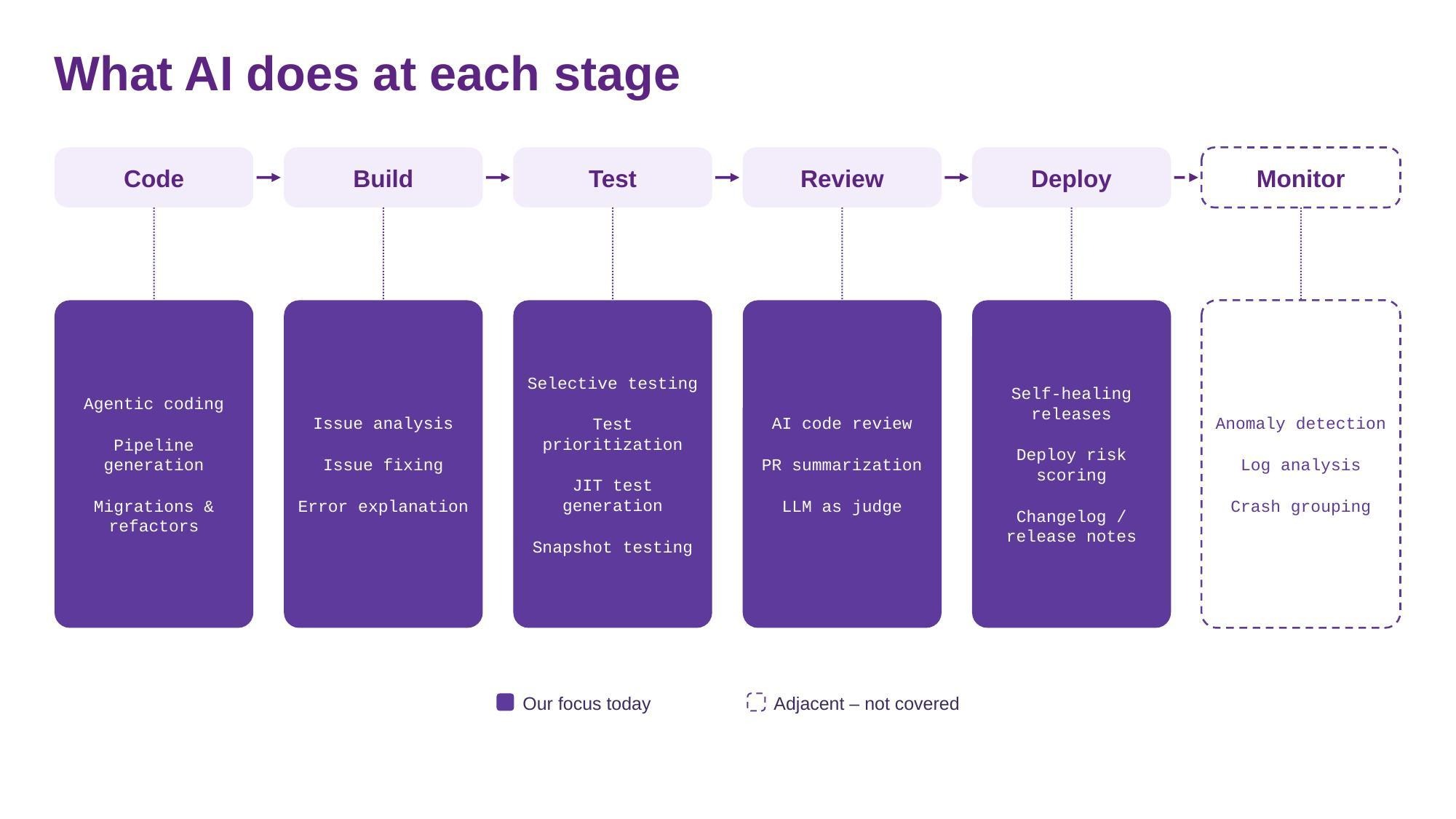
Faster gets you feedback in minutes. Smarter is about what the pipeline does with those minutes. Instead of a traditional pipeline that just runs scripts and reports pass/fail, AI works at every stage of the delivery flow: diagnosing failures, generating tests, filtering what needs human eyes, and flagging risk before it ships.
Build: from red build to fix
An always-on analyze step at the end of the workflow. On failure, it reads the log and the diff it already has and posts a diagnosis to the PR: what broke, and where. What happens next scales through three levels of automation:
- Manual. The diagnosis alone makes human debugging faster, because the failure arrives legible instead of buried in a log. Bitrise Build Hub even lets you remote into the build machine and debug it live.
- LLM-assisted. An LLM picks up the failure. Claude Desktop, for example, pulls the failing job’s logs through GitHub’s MCP server (or the gh CLI, where a shell is available), reasons about the diagnosis, and fixes the issue, launching an RDE if it needs a clean environment to reproduce or test in. Or flip it around: run the LLM from within the RDE itself, with the full toolchain at hand.
- Automated. Nobody watches at all. At Bitrise, we use Kolega, our autonomous coding bot (more detail below): it listens to the PR, pulls the logs, and fixes the issue in its own disposable RDE. If the PR was authored from a Claude Code session, its Fix CI feature spots the red check, reads the failure output, and iterates until green.
Whichever level does the fixing, a fresh CI run judges the result. The same pipeline that catches an agent's code also catches an agent's fix.
Test: run less, generate more
Selective testing and prioritization are also intelligence wins: the pipeline knows which tests matter for this diff. The newer idea is JIT test generation: AI reads the change at PR time, generates targeted tests for exactly what changed, runs them, promotes the valuable ones into the suite and throws out the rest.
Snapshot testing has always been a weak point on mobile: CI flags forty pixel diffs and a human rubber-stamps them all. A vision model changes the economics: it separates rendering noise from real regressions, checks intentional changes against what the PR says it does, and escalates only what it can't call. The reviewer sees three diffs instead of forty.
Review: a filter in front of the human
AI code review and PR summarization mean every pull request arrives pre-digested: what changed, why, and what looks risky. An LLM-as-judge goes further, reading the diff plus the pipeline’s evidence (screenshots, recordings, traces) against the standards your team applies by habit but never got around to writing down in a linter or style guide. None of this replaces human review, but it does decide what deserves human attention. The human reviewer becomes the last gate, not every gate, which matters a lot once agents are authoring PRs in volume.
Deploy: the pipeline watches the release
Deploy risk scoring looks at what changed and how many users it touches, and flags releases that carry more risk than usual before they ship. Changelogs and release notes write themselves from the commits. And a self-healing release closes the loop entirely: a phased rollout starts, the pipeline observes the new version, a crash spike triggers a pause, an agent is called out to fix, and the team is notified. Instead of showing up days later in a postmortem, the crash data triggers a fix while the rollout is still in progress.
Code sits at the front of this map (agentic coding, pipeline generation, migrations) and monitoring extends beyond it, but the pattern across every stage is the same: AI doesn't just run the pipeline's scripts, it does work inside them.
What a fast, smart pipeline unlocks: Kolega, the Bitrise Slack coding bot
The busiest engineer at Bitrise doesn’t have a laptop. It lives in Slack.
Kolega picks up a Jira ticket or an @mention, posts a plan in the thread, spins up its own RDE, writes and tests the code, opens the PR, watches CI, answers reviewers on its own, and, once merged, cleans up and closes the ticket. A human describes the outcome and reviews the result. Everything in between happens on its own. The messages people send it are gloriously mundane: “Clean up the billing-period feature flag, it’s already true for everyone.” “Hammer this pull request until CI becomes green.”
What makes it safe to run is the architecture, and the architecture has one load-bearing rule: the orchestrator is not a coder.
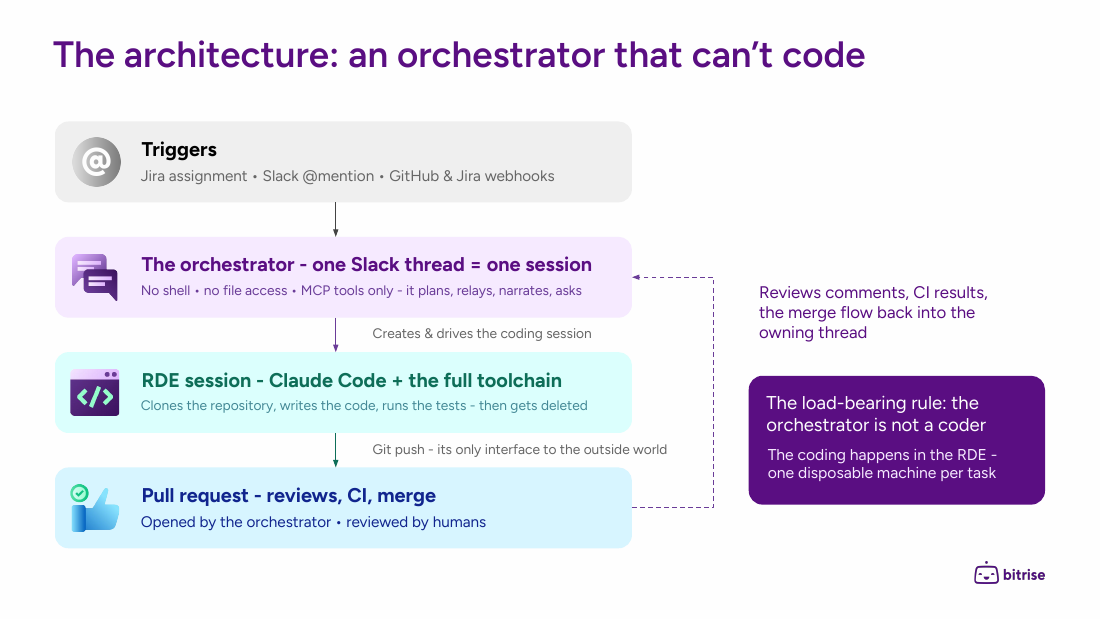
The orchestrator lives in Slack, holds the credentials, and talks to the world through scoped MCP tools. It has no shell and no file access, so it can never touch code directly. The coding happens in an RDE session: Claude Code with the full toolchain on a disposable machine, one per task, deleted when the task ends. Its only reach into the outside world is git push. The node that holds the credentials can't write code, and the one that writes code can't do anything except open a pull request. The PR is the only place the two meet.
Kolega’s speed is capped by CI. Every iteration it makes has to wait on a pipeline run before it can try again, so the faster half of this article is its speed limit. Every PR it opens is judged by the pipeline before a human sees it, so the smarter half is its license to operate.
The mobile reality
This matters more for mobile teams because the loop needs macOS twice: once on the doing side, where the agent writes and builds code and runs it on a simulator, and once on the validating side, where CI builds and tests every PR at agent volume.
Codespaces doesn’t do macOS, and GitHub has said there are no plans for it. Copilot’s coding agent works in an ephemeral Linux container. For a backend service, fine. For an app that needs Xcode, simulators, and a real macOS toolchain to even compile, the mainstream agent stack can write the code but can never run it. In a loop where CI/CD is the only trust mechanism, that means it can never verify anything it does.
That’s why our loop covers both halves. The RDE is the doing side: a disposable, per-task development machine with the full mobile toolchain, that an orchestrator can drive. Bitrise Build Hub is the validating side: autoscaling Mac and Linux runners for GitHub Actions, with build caching and pre-booted VMs.
Mobile teams are sometimes an afterthought when conjuring tooling. They don’t have to be an afterthought in the agentic era.
Where to start
Not with the bot. The order matters, because each step depends on the one before it:
- Make CI fast enough for agents. Powerful runners, build caching, and parallelization. Bitrise Build Hub gives you all three for GitHub Actions with a one-line
runs-onchange. Apple silicon runners, a co-located build cache that agent retries hit constantly, and autoscaling that makes parallelization practical, because splitting a suite across eight runners only helps if eight runners spin up the moment the burst arrives. If your feedback loop is 25 minutes, nothing else in this article will work, because every agent iteration pays that price. - Put AI to work inside the pipeline. Start with the cheapest wins: an analyze step on failing builds, and AI review and PR summarization on every pull request. As trust in the tool grows, climb the ladder from manual (the diagnosis helps a human), to LLM-assisted (Claude fixes it via MCP or from an RDE), to automated (a bot listens and fixes without being asked). Then look at selective testing, JIT test generation, snapshot triage, and deploy risk scoring.
- Grant full autonomy. Scoped, per-task, with an architecture where the component holding credentials can’t code and the component writing code can’t reach anything but
git push. To help you begin, we’ve provided a full open-source reference called bitclaw, allowing you to deploy this architecture within your own Slack environment today.
The teams that thrive with agents won’t be the ones with the cleverest prompts. They’ll be the ones whose pipelines were ready.
Naveen Nazimudeen is a Senior Solutions Engineer at Bitrise, specializing in CI/CD pipelines and Remote Dev Environments for agentic AI. This article is based on the webinar on AI in GitHub Actions.
Get started for free
Get a 30-day free trial and join the 400,000+ mobile developers who already love Bitrise.
Start free trial