One of the busiest engineers at Bitrise doesn't have a laptop. It lives in Slack. Assign it a Jira ticket or @mention it in a thread, and it reads the requirements, posts a plan, spins up a cloud dev machine, writes and tests the code, opens a pull request, watches CI, reacts to review comments as they land and once the pull request merges, cleans up after itself and closes the ticket. We call it Kolega — not the proper Hungarian word for a colleague (that would be kolléga), just the playful way you'd call out to a coworker around our Budapest office.
This post is the story of how we built it, what we use it for, and what we learned running an autonomous coding agent against our own production repositories. It's also an argument for a specific architecture: a small, locked-down orchestrator living in Slack that delegates all actual coding to disposable Remote Dev Environments. And it comes with a complete open source reference implementation, bitclaw, that you can run against your own Slack workspace.
What a day with Kolega looks like
The fastest way to understand the agent is to read what people send it. A sample from its Slack channel:
- "Clean up the
billing-period-changefeature flag, it's already true for everyone." - "Hammer this pull request until CI becomes green."
- "Update the project scanner to the new release of its core dependency. Here's a similar pull request from last time to use as your guide."
- "Can you check this support ticket for me?"
- "We're seeing this error in Datadog. Can we include more of the available context in the message?"
Most work doesn't even need a message. Assigning a Jira ticket to Kolega's Jira user is enough: within a second, a card appears in the team channel.
From there, the thread fills with milestones as the work progresses — and only milestones, because nobody wants an agent that live-streams its inner monologue:
Notice what nobody did in that thread: nobody forwarded the review comment to the agent, and nobody told it the pull request was merged. Those events arrived on their own. Everything the session works with is anchored to the thread, the pull request and the Jira ticket alike, so review comments, CI results, Jira comments, and the merge itself flow back in as they happen, and the agent reacts: it fixes what the reviewer asked for, answers questions on the ticket, and when the merge lands it tears down its dev machine, transitions the ticket, and signs off.
The same loop handles heavier work too. Two threads from a recent week:
- A design-system migration touching around 200 usages across 167 files. Kolega planned the sweep, delegated it, and then shepherded the pull request for four days while the default branch moved underneath it: three rounds of merge conflicts resolved, nine automated review comments addressed, CI kept green through every push. The humans involved did exactly one thing: review.
- A support escalation: "the app spins, then silently stops fetching branches" for one class of git provider. The coding agent traced the code path and found a client that never received an HTTPS credential and failed without surfacing an error. Kolega shipped the fix with regression tests, and when an unrelated CI check went red, it compared other open pull requests, recognized a repository-wide flake rather than its own bug, and rebased past it.
The pattern is always the same: a human describes the outcome and reviews the result. Everything else — noticing the review comment, fixing it, spotting the merge, cleaning up after itself — happens on its own.
Why we built our own
An agent like this touches everything sensitive at once: your source code, your credentials, your ticket tracker, and — on public repositories — the open internet. That's exactly why we didn't reach for a generic off-the-shelf agent. A product built for everyone can't encode the things that make an agent trustworthy for you: which authors your bot may listen to, which actions need a human's click, what a "done" ticket means in your workflow, what tone it should strike with your team.
Owning the orchestrator means all of that is code you control. We decided exactly which tools the agent holds, wrote our trust rules as executable checks rather than system-prompt wishes, and tuned the workflow (milestone posts, review etiquette, merge policy) to how our teams actually work. The customization is what makes it genuinely useful, and the ownership is what makes it trustworthy enough to point at production repositories.
It's also more achievable than it sounds. The whole orchestrator is a single small Python service — and most of it was written by a coding agent, in the same delegate-review-merge loop it now runs for everyone else. It went from first commit to doing real tickets in a few weeks.
The trick: an orchestrator that can't code
The design has one load-bearing rule: the orchestrator is not a coder.
- One Slack thread is one session, backed by one persistent Claude conversation, so context never gets lost between messages, webhooks, and days-later follow-ups.
- Every capability is a narrowly scoped tool: post to Slack, read and manage pull requests, read Jira, query Datadog for logs, metrics, and error tracking, and create and drive Remote Dev Environments. The observability access matters more than it sounds: when the agent investigates an issue, it pulls the evidence itself — the error's stack trace, the log line's surrounding context, the metric that moved — instead of asking a human to paste it, and its plans are better for it.
- Pull requests and tickets are anchored to the thread that owns them, so a review comment, a CI result, or a Jira transition arrives as a message in the right conversation. The agent reacts to events instead of polling the world.
- And the orchestrator itself has no shell and no file access. It can't run code, and it can't even read source code through the GitHub API. Those tools are denied in code, not in the prompt. It plans, relays, narrates, and asks.
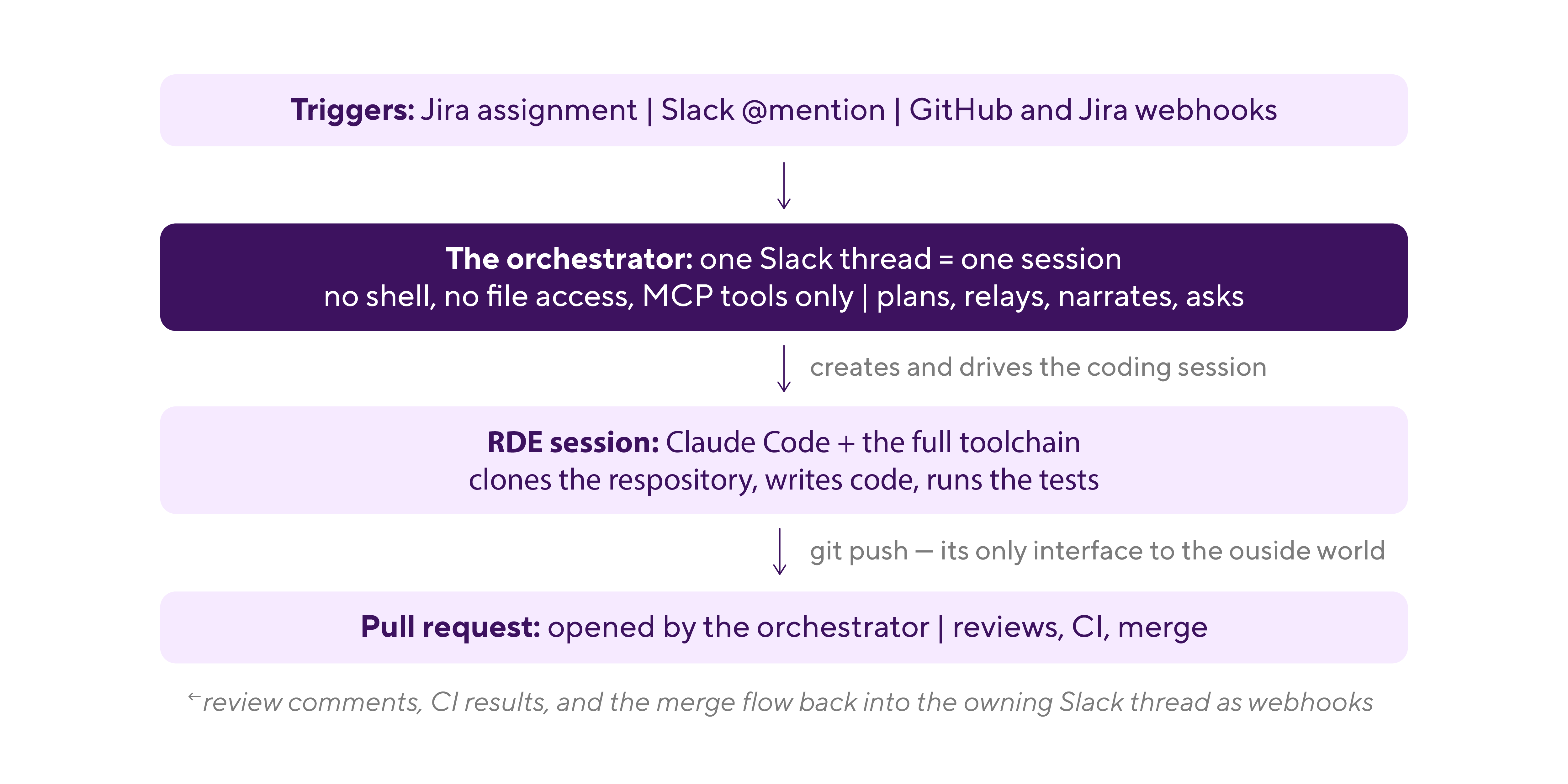
A locked-down orchestrator is easy to trust, but it raises the obvious question: if it can't code, who does?
Where Remote Dev Environments come in
Everything a coding agent needs is exactly what you never want on the machine that holds your bot's credentials: cloning repositories, installing arbitrary packages, executing build tools and test suites, running whatever a Makefile says. The answer isn't to harden one machine against all of that — it's to give every task its own disposable machine. That's what RDE is for, and it's what makes this architecture work so well:
- One template, one tool call. Every coding machine is created from a single pinned template: the stack, the machine type, and a warmup script that installs Claude Code, sets up a git-only SSH identity, and starts the agent in a tmux session. Credentials arrive through saved inputs and session inputs: — encrypted, never baked into an image. For the orchestrator, "give me a ready coding environment" is one API call.
- A brief, not a babysitter. Each session is created with a self-contained task brief: the repository, the ticket, the acceptance criteria, the branch rules — and one behavioral instruction we consider the most important sentence in the system: never block on input; pick the most defensible default, document the assumption in the commit message and pull request description, and continue. The pull request review is where wrong assumptions get corrected, and that's cheaper than an agent that stops to ask.
- Isolation is the security model. The coding agent gets a push-scoped SSH key and no GitHub API access at all; git is its only interface to the outside world. Even if malicious text hidden in a codebase prompt-injects it, the blast radius is a pushed branch that still has to survive human review. The orchestrator's credentials never touch the machine, and the machine is deleted when the work is done.
- The dev environment matches CI. RDE sessions run on the same infrastructure and stacks as Bitrise CI, so "the tests pass in the session" and "the tests pass in CI" stop being different claims. When CI does fail, the orchestrator relays the failing check into the session and the coding agent reproduces it in a matching environment.
- Every task gets its own machine. Ten tickets in flight means ten isolated environments with zero contention. Parallelism is the default, not an achievement.
- It's all MCP. Creating, driving, and deleting sessions are ordinary tool calls on the RDE MCP server. The orchestrator literally types instructions into the coding agent's tmux pane and reads the pane back — and any AI assistant that speaks the Model Context Protocol can drive sessions the same way. There's no bespoke integration to build; the agent-shaped API already exists.
What we learned
Running an autonomous agent against real repositories for months distilled into a few rules we'd now consider non-negotiable:
- Guardrails live in code, not prompts. A system prompt steers behavior; it doesn't enforce it. Everything that matters — which tools exist, whose text the agent may read, what needs approval — is a hard check that a prompt injection can't talk its way past.
- Every guardrail is an incident report. The agent once merged its own pull request the moment it saw an approval, so merging now happens only on an explicit human instruction. On public repositories anyone can comment on your bot's pull request, so untrusted authors' text is redacted before the model ever sees it, and every public write waits behind an Approve / Reject button in Slack.
- Keep humans on the two decisions that matter. Merging, and anything the outside world can see. Everything else (planning, coding, testing, replying to reviewers) flows better without a human in the middle.
- "Stop" must always work. A stop command is handled outside the normal message queue, so it interrupts a running turn instead of politely waiting behind it.
- Fail closed. When the agent can't confirm an author is trusted, a repository is private, or a check succeeded, it assumes the unsafe answer and holds.
- Delegate the thinking, not just the typing. Our orchestrator doesn't read source code even to plan: — the coding agent, sitting in front of the full working tree, plans its own work. The moment a task is about understanding code, it belongs in the RDE.
Try it yourself
We published bitclaw, an open source reference implementation of this architecture, so you can actually run it and not just read about it: github.com/bitrise-io/bitclaw-public.
It's the same design as our internal agent with the same guardrails, deliberately simplified for readability: SQLite instead of Postgres, polling instead of an internal push channel, plain logs. It's MIT-licensed and educational — a working answer to study and adapt, not a supported product. The README's security model section documents every guardrail together with the production lesson that motivated it, which is arguably the most valuable part of the repository.
Setup is tiered, so you can see it respond in minutes and grow it into a coding agent from there:
Tier 1 is a single docker run with three environment variables:
docker run -it --rm \
  -v bitclaw-data:/data -v bitclaw-claude:/home/app/.claude \
  -p 8080:8080 \
  -e SLACK_BOT_TOKEN=xoxb-your-bot-token \
  -e SLACK_APP_TOKEN=xapp-your-app-token \
  -e ANTHROPIC_API_KEY=sk-ant-your-api-key \
  bitriseio/bitclaw-public:latest
Tier 2 is the reason the repository exists: the docs/rde-template.md guide in the repository walks you through building the coding-agent template (— a warmup script, a handful of saved inputs, about ten minutes) — after which your bot delegates real coding work to Remote Dev Environments exactly the way ours does.
⚠️ Do your own threat modeling. bitclaw's guardrails were built against real incidents, but they're a reference, not a guarantee. Review the security model and adapt it to your own trust boundaries before pointing an autonomous agent at your repositories.
Further reading
- RDE Quickstart: create your first RDE session in three commands.
- Key concepts: sessions, templates, saved inputs, and the session lifecycle.
- Templates: define the reusable environment your coding agent runs in.
- Saved inputs: store the credentials your sessions need, once.
- MCP server for AI agents: the tool surface any agent can use to drive RDE.
Get started for free
Get a 30-day free trial and join the 400,000+ mobile developers who already love Bitrise.
Start free trial