

A React Native build is really two builds stacked on top of each other. On Android, Gradle compiles your Kotlin and Java, then drops down into cmake and ndk-build to compile the C++ that ships inside Hermes, Folly, ReactCommon, and your own turbo modules. On iOS, Xcode does the equivalent: Swift and Objective-C on top, the same C++ underneath via Clang. Two build systems, two languages on top, one shared set of C++ underneath.
We already shipped Build Cache for Gradle and Build Cache for Xcode. Both work for the platform they were designed for. But if you work on React Native, you run yarn ios in the morning and yarn android in the afternoon, and you don't want to think about which cache is active for which build. We wanted to give you a single switch that covers everything that can be cached on both sides of the project.
This post walks through what that switch actually does, where the existing caches stopped short, and how we filled the gap.
One activate command, three cache backends
The entry point is a single CLI command:
bitrise-build-cache activate react-native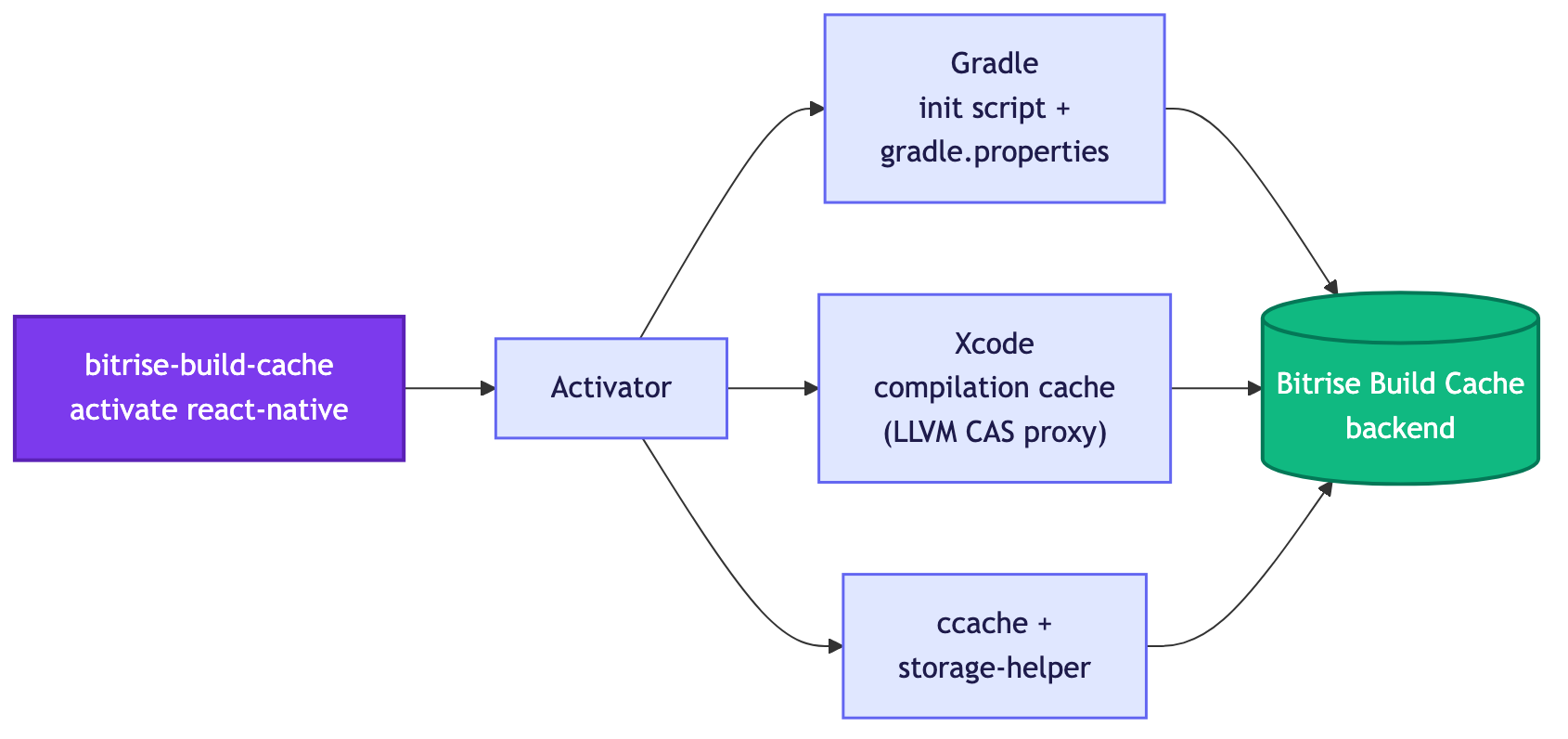
That one command activates three subsystems:
- Gradle - writes an init script and updates
gradle.propertiesso the Gradle daemon hits the remote build cache for JVM compilation, Kotlin/Java task outputs, and the rest of the standard task graph. - Xcode - turns on Xcode 26+ compilation caching (the LLVM Content Addressable Storage path we covered in our previous post) and points the Swift driver at our local CAS proxy.
- C++ via ccache - installs and starts a small helper that turns ccache into a remote-cache client backed by the same Bitrise Build Cache service.
From where you sit it's one command, one progress log, one set of analytics in Bitrise Insights. From ours it's three very different caches that we had to teach to behave like one cache.
Why Gradle's native cache wasn't enough
The Gradle build cache works by hashing task inputs (sources, classpaths, compiler args) and storing task outputs (class files, jars, AAPT artifacts) under that hash. On a clean CI checkout you can skip nearly all of Gradle's JVM work if a previous build produced the same inputs.
Gradle itself is perfectly capable of caching native-build task outputs too, but the React Native Android plugin's C++ tasks (the ones that drive CMake for Hermes, Folly, ReactCommon, and your turbo modules) are declared as non-cacheable. From Gradle's point of view they're a black box that always runs. On a developer's machine that doesn't matter much, since incremental local builds keep the object files around. On CI, where every clean clone re-compiles every translation unit from scratch, it adds up to minutes of repeated work on every build.
We didn't want to wait for those task definitions to change upstream to start fixing this, so we went one layer down, to the compiler itself.
Why we picked ccache
ccache has been the de-facto C++ compiler cache for over twenty years. It hashes the preprocessed source plus the compiler version and flags, and stores the resulting object file under that hash. On the next compile with the same inputs, it returns the cached object in milliseconds.
Until recently, ccache was a strictly local cache: every CI runner cached only what it built itself, and a freshly provisioned VM started with an empty cache. What changed for us was ccache's remote storage backends, a relatively new addition that lets the local ccache instance proxy reads and writes to a shared backend. That gave us a way to plug ccache into the same Build Cache service that already powers our Gradle and Xcode caches.
The catch: ccache speaks its own wire protocol to its remote backends. Bitrise Build Cache speaks gRPC over its own key/value protocol. We needed something in the middle.

The storage helper
The piece we built to bridge those two protocols is the storage helper. It's a small Go process that runs alongside your build, listens on a Unix socket, and translates between ccache's remote-storage requests and our backend's gRPC API.
The activation flow looks like this:
activate react-native
    │
    ├── install bitrise-build-cache-cli (if missing) and ccache
    ├── export CCACHE_REMOTE_STORAGE=<helper socket URL>
    ├── export CCACHE_REMOTE_ONLY=true
    ├── export CMAKE_CXX_COMPILER_LAUNCHER=ccache
    └── start storage-helper as a detached process
Once activated, the rest is invisible. When CMake invokes Clang to build, say, Hermes/VM.cpp, the CMAKE_CXX_COMPILER_LAUNCHER=ccache shim wraps the compiler. ccache hashes the inputs, asks its remote storage for the object, and the helper translates that "remote storage" call into a gRPC GetCapabilities / Get call against our backend. On a hit the object comes back over the socket and ccache writes it to disk as if it had compiled it. On a miss the real compile runs and ccache uploads the resulting object back through the helper.
The helper is detached on purpose: the activate step exits, but the helper keeps listening until the build finishes or it times out idle. That way the same socket serves every subsequent compile in the workflow.
One invocation, one analytics story
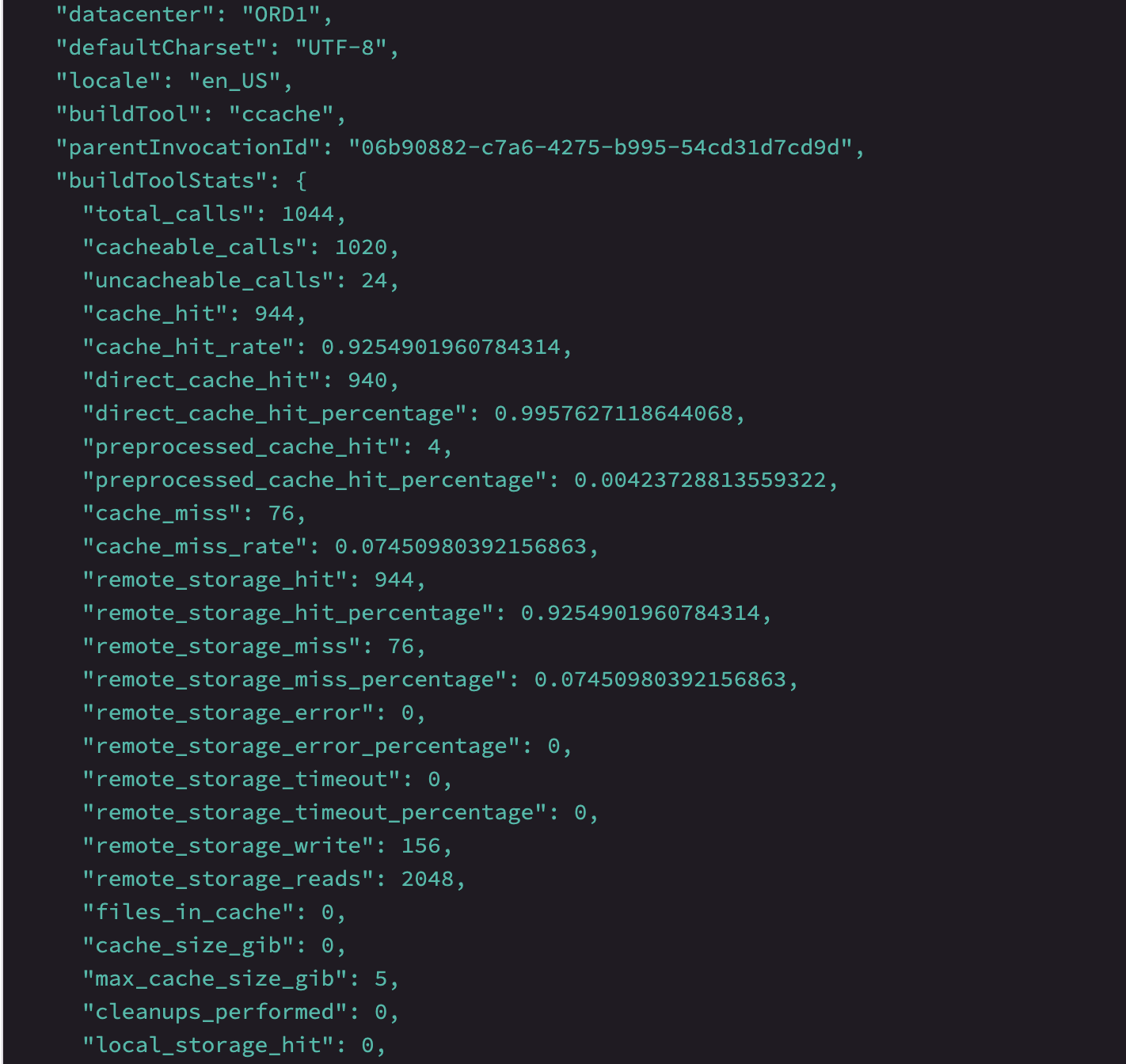
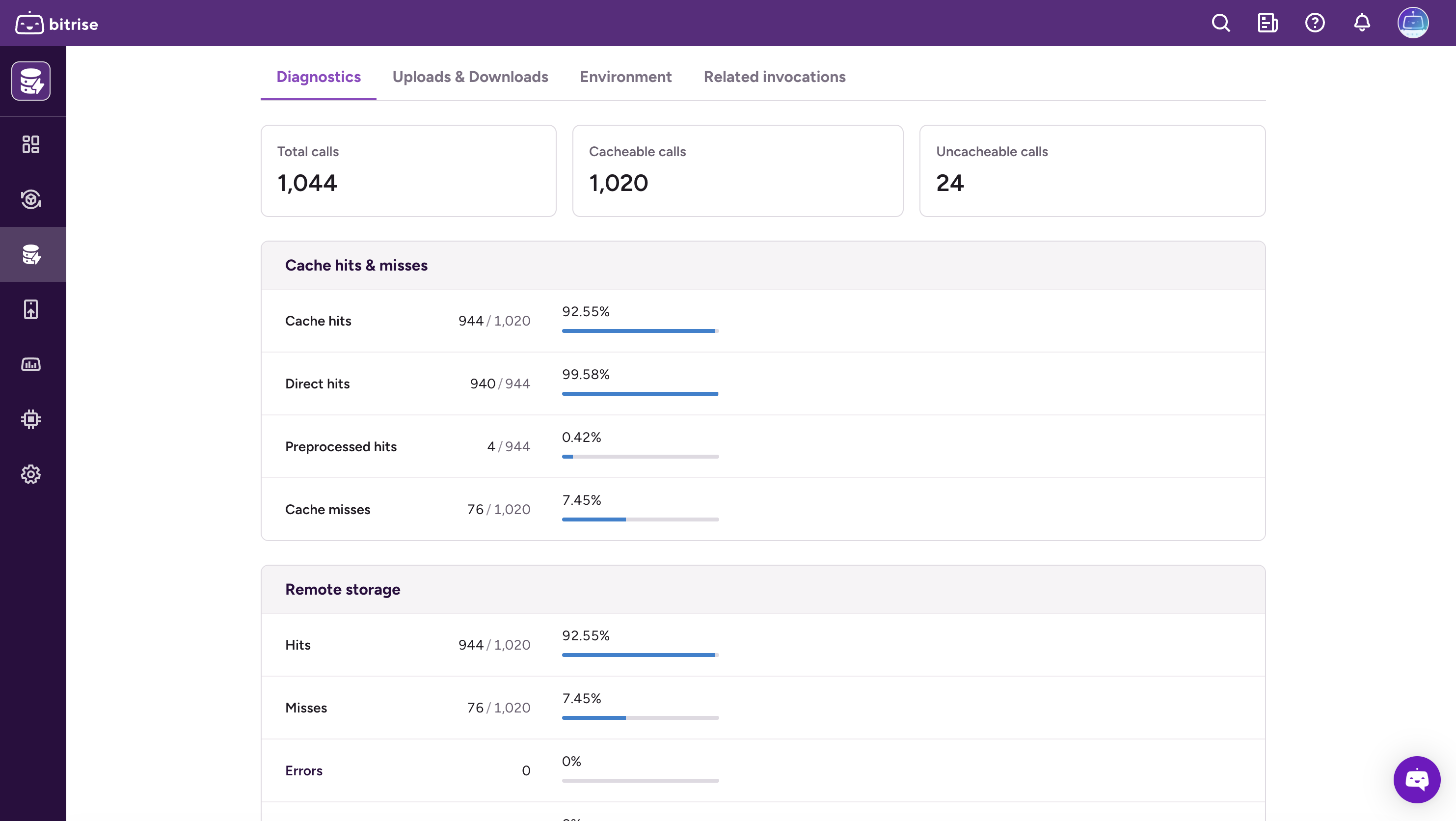
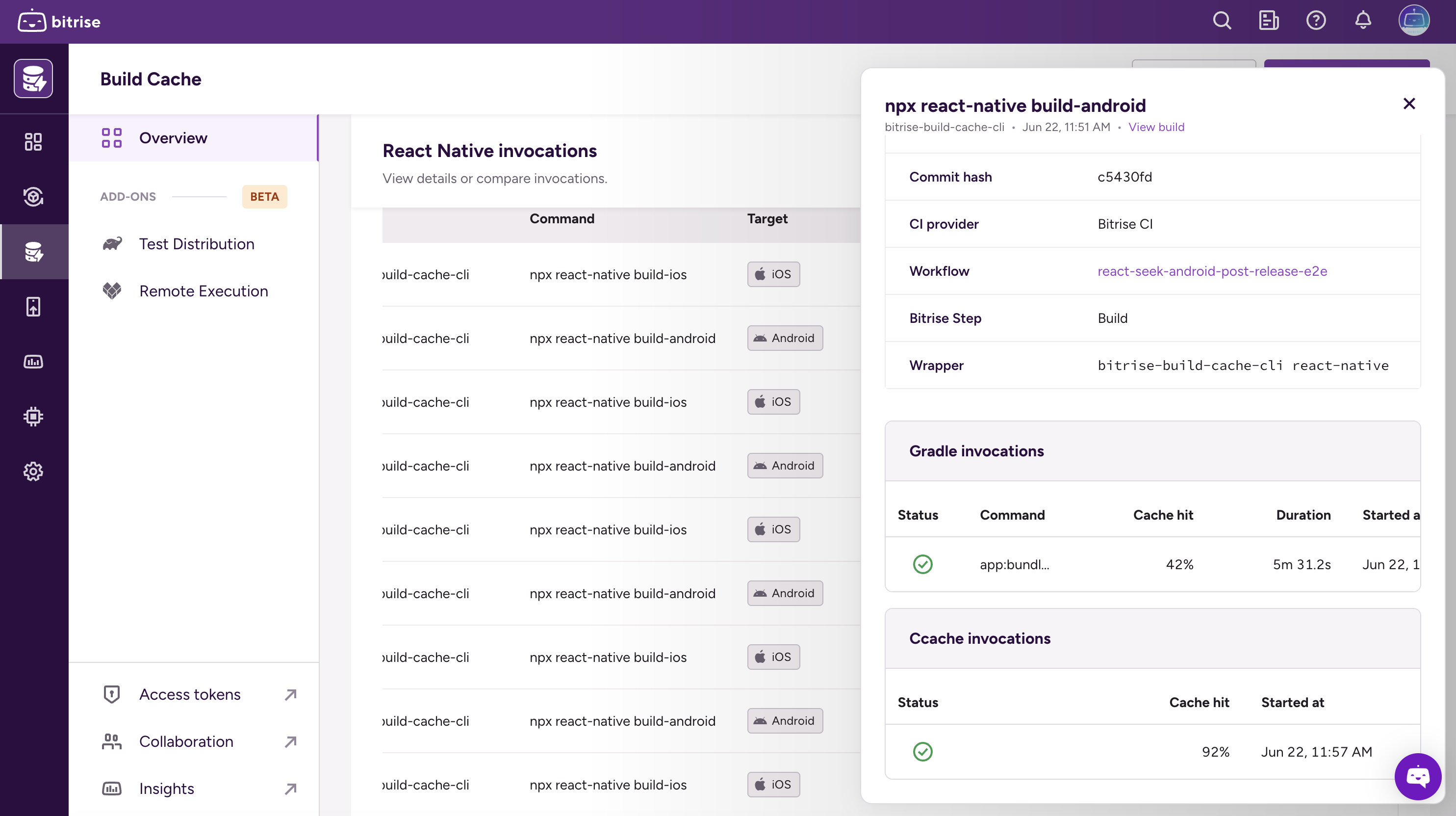
Caching is only half the picture. The other half is being able to see what it did. We wanted React Native teams to open Bitrise Insights and see a single "react-native run-android" invocation, not a Gradle invocation here, a ccache invocation there, and no way to tie them together.
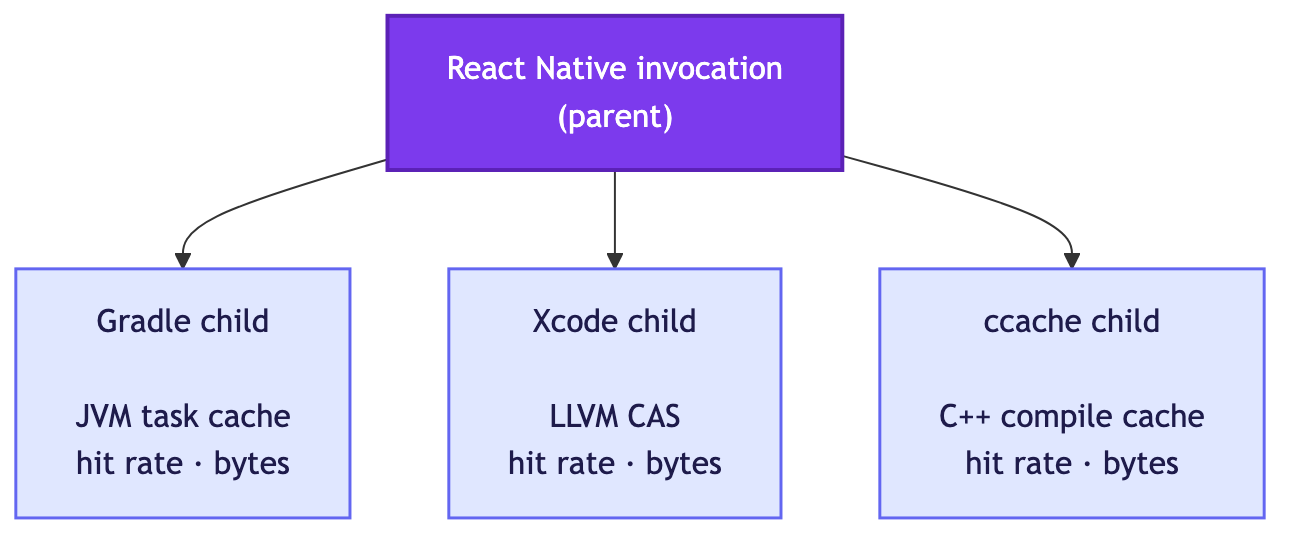
To get that, react-native run creates a parent invocation ID at the start of the run and exports it as BITRISE_INVOCATION_ID into the child environment. Every cache that's active during the build (the Gradle plugin, the Xcode wrapper, the ccache storage helper) picks that ID up and reports its own activity as a child of it. The storage helper additionally accepts a SetInvocationID IPC call so it can reset its session byte counters and emit a clean per-run stats record.
The result: in Insights you see one parent React Native invocation with the Gradle, Xcode, and ccache children grouped underneath it. Click into the ccache child and you get the hit rate, the bytes transferred, and the cache duration for the C++ portion specifically.
Early results from private beta
We ran Build Cache for React Native through a private beta before opening it up, and the numbers from teams who ran it on their real CI pipelines tracked closely with what we saw in our own benchmarks.
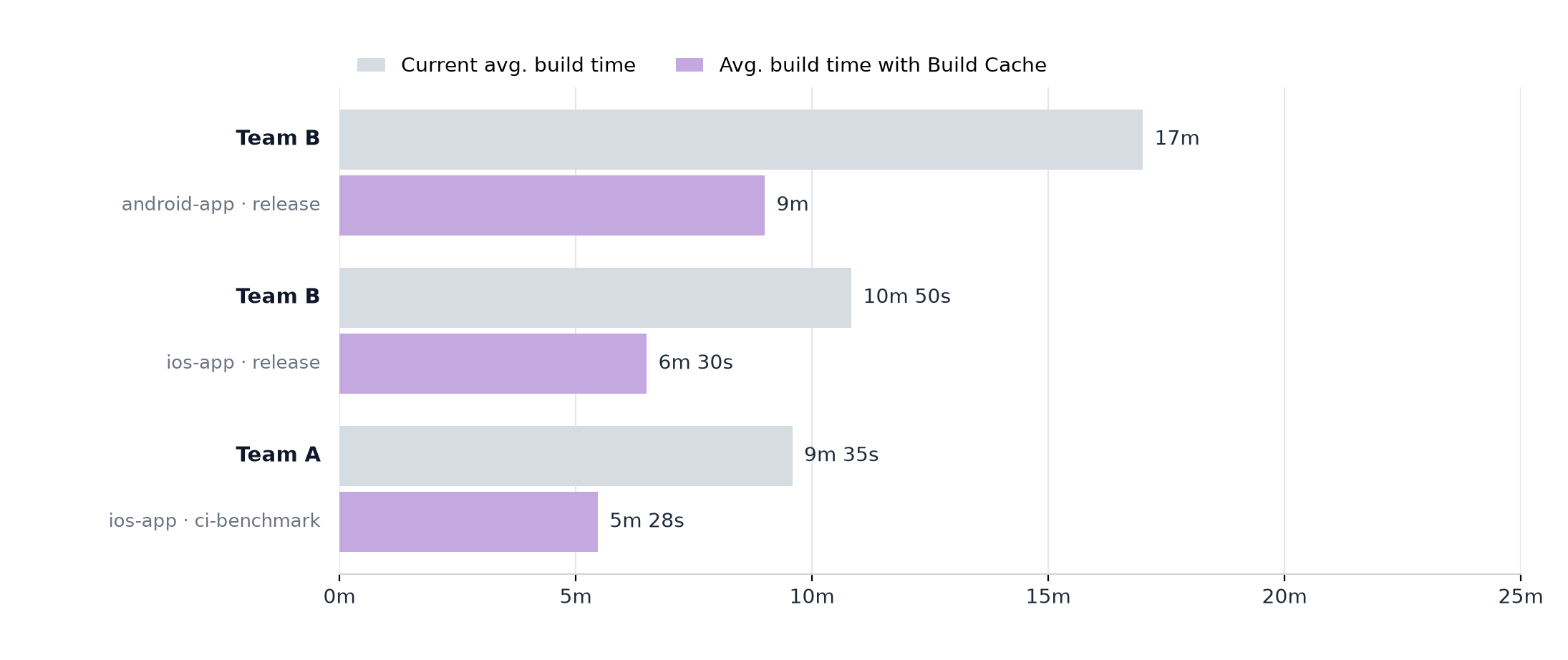
One team, a large React Native app with a hot iOS build path, reported their benchmark iOS build dropping from 9m 35s to 5m 28s, a roughly 43% reduction.
Another team ran the cache on both platforms of a multi-target React Native app and saw the bigger swing on the side where Gradle's native build had previously been the bottleneck: Android dropped from ~17m to ~9m (~46% faster), iOS from ~10m 50s to ~6m 30s (~40% faster). The Android delta is where ccache's contribution shows up most clearly: that's the half of the build where the C++ tasks were running uncached on every CI run before, and where the per-translation-unit cache now does the most work.
Numbers will vary by project: how much of your build is C++ vs Kotlin/Swift, how cold the cache is, how parallel your CMake invocations are. The pattern we saw is consistent though: the more time your build spends in the compilers we cache, the more time you get back.
What we shipped
If you're adopting it today, the surface area is small:
- Add the Activate React Native Build Cache step to your workflow.
- Run your normal
yarn ios/yarn android/npx react-native run-*command through the React Native Run step (or callbitrise-build-cache react-native rundirectly). - Open the React Native tab in Bitrise Insights to see the parent run with its Gradle, Xcode, and ccache children grouped beneath it.
For the actual setup steps, see Configuring the Build Cache for React Native in the Bitrise CI environment in the docs.
Behind that small surface, three caches are working: Gradle for the JVM half of Android, Xcode's LLVM CAS for the Apple half, and ccache for the C++ that both halves share.
If you're already using Build Cache for Gradle or Xcode standalone, none of that goes away. The React Native activation wires the same backends together with one common interface, and adds ccache to cover the C++ on Android that the React Native Gradle tasks leave uncached. If you ship a React Native app on Bitrise, try the step and tell us what your build times look like.
Get started for free
Get a 30-day free trial and join the 400,000+ mobile developers who already love Bitrise.
Start free trial