
Count how many times you’ve proudly submitted a new PR only for CI to fail for the most mundane and annoying reasons:
- Unused imports
- A line is too long
- Project conventions require the use of API
fooinstead of APIbar - Unused code
While these lint rules are useful and important to enforce, would it be possible to just…not have to deal with them?
Enter auto-fixing CI, the concept of self-healing PRs and CI workflows, without any human (or agent) interaction:
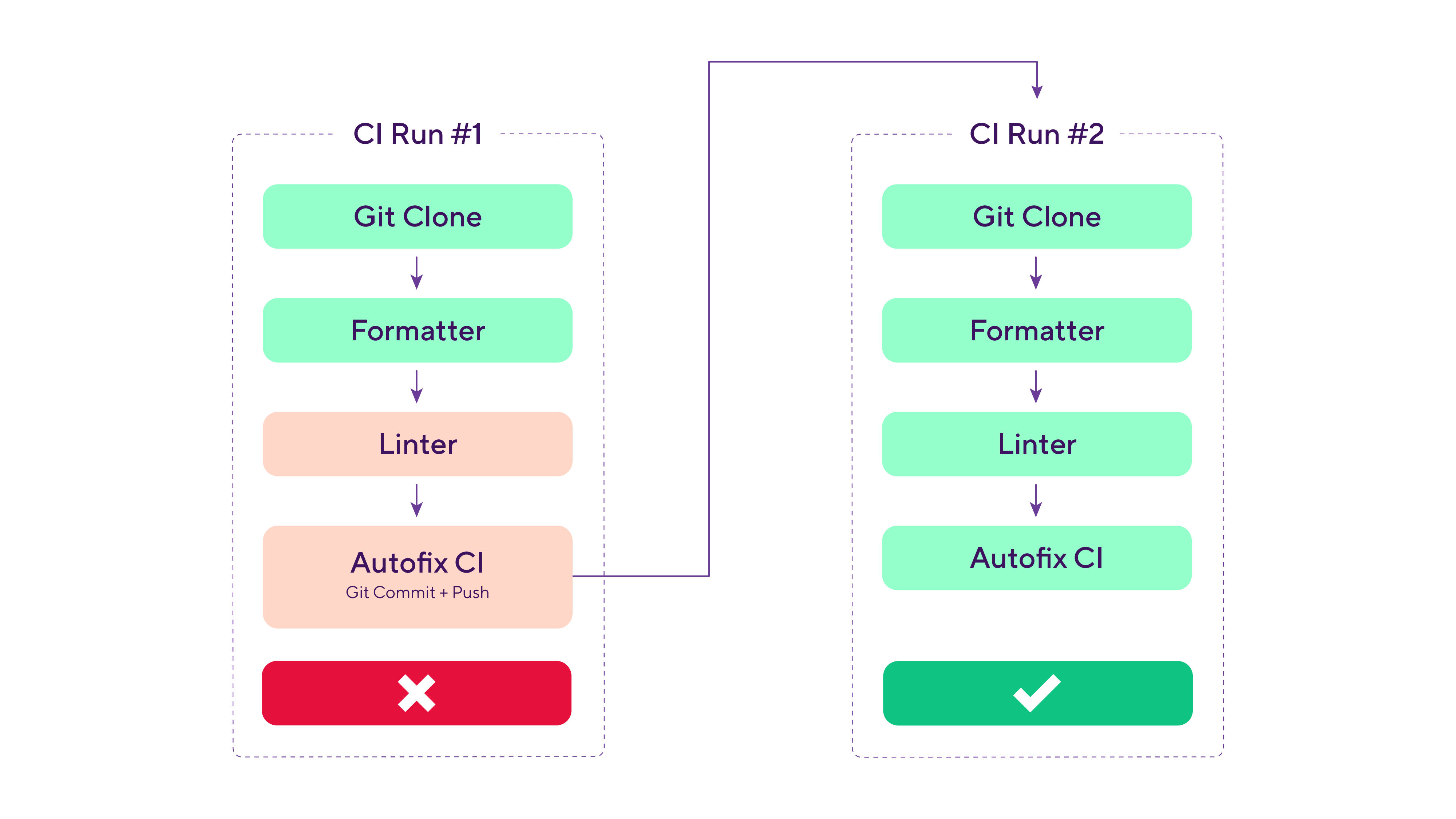
The key detail that enables all of this to work: modern linters can apply trivial and mechanical fixes to most lint violations. Formatters, by design, fix their inputs.
Inspired by the wonderful autofix.ci project, the same auto-fixing behavior is now available in your Bitrise CI workflows as well. It works with all your existing linters, formatters, and other automations. AI agents benefit too, from tighter feedback loops, to no tokens being spent on CI logs and dealing with trivial fixes.
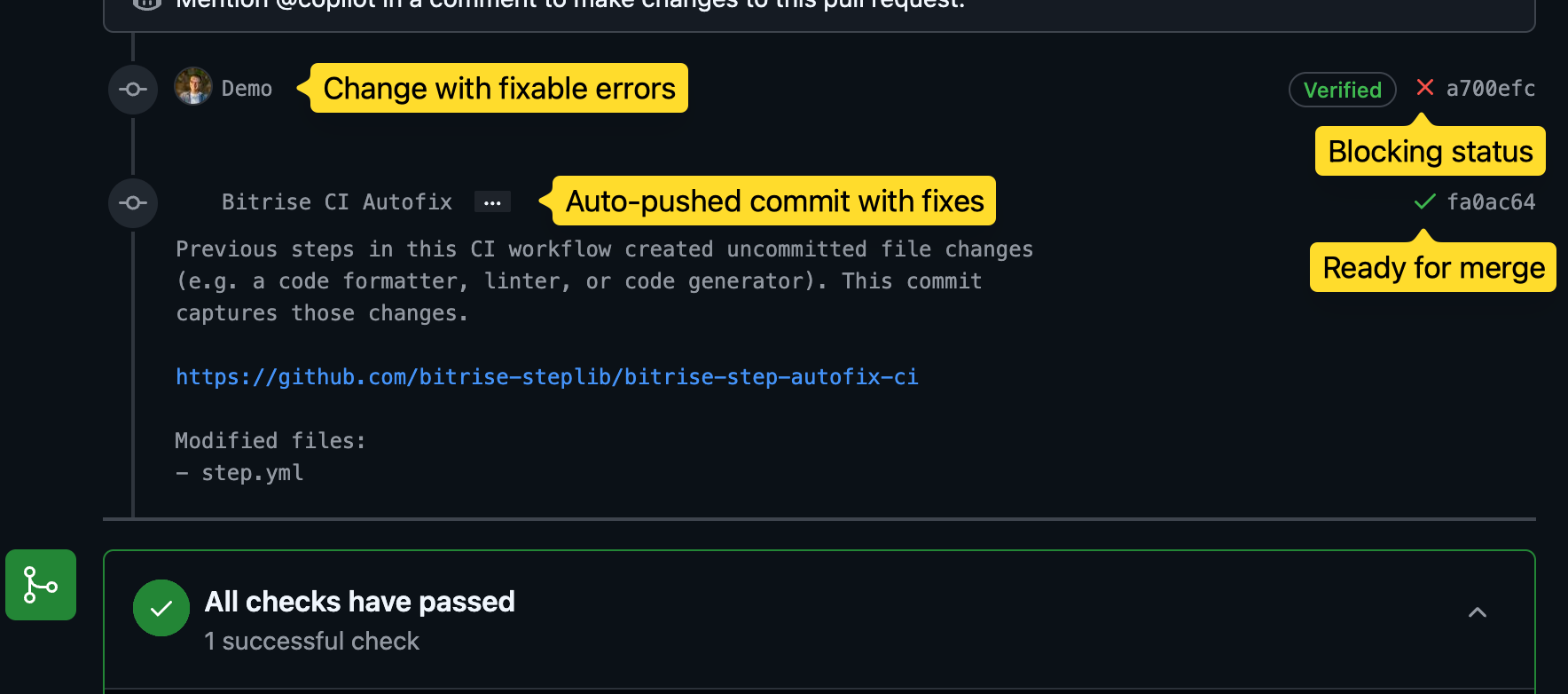
Getting started with Autofix CI
Setting up your own auto-fixing CI requires two steps:
First, add the Autofix CI step right after your linters and formatters:
workflows:
  pr-lint:
    steps:
    - git-clone@8: {}
    - script@1:
        title: Lint + format
        inputs:
        - content: npm run format && npm run lint
    - autofix-ci@1: {}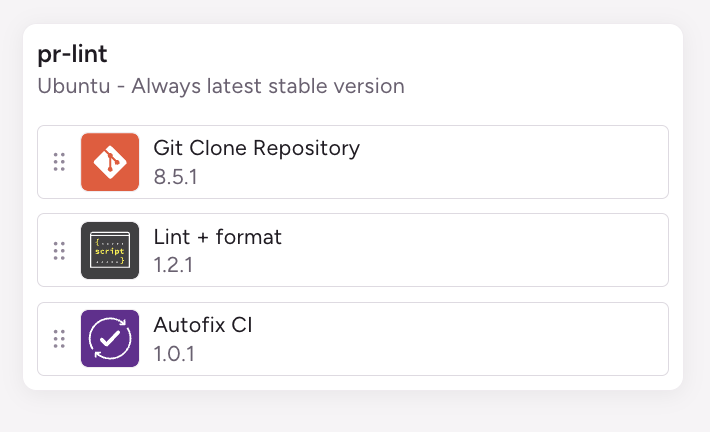
Second, tell your linters to not just report errors, but also apply fixes (when available). Not sure what linter to run or how to configure it? Keep reading for a list of recommended tools and configuration options.
Running the linter in fix mode creates local modifications in the CI environment, which the Autofix CI step detects. It commits and pushes those changes (using a bot identity, never as the PR author), triggering a new CI run.
Linters with great autofix support
If you need inspiration for what can be auto-fixed, here are some recommendations to start you off:
- SwiftLint and its
--fixflag - clang-tidy and its
-fixflag for Objective-C and C++ code - ktlint is also a formatter (
--formatflag) - ESLint’s
--fixflag - golangci-lint can both
formatandrun --fixlint violations
Settings worth knowing about
Once the basics are set up, here are a few additional features and behaviors to be aware of:
PR approval settings: auto-fixing the PR involves automatically pushing new commits. Depending on your team’s PR practices, you might want to review your branch protection settings, especially the Require approval of the most recent reviewable push and Dismiss stale pull request approvals when new commits are pushed settings.
Dry-run mode: use the dry_run step input to test authentication and config changes without actually pushing commits.
Automate it further: you can build further automations on top of the step's result. Check out the Autofix CI step docs for outputs like $AUTOFIX_NEEDED and $AUTOFIX_PUSHED.
Untracked files: By default, the step considers untracked files as a reason to auto-fix the PR and commits those untracked files. You might discover that your tooling generates temporary files in the git repo during the CI run. You can change the step’s behavior by setting include_untracked to false.
Rolling builds: Not required, as the step fails the build straight after pushing, so the rest of the workflow never runs and there's nothing left to cancel. Enabling rolling builds is still worth doing for everything else in your project.
Security implications
Is it even a good idea to push automated commits to PR branches?
First, let’s start with the security precautions we take, and you should know about:
The step only works with Merge Requests and refuses to run when triggered by a Pull Request from a fork. It doesn’t fail the build, just returns early, so your existing steps and linters decide the status of the build.
It also does nothing when the build is triggered by something other than a PR, so your main branch won’t silently get new commits.
Next, the step also detects if bitrise.yml got auto-fixed by an earlier step, and returns early. This prevents a malicious PR from sneaking CI configuration changes through an auto-commit.
If auto-fixing is required, the commit is authored as a bot identity (Bitrise Autofix <[email protected]>), never as the PR author, so automated changes are distinguishable from human commits.
Git authentication reuses your project’s existing connection to GitHub (SSH key or HTTPS token), and when it comes to pushing the commit, the token is never persisted to disk or exposed in process arguments thanks to a custom credential helper implementation in the step.
Why we didn't put an agent in the loop
It might be tempting to insert one more step between the linter and the Autofix CI step, and just claude -p "Fix remaining lint violations, make no mistakes". Here are a few considerations on why it might not be the best design:
Missing context: this agent would only see raw code and would miss important context about the PR’s intention, constraints, and previous iterations. The remaining lint violations which can’t be deterministically fixed by the linter are precisely the ones that require more judgment and context.
Unexpected changes to the PR: automatically pushing non-trivial changes might surprise reviewers or even the PR author. It’s much easier to trust trivial and deterministic changes being automated away.
For agent-authored PRs, that agent’s session already has all the surrounding context to make the right fix. It also works out of the box (just let the agent interact with your CI): there is no need to add custom scripts to your CI workflow and deal with LLM API tokens.
Get started by adding Autofix CI to your linter workflow and make those annoying mechanical fixes a thing of the past.
Get started for free
Get a 30-day free trial and join the 400,000+ mobile developers who already love Bitrise.
Start free trial