The fundamentals of React Native over-the-air updates shouldn't sit behind a paid tier.
Today we're shipping three additions to Bitrise CodePush: delta updates that help significantly reduce the size of your updates, CodePush code signing so you can secure every package you push to your users’ devices, and a dedicated Bitrise CI Step that publishes updates straight from your workflow.
All three are available to every CodePush user, including everyone on the free plan.
Delta updates: send only what changed
Every OTA update used to ship the whole JavaScript bundle. A one-line copy tweak cost the same bandwidth as a full feature release.
Not anymore. With delta updates, Bitrise CodePush compares the bundle already on the device against the new one and sends only what changed.
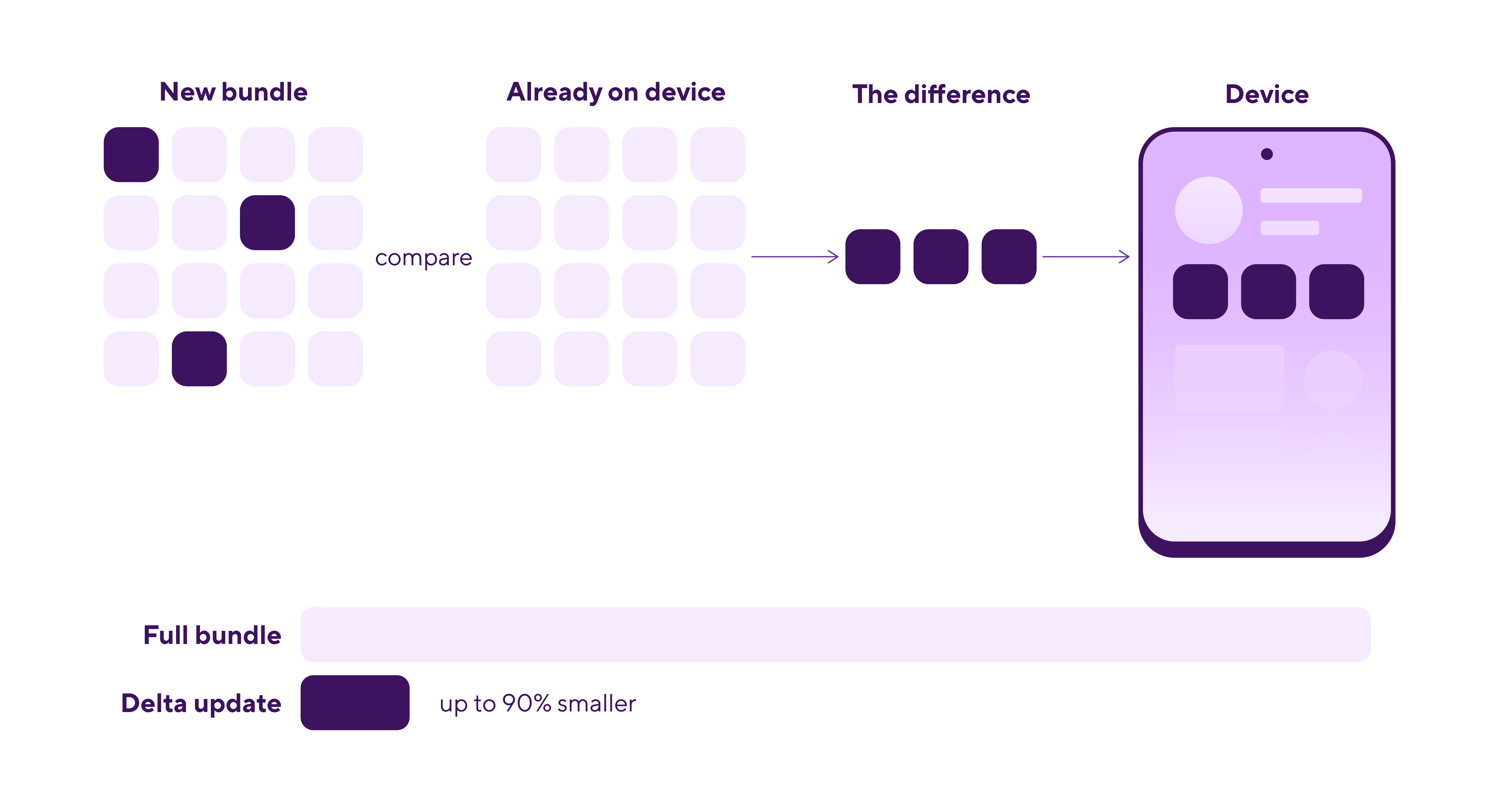
Across real production deployments we’ve observed update size reductions ranging between 33% to 90%. The saving works in two ways:
- Your end users download less, so updates are faster and their data plans thank you.
- You burn less of your plan's data transfer allowance, so you're far less likely to hit the ceiling.
How much you save tracks the size of the change. A fix to a single screen benefits far more than a release that touches the whole app.
Delta updates is on by default on every plan, including the free tier. Nothing to configure, nothing to migrate. Your next update is already smaller.
And this is just the first iteration. Today's diff works at the file level, and we're already testing a more granular approach that will shrink updates further.
Code signing: secure your OTA updates
If your app handles payments, health data, or anything a security team cares about, someone will eventually ask how you know an update hasn't been altered between your build and your users' devices.
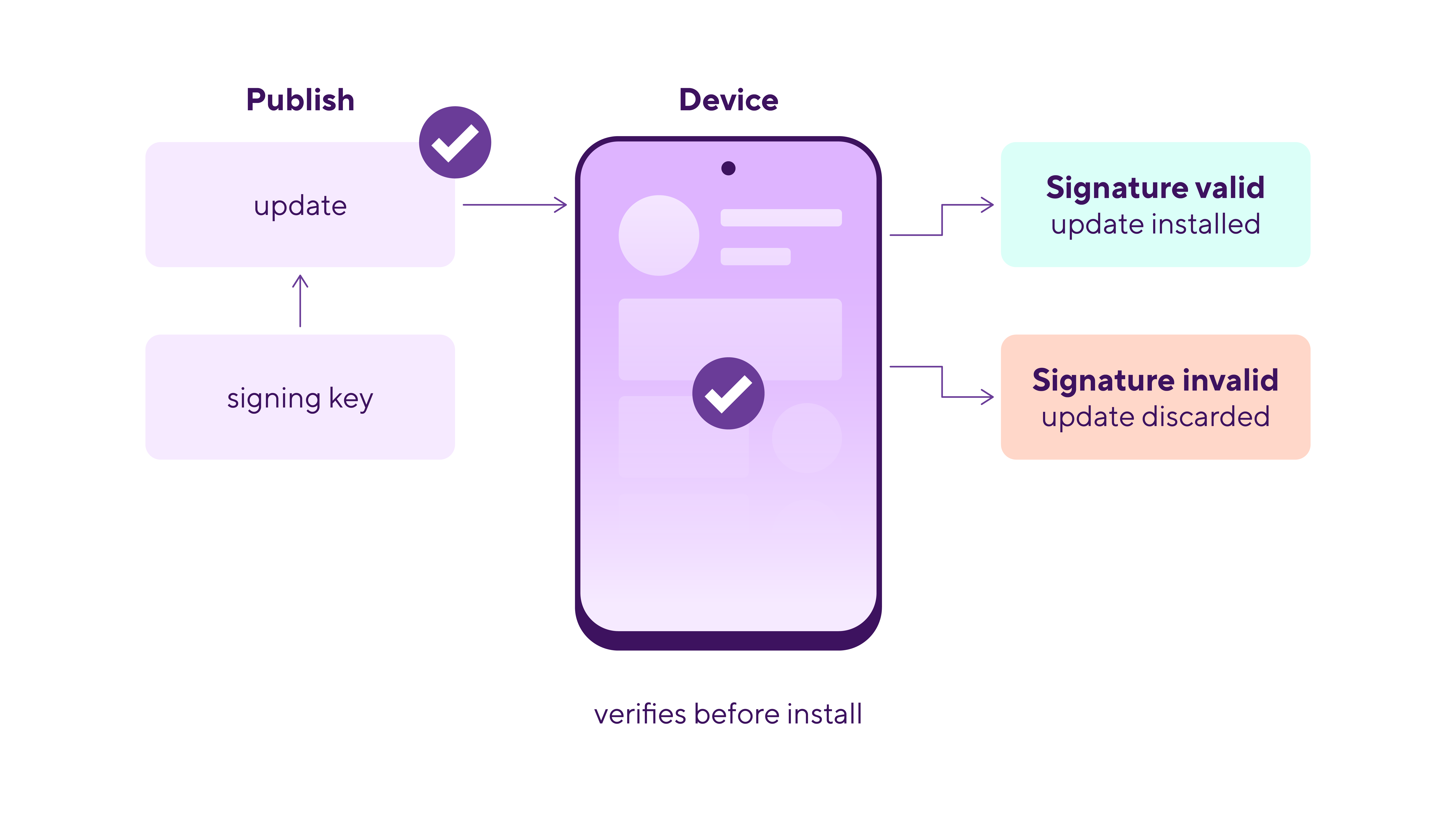
CodePush code signing answers that question. Your app verifies every update before it applies it. Anything that fails verification, whether it was tampered with or simply arrived corrupt, is rejected and never installed.
You generate an RSA keypair and embed the public key in your app. At release time the CLI signs the bundle with your private key into a JWT containing the bundle's hash, and the SDK checks that signature on device.
In practice, it's one flag:
bitrise :codepush push --bundle --platform ios \
  --deployment Production \
  --app-version 1.0.0 \
  --private-key-path ./private_key.pem
Code signing is live now through the CLI. Configuration through the Bitrise web UI is on the way, which takes the manual key handling off your plate and makes signing something a platform team standardizes across projects rather than something one engineer sets up in a terminal.
Many React Native OTA solutions reserve code signing for higher tier plans. We think it belongs in the core product. Every user can sign their updates at no extra cost, including everyone on the 100,000 MAU free tier.
Full setup for iOS, Android, and Expo is in the code signing docs.
Publish from your Bitrise workflow
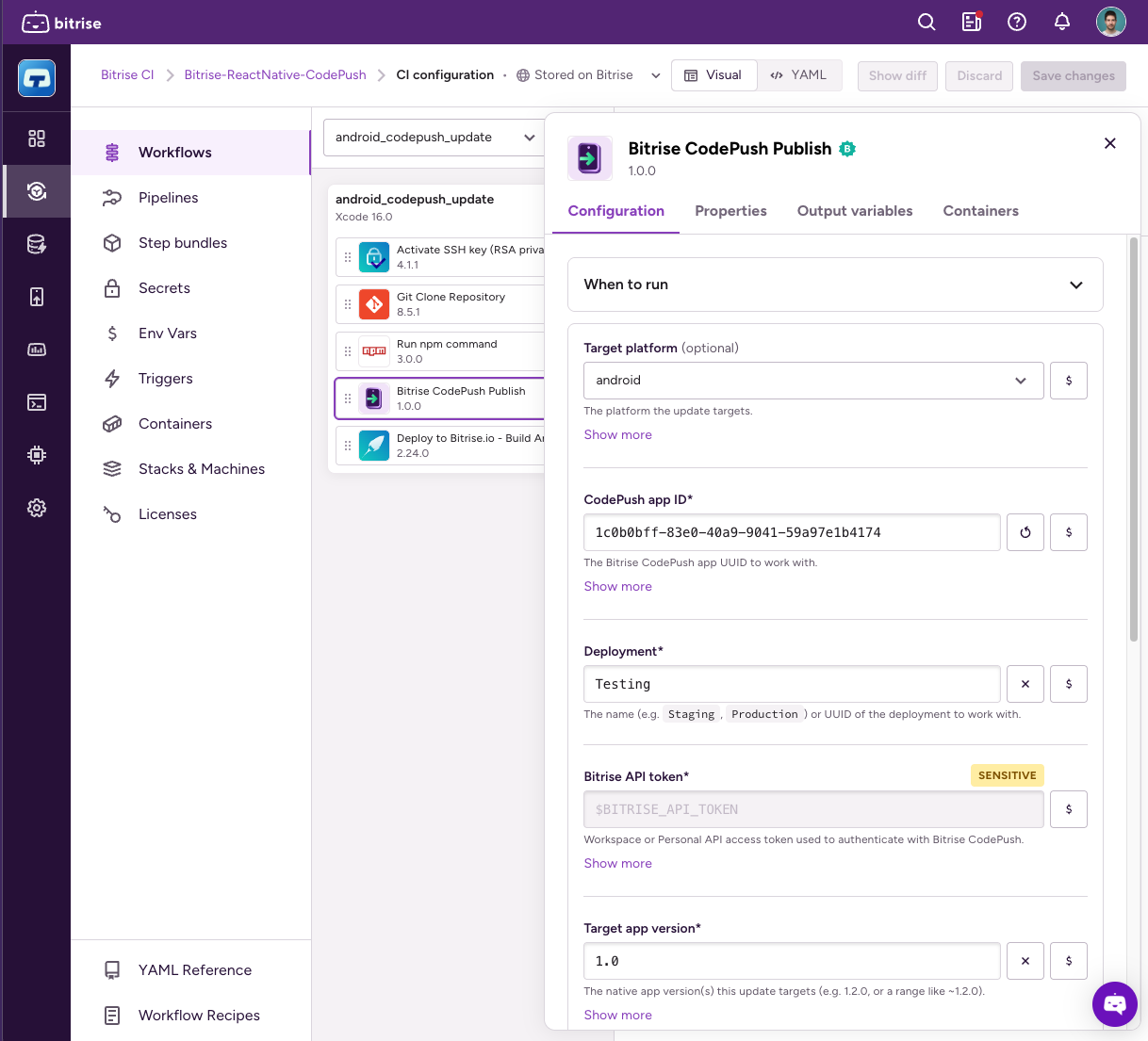
Bitrise CodePush works with any CI. It now works particularly well with ours.
If you build your React Native app on Bitrise CI, you can add CodePush to the same pipeline straight from the Workflow Editor. Drop the Step in where you want it, set your inputs in the UI, and it runs alongside the 400+ Steps you can already use. No custom scripts to maintain, no CLI version to keep in sync, no YAML to hand-write.
The Step handles the fiddly parts for you. It auto-detects your entry file and Hermes configuration and tells Expo and bare React Native apart from your package.json. The built package lands in $BITRISE_DEPLOY_DIR, so Deploy to Bitrise.io picks it up and it shows on the build's Artifacts tab.
Want more control? Our Workflow recipe is a working bitrise.yml you can copy and adapt, and the CodePush CLI exposes every command directly if you'd rather build your own release logic. The Step itself is open source too. Happy deployments!
Small, secure updates are the default with Bitrise
Delta updates and code signing are usually classified as premium features. For us that's the wrong line to draw. Sending less data, and being able to verify what you sent, aren't Enterprise-only features. They're what a production OTA setup needs on day one.
So they're available for everyone. The free tier covers 100,000 monthly active users, 5 TB of data transfer, and unlimited apps. Above that, pricing scales with monthly active users, with delivery bundled close to infrastructure cost rather than marked up, which is why our CodePush stays affordable at the volumes where other OTA bills usually start to hurt.
Get started with CodePush on Bitrise
Already on CodePush? Delta updates are live in your account right now, so your next release is already smaller. Code signing is ready when you want it, and the CI Step is waiting in the Workflow Editor.
New to Bitrise CodePush? Everything mentioned is free up to 100,000 monthly active users, and our CodePush guide covers how it works before you set it up.
Running at higher volumes, or considering moving off another OTA provider? Talk to our team about pricing at scale and what a migration looks like.
Get started for free
Get a 30-day free trial and join the 400,000+ mobile developers who already love Bitrise.
Start free trial