Mobile builds on GitHub Actions are slow for two reasons
Your mobile CI can be slow for several reasons, but the two biggest issues we see affecting build times on GitHub Actions across thousands of mobile projects are a lack of raw compute and cold builds. And fixing one in isolation won't deliver the performance improvements needed in today's climate, as AI agents push more code through your pipeline than ever before.
Let's break it down:
1) The machines
GitHub's hosted Mac runners top out at M2 Pro, with 5 vCPUs and 14 GB of RAM, and jobs can sit in a queue at peak times.
On a weak machine, every stage of the pipeline stretches: compiling, testing and archiving all take longer, and tight memory can slow large builds further or make them fail.
Longer jobs hold runners for longer, so queues build up behind them. PR checks come back late, so developers wait, switch context, or merge with less confidence.
Over a day, that adds up to fewer builds, slower feedback and later releases. Over a week or a month it has a detrimental impact on your release schedule affecting your go-to-market, customer experience and competitive position.
2) Cache that always starts cold
GitHub gives each repo 10 GB of cache, but for many engineering teams this is nowhere near enough capacity to be effective. DerivedData from Xcode alone can eat up to 20 GB or more, so even your prized 'cached' builds may often start cold, compiling every artifact for every build.
And GitHub Actions' default dependency cache stores DerivedData/compilation cache as one big archive, so if anything in it changes, the whole archive has to be uploaded again. With Bitrise Build Cache, only the objects that changed are uploaded, and only the ones needed for the build are downloaded.
With AI coding agents, both issues are compounded at an alarming rate. Our State of Mobile Development 2026 report shows that AI-authored builds have grown 161x in just 12 months with agents pushing more commits and CI runs.
Our mobile expertise
We've spent over a decade building CI infrastructure purpose-built for mobile: powerful Apple silicon and Linux machines with the latest Xcode versions (available within 24 hours), plus preinstalled Android SDKs and tooling that compute-heavy mobile builds depend on.
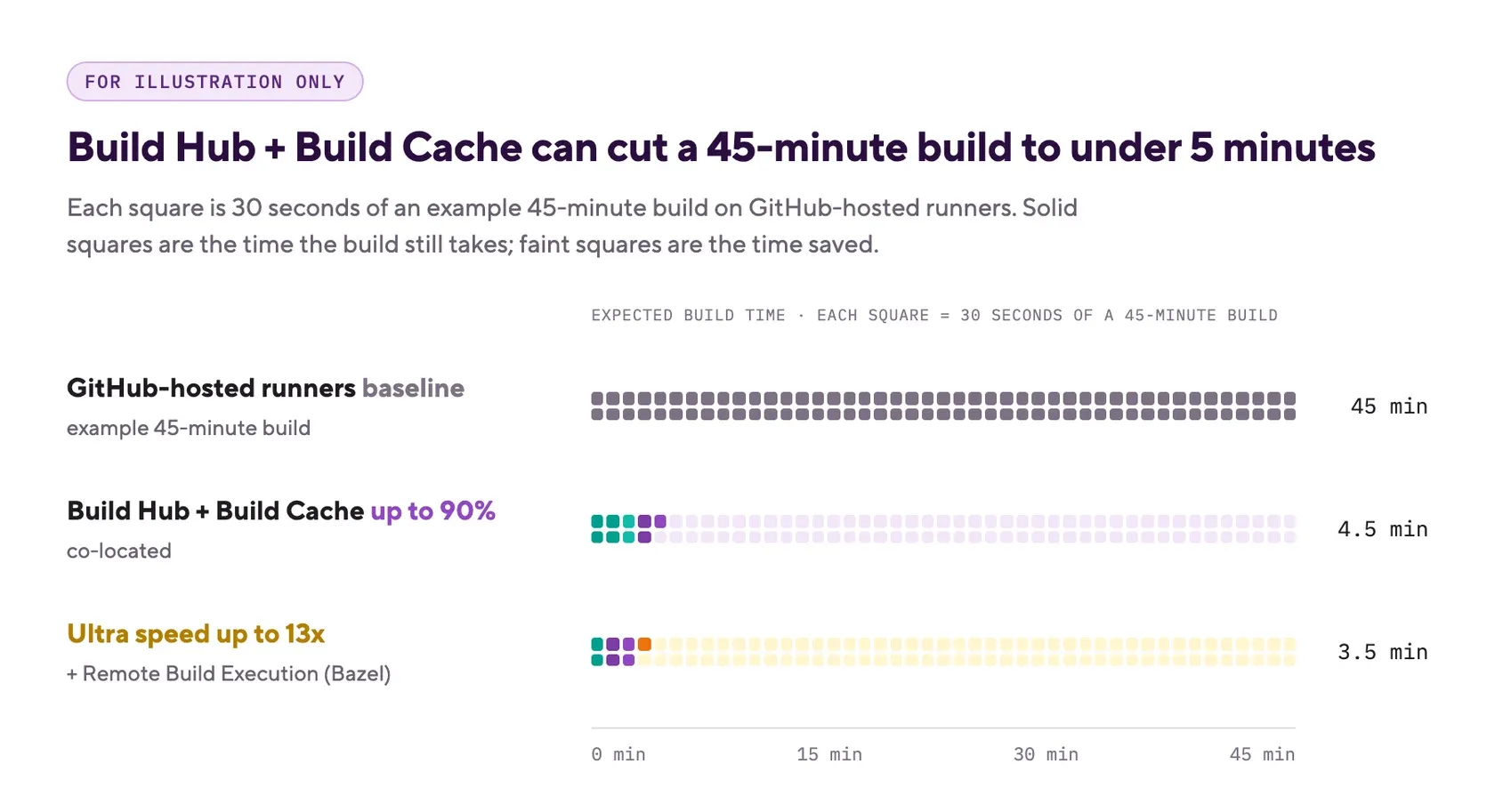
That experience led to the development of Bitrise Build Hub (runners) and Bitrise Build Cache (remote caching) which solve and eliminate these problems head-on, resulting in up to 90% faster builds for everyone on your team.
Why Build Hub and Build Cache are better together
Faster machines doing less work
Bitrise Build Hub runs your CI jobs on the fastest, mobile-optimized Mac (M5 Pro and M6) and Linux machines. An M5 Pro X-Large job gets 18 vCPU and 54 GB of RAM, compared with 5 vCPU and 14 GB on GitHub's largest macOS runner. On the open-source DuckDuckGo iOS project, that resulted in 72% faster builds: 2m 27s instead of 8m 43s.
Bitrise Build Cache then makes sure those machines only compile new work by storing previous build outputs instead of starting from scratch. In benchmarks on open-source Android and iOS projects, Build Cache cut build times by up to 83% for Bazel, 72% for Gradle and 55% for Xcode.
Together, they speed up your builds significantly.
Our runners and build cache sit in the same Bitrise data centers, in the US or EU. Cache hits travel a shorter distance, so they come back faster and cost $0 in egress. Even better, there's no token to manage either: Build Hub runners authenticate to Build Cache automatically via our CLI using your Bitrise account.
The result is builds up to 90% faster, with every build using fewer minutes allowing your monthly budget to go further.
Here's what happens to one job, step by step.
How do Build Hub and Build Cache compare with GitHub-hosted runners?
Bitrise Build Hub sits underneath GitHub Actions, so your workflows, triggers and YAML stay exactly as they are.
Change one runs-on line and your mobile jobs land on Build Hub, with Build Cache waiting right next to them.
What you get on top: 10x the dependency storage (100 GB vs 10 GB), remote build caching for Xcode, Gradle, Bazel, React Native and ccache, and insights into every Build Cache invocation.
Here's how that stacks up against GitHub-hosted runners and cache.
Proven on both halves of the stack
Each half of the stack is already proven in production.
Jeppesen ForeFlight moved its iOS builds to Build Hub by changing one line of YAML cutting build times by 54%. Its 2-million-line app had hit memory crashes on GitHub's runners; on Build Hub's 54 GB machines they disappeared, and the team now saves up to 30 hours a month.
"Previously our focus was always on keeping the lights on... Since moving to Bitrise, and now Build Hub, all of that has gone away."
Nathan Hillyer, Director of Engineering, Mobile Platform, Jeppesen ForeFlight
Maven Clinic, the world's largest virtual clinic for women and families, had a mobile pipeline that couldn't keep up with its growing team.
"Pull requests and build and deploy jobs for Android and iOS were taking 45 minutes or more when they should have taken 15 minutes or less."
Ben Piatt, Mobile Software Engineer, Maven Clinic
With Bitrise Build Cache, its Android builds dropped from 12–13 minutes to 3–8, and build times fell by nearly 50% even as the codebase kept growing.
How to get started
Getting started takes a free trial, a machine pool and two small changes to a workflow you already have.
- Sign up for a free trial, and start Build Hub and Build Cache on the same day, so one evaluation covers both.
- In Bitrise, open Build Hub and create a machine pool: install the Bitrise - Build Hub GitHub app on your organization, then pick a machine type and image. Bitrise labels the pool
bitrise-runner-<pool-name>. - Point the job at Build Hub by setting its
runs-onlabel to that pool. - Add two steps that install the Bitrise Build Cache CLI and activate the cache for your build tool.
There's no token to add: the runner is already connected to your Bitrise workspace.
Rather hand it to an AI coding agent? Our setup prompt does the install for you.
jobs:
  build:
    runs-on: bitrise-runner-ios
    steps:
      - uses: actions/checkout@v4
      - name: Install the Bitrise Build Cache CLI
        run: curl --retry 5 -sSfL 'https://raw.githubusercontent.com/bitrise-io/bitrise-build-cache-cli/main/install/installer.sh' | sh -s -- -b /tmp/bin -d
      - name: Activate Bitrise Build Cache for Xcode
        run: /tmp/bin/bitrise-build-cache activate xcode --cache --cache-push
      - name: Build
        run: xcodebuild build -workspace MyApp.xcworkspace -scheme MyApp
Now it's your turn
Want to see it on one of your slowest workflows? Start your Build Hub and Build Cache trials on the same day, point that workflow at a Build Hub runner, and watch its build time shrink over the next few runs.
Already using one of them? Add the other, so your compute and cache finally sit in the same data centers costing you $0 egress.
Want to test at scale? Contact us today.

Get started for free
Get a 30-day free trial and join the 400,000+ mobile developers who already love Bitrise.
Start free trial