 New Maestro Test step!
You can now run Maestro end-to-end tests on Bitrise without writing any scripts. The official Maestro Test step handles setup and test runs. Your results land in Test Reports with screenshots, video and logs for every flow. Available on all Bitrise plans.

The problem
Until now, running Maestro on Bitrise meant gluing scripts together. You’d curl-install the CLI, boot a device, run maestro test, then work out how to get a nested folder of output files into the build. Every team ended up with its own boilerplate to write and maintain. Results didn’t appear in Bitrise on their own either, so features like flaky test quarantine were out of reach unless you built yet more plumbing to get there.
What’s new
 An official, Bitrise-maintained Maestro step
The Maestro Test step installs a pinned Maestro CLI, installs your .app or .apk on the simulator or emulator, and runs your flows. It works with native iOS and Android, and with cross-platform frameworks like React Native, Expo and Flutter.
-
Point it at your flow folder (default .maestro/)
-
Filter flows with include and exclude tags
-
Pin a Maestro version so CLI changes don’t break your builds
-
Picks up the output of Xcode Build for Simulator and Android Build automatically
 Results in Test Reports and Insights, out of the box
Pair the step with Deploy to http://Bitrise.io and results go straight to Test Reports. Each flow becomes its own test case, with its status, duration, failure screenshot, video and device logs. Your Maestro flows sit next to your unit and native UI tests, and test metrics show up in Insights.
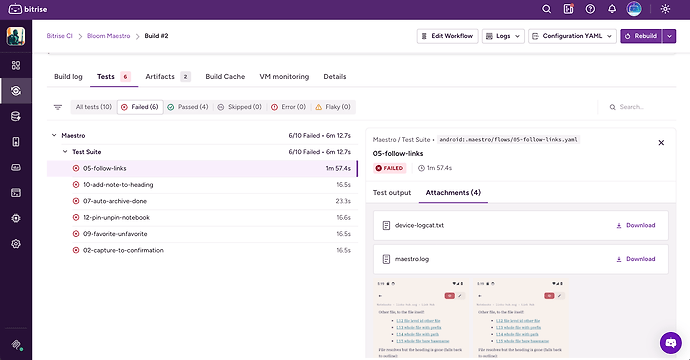
 Flaky test marking and quarantine
A flow that passes only on retry is marked as flaky. You can quarantine flaky flows so they no longer fail the build, the same as any other test on Bitrise.
Getting started
Add the Maestro Test step to your workflow paired with a step which starts an emulator/simulator AVD Manager on Android and Xcode Start Simulator on iOS. To see your test results in Bitrise add Deploy to Bitrise.io at the end of the workflow, set to run even when tests fail.
Full details of how to set up your workflow are available in our docs: Running Maestro tests on Bitrise
Swap your Maestro script steps for the Maestro Test step and see your E2E results where the rest of your tests already live. Happy testing! 